Skip to content
Loading
Web API - Convert XML output to datatable and display data
  • Dear Ashutosh sir,

    I have implemented your code - Class method.
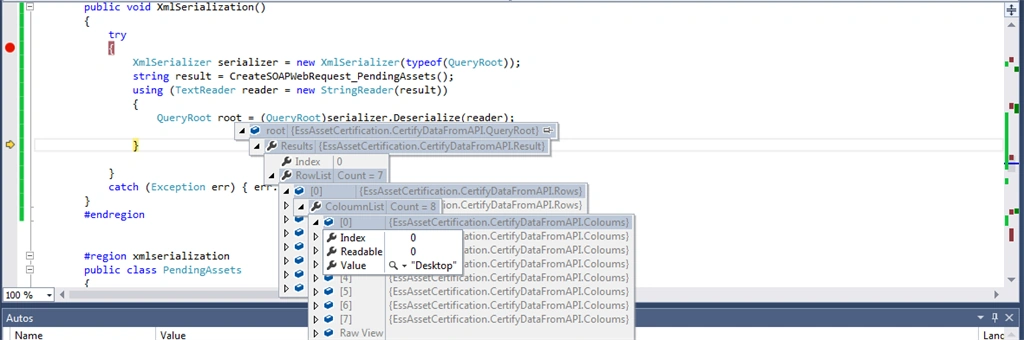
    I am sharing the output - I think I am almost here ....
     
    But, I am failiing in looping the results.
     
    Please guide a little bit - Thanks a million for your help.
     
    Output -
     
    0
  • Local Coders
    You can use this code(Recommended)


    MemoryStream objMS = new MemoryStream(); DataTable oDT = new DataTable();//Your DataTable which you want to convert oDT.WriteXml(objMS); objMS.Position = 0; XPathDocument result = new XPathDocument(objMS);
    This is another way but first ex. is recommended
    StringWriter objSW = new StringWriter(); DataTable oDt = new DataTable();//Your DataTable which you want to convert oDt.WriteXml(objSW); string result = objSW.ToString();
    0
  • Dear Ashutosh sir,

    Your Solution -

    one option is to create class structure similar to your xml and convert first your xml into .net object using XmlSerializer.
    once you xml is converted into .net object then you can push that objct into your database.
    ------------------------
    Could you please explain with example ?? 
    Else, I have shared my xml output with you, could you please guide on that ??
    0
  • Ashutosh Gupta
    Hello Ridhi,
     
    one option is to create class structure similar to your xml and convert first your xml into .net object using XmlSerializer.
     
    once you xml is converted into .net object then you can push that objct into your database.  
    0
  • Dear All,
     
    Please help me out with this...
     
    Thanks a ton to all in advance..
     
    It is really important and urgent for me...
    0
  • Dear Team,

    In my xml output string -

    Columns are following -
    Computer.ComputerType
    Model.Brand.Name
    Model.Name
    Asset.SerialNo
    User.UserName
    RIL_Inventoried_User.UserName"
    Asset.Field1
     
    And  
    <Result>
    <Row Index="0">
    --These are the values for each column.
     
    PLEASE HELP ME OUT IN MAKING THE DATATABLE FROM THIS XML STRING AND DISPLAY IT ON GRIDVIEW.
    PLEASE HELP AS IT IS VERY URGENT... 
    0
  • Dear sir,

    From the web api, I am getting the response as xml string.

    I am sharing that output with you -
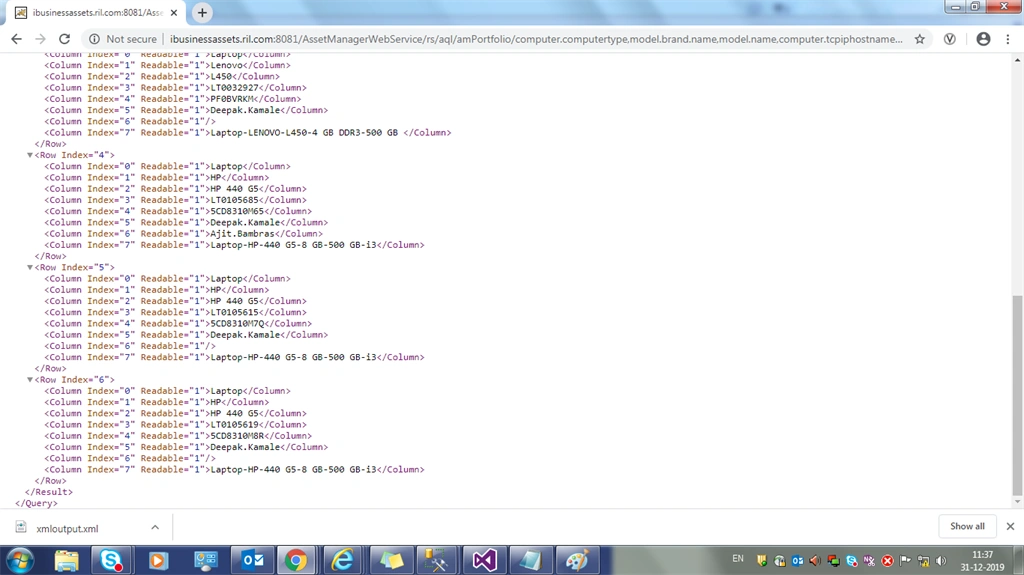
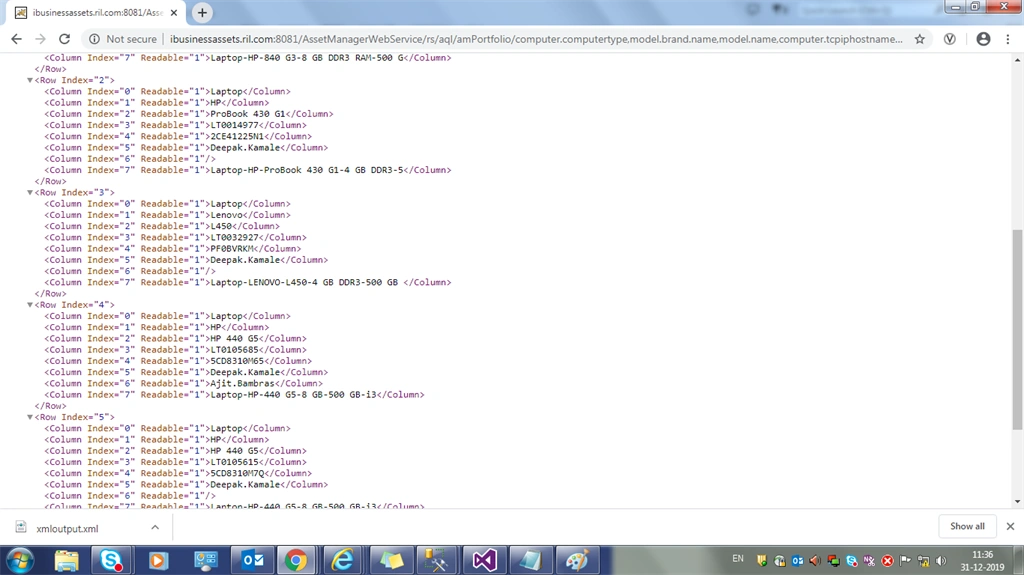
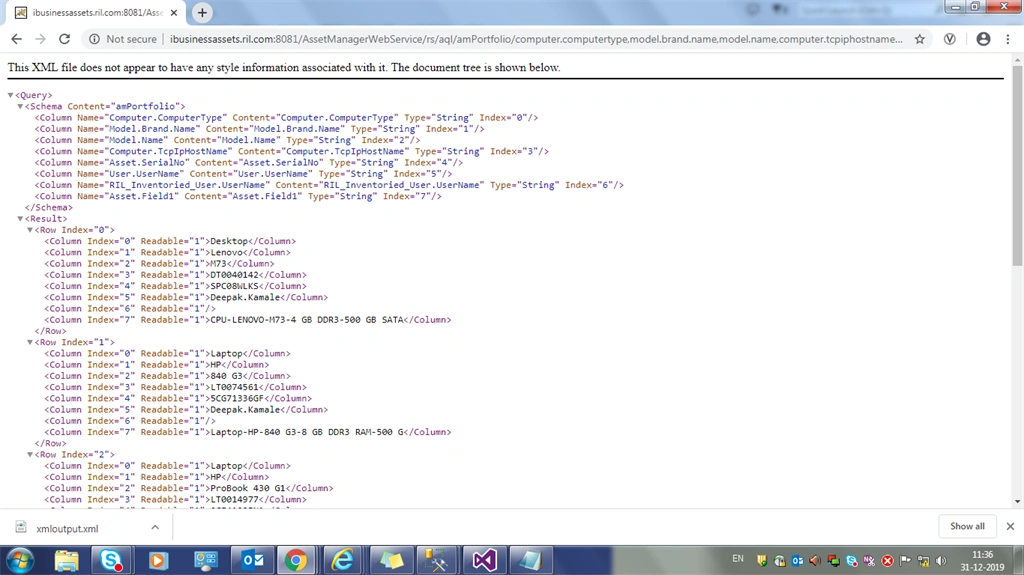
    XML String Output -
    -------------
    xml version="1.0" encoding="UTF-8"?>
    <Query>
    <Schema Content="amPortfolio">
    <Column Name="Computer.ComputerType" Content="Computer.ComputerType" Type="String" Index="0" />
    <Column Name="Model.Brand.Name" Content="Model.Brand.Name" Type="String" Index="1" />
    <Column Name="Model.Name" Content="Model.Name" Type="String" Index="2" />
    <Column Name="Computer.TcpIpHostName" Content="Computer.TcpIpHostName" Type="String" Index="3" />
    <Column Name="Asset.SerialNo" Content="Asset.SerialNo" Type="String" Index="4" />
    <Column Name="User.UserName" Content="User.UserName" Type="String" Index="5" />
    <Column Name="RIL_Inventoried_User.UserName" Content="RIL_Inventoried_User.UserName" Type="String" Index="6" />
    <Column Name="Asset.Field1" Content="Asset.Field1" Type="String" Index="7" />
    Schema>

    <Result>
    <Row Index="0">
    <Column Index="0" Readable="1">DesktopColumn>
    <Column Index="1" Readable="1">LenovoColumn>
    <Column Index="2" Readable="1">M73Column>
    <Column Index="3" Readable="1">DT0040142Column>
    <Column Index="4" Readable="1">SPC08WLKSColumn>
    <Column Index="5" Readable="1">Deepak.KamaleColumn>
    <Column Index="6" Readable="1" />
    <Column Index="7" Readable="1">CPU-LENOVO-M73-4 GB DDR3-500 GB SATAColumn>
    Row>
    <Row Index="1">
    <Column Index="0" Readable="1">LaptopColumn>
    <Column Index="1" Readable="1">HPColumn>
    <Column Index="2" Readable="1">840 G3Column>
    <Column Index="3" Readable="1">LT0074561Column>
    <Column Index="4" Readable="1">5CG71336GFColumn>
    <Column Index="5" Readable="1">Deepak.KamaleColumn>
    <Column Index="6" Readable="1" />
    <Column Index="7" Readable="1">Laptop-HP-840 G3-8 GB DDR3 RAM-500 GColumn>
    Row>
    <Row Index="2">
    <Column Index="0" Readable="1">LaptopColumn>
    <Column Index="1" Readable="1">HPColumn>
    <Column Index="2" Readable="1">ProBook 430 G1Column>
    <Column Index="3" Readable="1">LT0014977Column>
    <Column Index="4" Readable="1">2CE41225N1Column>
    <Column Index="5" Readable="1">Deepak.KamaleColumn>
    <Column Index="6" Readable="1" />
    <Column Index="7" Readable="1">Laptop-HP-ProBook 430 G1-4 GB DDR3-5Column>
    Row>
    <Row Index="3">
    <Column Index="0" Readable="1">LaptopColumn>
    <Column Index="1" Readable="1">LenovoColumn>
    <Column Index="2" Readable="1">L450Column>
    <Column Index="3" Readable="1">LT0032927Column>
    <Column Index="4" Readable="1">PF0BVRKMColumn>
    <Column Index="5" Readable="1">Deepak.KamaleColumn>
    <Column Index="6" Readable="1" />
    <Column Index="7" Readable="1">Laptop-LENOVO-L450-4 GB DDR3-500 GBColumn>
    Row>
    <Row Index="4">
    <Column Index="0" Readable="1">LaptopColumn>
    <Column Index="1" Readable="1">HPColumn>
    <Column Index="2" Readable="1">HP 440 G5Column>
    <Column Index="3" Readable="1">LT0105685Column>
    <Column Index="4" Readable="1">5CD8310M65Column>
    <Column Index="5" Readable="1">Deepak.KamaleColumn>
    <Column Index="6" Readable="1">Ajit.BambrasColumn>
    <Column Index="7" Readable="1">Laptop-HP-440 G5-8 GB-500 GB-i3Column>
    Row>
    <Row Index="5">
    <Column Index="0" Readable="1">LaptopColumn>
    <Column Index="1" Readable="1">HPColumn>
    <Column Index="2" Readable="1">HP 440 G5Column>
    <Column Index="3" Readable="1">LT0105615Column>
    <Column Index="4" Readable="1">5CD8310M7QColumn>
    <Column Index="5" Readable="1">Deepak.KamaleColumn>
    <Column Index="6" Readable="1" />
    <Column Index="7" Readable="1">Laptop-HP-440 G5-8 GB-500 GB-i3Column>
    Row>
    <Row Index="6">
    <Column Index="0" Readable="1">LaptopColumn>
    <Column Index="1" Readable="1">HPColumn>
    <Column Index="2" Readable="1">HP 440 G5Column>
    <Column Index="3" Readable="1">LT0105619Column>
    <Column Index="4" Readable="1">5CD8310M8RColumn>
    <Column Index="5" Readable="1">Deepak.KamaleColumn>
    <Column Index="6" Readable="1" />
    <Column Index="7" Readable="1">Laptop-HP-440 G5-8 GB-500 GB-i3Column>
    Row>
    Result>
    Query>
     
    0
  • Jaish Mathews
    I hope your XML keeps some standard format and then I would suggest re-usable custom classes, to serialize XML to those classes. To create a re-usable custom class for an XML, create a new class file in Visual Studio and open it. Now copy the XML and got to Visual Studio "Edit" menu -> Paste Special -> paste XML As Classes . This will generate the class structure for that specific XML.
     
    This is only one time setup for a specific XML.  Now everywhere this same custom class can re-use to represent that specific XML i.e. you can serialize and de-serialize using this custom class.


    0