I am trying to setup mysql entityframework edmx in visual studio 2019 .
I have installed.
MySQL.Data
MySql.Data.Entity
MySQL.Web
but still in connect window not able to see mysql for visual studio
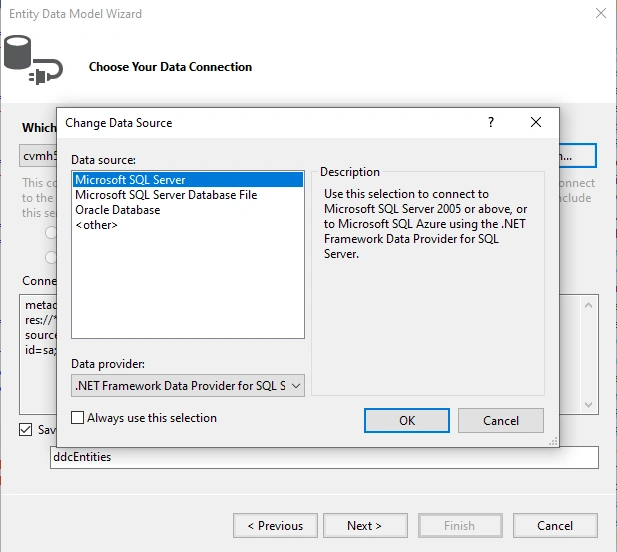
Not able to see mysql option
I am trying to setup mysql entityframework edmx in visual studio 2019 .
I have installed.
MySQL.Data
MySql.Data.Entity
MySQL.Web
but still in connect window not able to see mysql for visual studio
Not able to see mysql option
Know the answer? Post it — somebody with the same question will find it here.
Sign in to answer this question
It is the same account you read, post and publish with — and you will come straight back to this page.
raj rajPosted Jun 9, 2023, 6:41 AM
we need to use in visual studio 2019
Mohamed Azarudeen ZPosted Jun 9, 2023, 6:31 AM
1. Verify the installation: Ensure that the MySQL connector and related packages are installed correctly. You can check this by going to Tools > NuGet Package Manager > Manage NuGet Packages for Solution and confirming that the MySQL packages are listed as installed.
2. Restart Visual Studio: Sometimes, a simple restart of Visual Studio can resolve the issue. Close Visual Studio completely and reopen it to see if the MySQL option appears in the Connect to Database window.
3. Check Visual Studio version compatibility: Ensure that the version of MySQL connector you installed is compatible with the version of Visual Studio you are using. Check the documentation or release notes of the MySQL connector to verify its compatibility.
4. Verify Visual Studio settings: Go to Tools > Options > MySQL and check if the settings are configured correctly. Make sure the MySQL connection details are entered accurately, including the host, port, username, and password.
5. Reinstall MySQL connector: If the above steps do not resolve the issue, try uninstalling and reinstalling the MySQL connector and related packages. Make sure to restart Visual Studio after the reinstallation.
6. Use the Entity Framework Core approach: The Entity Framework team has shifted focus to Entity Framework Core, which is a more lightweight and cross-platform version. Consider using the Entity Framework Core approach for MySQL instead of the older Entity Framework with EDMX. Entity Framework Core has better support for various databases, including MySQL.