Hi All,
I am facing a discrepancy in loading image into gridview column in asp.net using c#.
My gridview has action with/without images. Action with images showing System.Byte[]. Please find screenshot below.

I don't want to show System.Byte[] in the column. I already wrote a .css class to assign a icon to that column control. That image is displaying . I need your help to remove System.Byte[] and only to show that icon.

Here is my table where store image:-
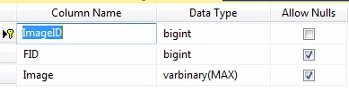
SQL stored procedure i using to bind the gridview
- SELECT tblActionDetaills.FID,tblVilla.VillaName,tblActionDetaills.VID,tblActionDetaills.AdminUserID,
- tblImageDetails.Image,
- Convert(varchar(20),EventDate,103) as EventDate,
- REPLACE(SUBSTRING(CONVERT(nvarchar(128),EventDate, 109), 12 , 128),':000', ' ') as EventTime,
- Description,Comment FROM tblActionDetaills inner join tblVilla on tblVilla.VID=tblActionDetaills.VID
- inner join tblUserLogin on tblUserLogin.UserID=tblVilla.UserID
- left join tblImageDetails on tblImageDetails.FID=tblActionDetaills.FID
- WHERE tblUserLogin.UserID=@UserID
- order by Convert(datetime,EventDate,103) desc
- <asp:TemplateField ItemStyle-HorizontalAlign="Left" HeaderText="View Image" HeaderStyle-HorizontalAlign="Center">
- <ItemTemplate>
- <asp:LinkButton ID="LinkButton1" CssClass="lnkbtnSelect" CommandName="LoadImage" Text='<% # Eval("Image")%>' CommandArgument='<%#Eval("FID")%>' runat="server">View Imageasp:LinkButton>
- ItemTemplate>
- asp:TemplateField>
- using (SqlDataAdapter adapter = new SqlDataAdapter("LoadVillaDetailsForGridForCustomer", clsConObj.sqlCon))
- {
- adapter.SelectCommand.Parameters.Add("@UserID", SqlDbType.SmallInt).Value = Session["UserID"].ToString();
- adapter.SelectCommand.CommandType = CommandType.StoredProcedure;
- DataTable dtbl = new DataTable();
- adapter.Fill(dtbl);
- {
- grdConstructionDetails.DataSource = dtbl;
- grdConstructionDetails.DataBind();
- grdConstructionDetails.HeaderRow.TableSection = TableRowSection.TableHeader; //added by sai on 09/04/2019 for lbl
- lblTotalRecords.Text = Convert.ToInt16(dtbl.Rows.Count).ToString();
- }
- }

Bineeshcp ViswanathPosted Apr 14, 2019, 1:18 AM
Bineeshcp ViswanathPosted Apr 13, 2019, 10:13 AM
Laxmidhar SahooPosted Apr 13, 2019, 8:37 AM
Bineeshcp ViswanathPosted Apr 13, 2019, 8:29 AM
Laxmidhar SahooPosted Apr 13, 2019, 8:21 AM
Bineeshcp ViswanathPosted Apr 13, 2019, 1:22 AM
Laxmidhar SahooPosted Apr 13, 2019, 12:17 AM