
   public static WebDriver getWebDriver(string Sessionid)
   {
       try
       {
               ChromeOptions chromeOptions = new ChromeOptions();
               var FolderPathToStoreSession = @"C:\Session\" + Sessionid;
               chromeOptions.AddArguments("--window-size=1920,1080");
               chromeOptions.AddArguments("--disable-gpu");
               chromeOptions.AddArguments("--disable-extensions");
               chromeOptions.AddArguments("--no-sandbox");
               chromeOptions.AddArguments("--disable-dev-shm-usage");
               chromeOptions.AddArguments("--disable-setuid-sandbox");
               chromeOptions.AddArguments("--disable-features=RendererCodeIntegrity");
               chromeOptions.AddArguments("--disable-features=VizDisplayCompositor");
               chromeOptions.AddArguments("--disable-features=NetworkService");
               chromeOptions.AddArguments("--disable-features=NetworkServiceInProcess");
               chromeOptions.AddArguments("--start-maximized");
               chromeOptions.AddArguments("chrome.switches", "--disable-extensions");
               chromeOptions.AddArgument("--user-data-dir=" + FolderPathToStoreSession);

               chromewebDriver = new ChromeDriver(chromeOptions);
               return chromewebDriver;
       }
       catch(Exception ex)
       {
       }
       return chromewebDriver;
   }
Using This Code I Have Saved the Website Session using this line of Code
chromeOptions.AddArgument("--user-data-dir=" + FolderPathToStoreSession);
It Working Fine , if I pass the Session ID in this
getWebDriver(string Sessionid)
Then it opened a new browser and it Working Fine but the Issue is When I use the Same Session id AGain then it Gives an Exception
Opening in existing browser session.
session not created: Chrome failed to start: exited normally.
(session not created: DevToolsActivePort file doesn't exist)
(The process started from chrome location C:\Program Files\Google\Chrome\Application\chrome.exe is no longer running, so ChromeDriver is assuming that Chrome has crashed.) (SessionNotCreated)
if it Gives an Exception THen I Handle using try catch but the issue is it open a browser again see in below Screenshot
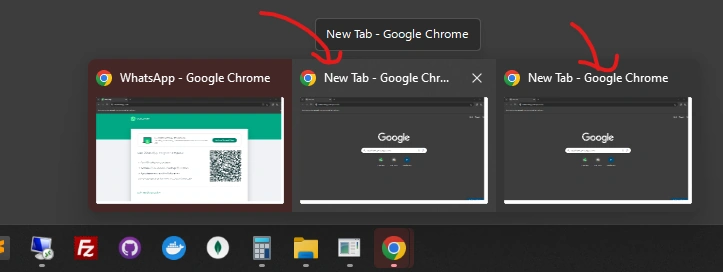
it Gives Error and open new browser
I Want to if the below code gives error then no browser opened.
chromewebDriver = new ChromeDriver(chromeOptions);
Ashutosh SinghPosted Apr 19, 2024, 11:01 AM
It seems like you want to reuse an existing Chrome session if it's available instead of creating a new one when calling the
getWebDrivermethod with a session ID. However, Selenium WebDriver doesn't directly support attaching to an existing browser session using session ID like this. Each WebDriver instance starts its own browser session.However, you can achieve session reuse using the Chrome DevTools Protocol (CDP) and the Chrome DevTools NuGet package. Here's a basic outline of how you could approach it:
Here's an example of how you might modify your code to achieve this:
In this example,
ChromeSession.ConnectToExistingInstance(sessionId)attempts to connect to an existing Chrome session using the provided session ID. Then, it attaches Chrome DevTools to the existing session. Finally, it initializes a new ChromeDriver instance using the existing session.Please note that the
ChromeSessionclass and related methods come from the Chrome DevTools NuGet package. You'll need to install this package in your project to use them.This approach allows you to reuse an existing Chrome session if it's available. However, keep in mind that managing browser sessions and attaching to existing sessions can be complex and may have limitations depending on your specific requirements and environment.
Ajay KumarPosted Apr 19, 2024, 12:26 PM
Thanks Ashutosh Singh