I am using Visual Studio 2015 Community to develop a Windows application..
I have two buttons at the bottom, right of the form and their anchors are set to Bottom, Right.
However when I save the solution and close Visual Studio and reopen the solution the buttons have moved up on the form. Every time I open the solution the buttons have moved up (Please see the picture). I have even tried locking the controls on the form.
Can anyone assist me with this?
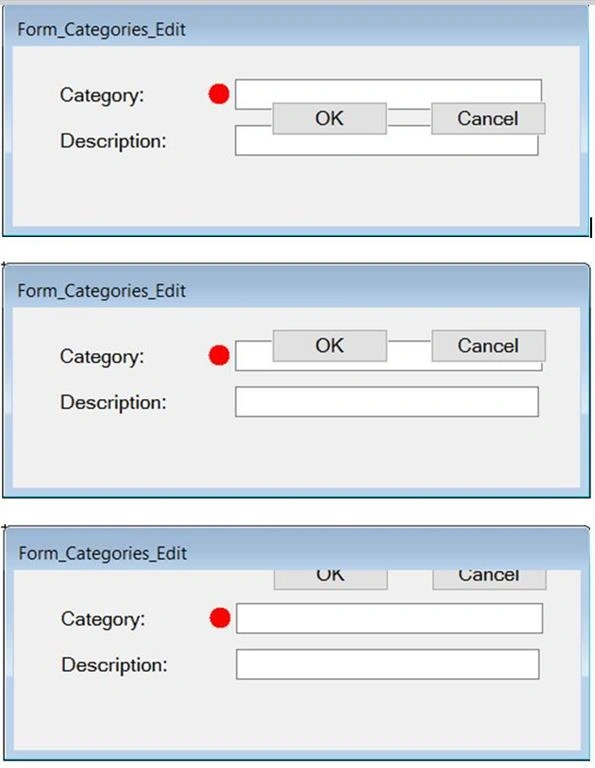
Kobus BothaPosted Jun 15, 2016, 1:44 AM
I can reproduce the problem as follows:
When I open the project again, the button has moved up. Location f the Button is now (280; 81).
If I save and close the project with the new location of the button and open the project again, the Button has again moved up and new location is (280; 52).
This was all just done in the Editor and I have not added any code of my own.
Regards.
Kobus BothaPosted Jun 14, 2016, 7:52 AM
Vinay SinghPosted Jun 14, 2016, 7:18 AM
Kobus BothaPosted Jun 14, 2016, 7:14 AM
On further investigation it happens when I set a Minimum Size for the form. I created a new application and left everything at the default settings then it seems fine. The moment I set a Minimum size for the form the button position move up every time I close and open the solution in Visual Studio.
Why would that be?
Kobus BothaPosted Jun 14, 2016, 4:11 AM
Asad AliPosted Jun 14, 2016, 4:07 AM