
I am working on MVC 5, there is have
- @Html.DropDownListFor(model => model.ShowAdConfigIDs, ViewData["Services"] as List<SelectListItem>, "Select", new { @id = "DDLServiceCate", @class = "form-control " })
- $(function () {
- $('[id*=DDLServiceCate]').multiselect({
- includeSelectAllOption: true
- });
- });
-
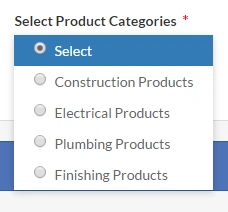
But actually I want look like below image showing.
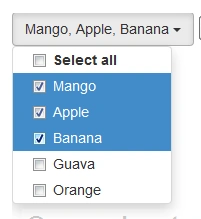
How can I do this ?
Please help me...
Rajeev PunhaniPosted Mar 24, 2017, 5:58 AM
Hi Abhilash,
Please add the width to multiselect button.
Bhaskar BanerjeePosted Jan 9, 2019, 4:29 AM
AlexisPosted Mar 10, 2018, 3:59 PM
Abhilash J APosted Mar 24, 2017, 6:19 AM
Asma KhalidPosted Mar 24, 2017, 6:00 AM
@Abhilash
I have already posted your answer in my previous comment. You need to add following attribute i.e.
Abhilash J APosted Mar 24, 2017, 5:37 AM
Ramesh PalanivelPosted Mar 24, 2017, 5:32 AM
Ramesh PalanivelPosted Mar 24, 2017, 5:26 AM
Rajeev PunhaniPosted Mar 24, 2017, 4:57 AM
Hi Abhilash,
You are missing multiple attribute when select is being generated .Add html attribute in the DropDownListFor constructor. Add Multiple attribute to your code.
Asma KhalidPosted Mar 24, 2017, 4:44 AM
use below code in javascript for bootstrap dropdown multi-select i.e.