Hi Team
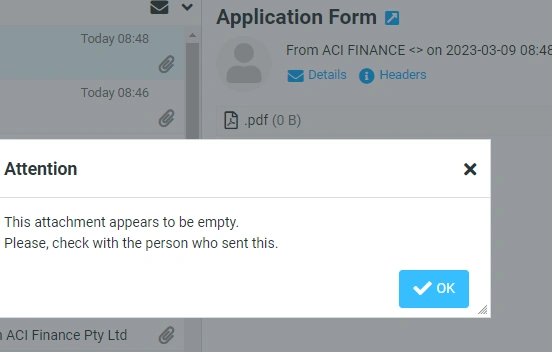
I need some help with my logic, i am sending an email with attachment but its not opening the pdf attachment. What could i be missing on my body or headers or attachment? I have tried to use $read() function but its not working. I tried to follow this link but still im not getting this right .
" . $eol;
$headers .= "MIME-Version: 1.0" . $eol;
$headers .= "Content-Type: multipart/mixed; boundary=\"" . $separator . "\"" . $eol;
$headers .= "Content-Transfer-Encoding: 7bit" . $eol;
$headers .= "This is a MIME encoded message." . $eol;
$logo = 'img/logo.png';
$link = '#';
$body = "Express Mail ";
$body .= "";
$body .= "";
$body .= "
";
$body .= " ";
$body .= "Name: {$fname} {$lname} ";
$body .= "Email: {$from} ";
$body .= " ";
$body .= "CellNumber: {$number} Loan Amount: {$amount} Monthly income: {$income} Town: {$town} Upload bankstatement {$bankstatement} Upload payslip: {$payslip}
";
$body .= "";
//SEND Mail
if (mail($mailto, $subject, $body, $headers)) {
echo "mail send ... OK"; // do what you want after sending the email
} else {
echo "mail send ... ERROR!";
print_r( error_get_last() );
}
$send = mail($to, $subject, $body, $headers);
$amount =$_POST['amount'];
$purpose =$_POST['purpose'];
$voucher =$_POST['voucher'];
$gender =$_POST['gender'];
$fname =$_POST['fname'];
$lname =$_POST['lname'];
$title =$_POST['title'];
$typeID =$_POST['typeID'];
$email =$_POST['email'];
$number =$_POST['number'];
$maritalstatus =$_POST['maritalstatus'];
$street1 =$_POST['street1'];
$street2 =$_POST['street2'];
$town =$_POST['town'];
$province =$_POST['province'];
$code =$_POST['code'];
$propertyownership =$_POST['propertyownership'];
$placeofwork =$_POST['placeofwork'];
$jobtitle =$_POST['jobtitle'];
$jobstreet=$_POST['jobstreet'];
$jobstreet2 =$_POST['jobstreet2'];
$jobtown =$_POST['jobtown'];
$worknumber =$_POST['worknumber'];
$jobprovince =$_POST['jobprovince'];
$jobcode =$_POST['jobcode'];
$income =$_POST['income'];
$bankname=$_POST['bankname'];
$branchname =$_POST['branchname'];
$accountno =$_POST['accountno'];
$accounttype =$_POST['accounttype'];
$signature =$_POST['signature'];
$bankstatement =$_POST['bankstatement'];
$payslip=$_POST['payslip'];
// Connect to database
$conn = new mysqli('localhost','acifinan_acifinan','Finance_01','acifinan_acifinanc');
if ($conn->connect_error)
{die('Connection Failed:'.$conn-> connect_error); }
else
{
$stmt= $conn->prepare("insert into application(amount, purpose, voucher, gender, fname, lname, title, typeID, email, number, maritalstatus, street1, street2, town, province, code, propertyownership, placeofwork, jobtitle, jobstreet, jobstreet2, jobtown, worknumber, jobprovince, jobcode, income, bankname, branchname, accountno, accounttype, signature, id, bankstatement, payslip) values (? , ? , ? , ? , ? , ? , ? , ? , ? , ? , ? , ? , ? , ? , ? , ? , ? , ? , ? , ? , ? , ? , ? , ? , ? , ? , ? , ? , ? , ? , ? , ? , ? , ?)");
$stmt-> bind_param("ssssssssssssssssssssssssssssssssss" , $amount,$purpose,$voucher,$gender,$fname,$lname,$title,$typeID,$email,$number,$maritalstatus,$street1,$street2,$town,$province,$code,$propertyownership,$placeofwork,$jobtitle,$jobstreet,$jobstreet2,$jobtown,$worknumber,$jobprovince,$jobcode,$income,$bankname,$branchname,$accountno,$accounttype,$signature,$id,$bankstatement,$payslip);
$stmt->execute();
echo "Submitted Successfully";
$stmt->close();
$conn->close();
}
?>
Tuhin PaulPosted Apr 1, 2025, 6:14 AM
Duplicate Email Sending
You are calling the
mail()function twice:Remove the duplicate call to
mail().Incorrect Variable Name for
$fromemailYou are using
$fromin the HTML body, but the variable is named$fromemail. This will result in an undefined variable error.Replace:
With:
Database Insertion Issue
You are inserting
$idinto the database, but$idis not defined anywhere in your code. This will cause an error during the database insertion.Define
$idor remove it from the query if it is not needed.Tuhin PaulPosted Apr 1, 2025, 6:07 AM
The issue with your code lies in how the email headers, body, and attachment are being constructed. There are several problems that need to be addressed for the email to work correctly with an attachment.
You are using
$filenameee = $_FILES['id']['name']to get the file name, but this only retrieves the name of the uploaded file, not its actual path on the server. To read the file content, you need to use the temporary file path stored in$_FILES['id']['tmp_name'].Replace :
With:
Incorrect MIME Structure
The email body is not properly structured for multipart emails. Specifically:
--separator--) should appear after all parts of the email.Separate the HTML content from the MIME structure. Use the following structure for the email body:
$htmlBodycontains your HTML content (the table).Missing
filenameinContent-DispositionThe
Content-Dispositionheader for the attachment must include thefilenameattribute. Without it, the email client may not recognize the attachment properly.Ensure the
Content-Dispositionheader includes the filename:Incorrect Use of
$read()The
$read()function is not a valid PHP function. It seems like you intended to usefile_get_contents()to read the file. Ensure you are using the correct function.Sangeetha SPosted Apr 1, 2025, 4:32 AM
Vinay SinghPosted Mar 27, 2025, 1:38 PM
Here are several steps you can follow to troubleshoot and resolve issues with a PDF attachment not opening when sent via PHP’s mail function. The main culprit in many cases is an error in handling the MIME structure and proper encoding of the binary file. Let’s explore a complete example and some common pitfalls:
1. Ensure Proper MIME Structure and Base64 Encoding
When sending binary files like PDFs, you must:
Form a multi-part email using proper MIME boundaries.
Read the PDF file in binary mode.
Encode the file content in base64.
Set the correct content-type and transfer-encoding headers.
Below is a full example that sends an email with a PDF attached:
php
2. Important Points to Verify
File Accessibility: Ensure the PDF file exists at the specified path and PHP has permission to read it.
MIME Boundary: The
$separator(or boundary) must be unique so that it doesn’t occur in the file content. Verify that the boundary lines in your message (preceded by--) are correctly placed and terminated with the proper end-of-line characters (\r\n).Proper Base64 Encoding: Use
base64_encodealong withchunk_splitto properly format the encoded string. This ensures that the binary data remains intact during transit.Headers Structure: The headers must include a
Content-Type: multipart/mixedwith the boundary, and the text and attachment parts must have the correct MIME types. For a PDF, the MIME type isapplication/pdf.Line Endings: Use proper line endings (
\r\n) consistently. Inconsistent use can sometimes cause issues with how email clients parse the headers and body.3. Common Pitfalls
Missing or Incorrect Headers: If the
Content-Transfer-Encodingis not set tobase64for the attachment, the PDF might be corrupted when opened.Mismatched Boundaries: Ensure that each part starts with
--$separatorand that the final boundary has an extra--appended (--$separator--).Direct Inclusion of Binary Data: Never include binary data directly in the email body without encoding it.
Testing in Different Clients: Some email clients are more strict about MIME formatting than others. Test your email in multiple clients.
4. Alternative Tools
If you continue to experience issues, consider using a library such asPHPMailer orSwiftMailer. These libraries handle many of these details automatically and reduce the likelihood of formatting errors:
php
Libraries simplify header management, boundary settings, and encoding, making your code less error-prone.
5. Next Steps
Double-check your file paths and permissions.
Verify and compare the raw email message (if possible) with a working example or an email generated via a library.
Test with different email clients to see if the issue persists across all of them.
Does this explanation help address your issue, or are there specific errors or behaviors you’re witnessing that we can delve into further? Let’s dive deeper if neede
Thanks
Vinay(codemantra99.com)