Hi
I have Parameter which displays dropdown Original , Duplicate etc. I have attached Image. I want size of Parameter Display should be small
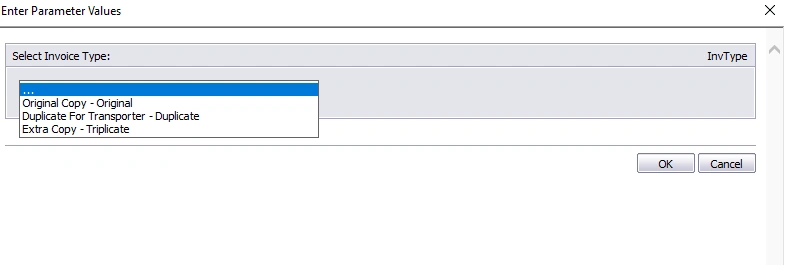
Thanks
Hi
I have Parameter which displays dropdown Original , Duplicate etc. I have attached Image. I want size of Parameter Display should be small
Thanks
Know the answer? Post it — somebody with the same question will find it here.
Sign in to answer this question
It is the same account you read, post and publish with — and you will come straight back to this page.
Cr BhargaviPosted Aug 29, 2023, 3:48 AM
Open Crystal Reports Designer: Open the Crystal Reports report that you're working on in the Crystal Reports Designer.
Select the Parameter Field: Locate the parameter field on your report where you have the dropdown displaying "Original," "Duplicate," etc.
Adjust Field Size: Right-click on the parameter field, and from the context menu, select "Format Field."
Go to the Common Tab: In the "Format Editor" window that appears, go to the "Common" tab.
Adjust Height and Width: In the "Height" and "Width" sections, you can adjust the size of the parameter field. Decrease the height and width to make the parameter dropdown smaller.
Apply Changes: After adjusting the size, click the "OK" or "Apply" button to save your changes.
Tahir AnsariPosted Aug 28, 2023, 4:30 AM
1. Open your Crystal Report.
2. Right-click on the parameter field displaying the dropdown.
3. Select "Format Field" from the context menu.
4. In the "Format Editor" window, go to the "Common" tab.
5. Find the "Width" setting and enter a smaller value to reduce the width of the parameter field.
6. Click the "OK" button to apply the changes.
Ramco RamcoPosted Aug 28, 2023, 3:32 AM
Hi Tahir
I want width size to be reduced
Thnks
Tahir AnsariPosted Aug 27, 2023, 4:46 PM
Tr y the steps
1. Open your Crystal Report.
2. Go to the "Field Explorer" panel on the right.
3. Right-click on "Parameter Fields" and select "New..."
4. Create your parameter and set the options such as "Original" and "Duplicate."
5. Once the parameter is created, right-click on it and select "Edit..."
6. In the "Edit Parameter" dialog box, go to the "Font" tab.
7. Adjust the font size to make the display smaller.
8. Click "OK" to save your changes.
This should make the parameter dropdown display with a smaller font size.