Hello All,
Can you please help me to convert .HTML page to PDF file using C#.net
And i am using below code for using Aspose.Pdf;
// Load HTML file
Aspose.Pdf.Document doc = new Aspose.Pdf.Document("C://document.html", htmloptions);
// Convert HTML file to PDF
doc.Save("C:/document.pdf");
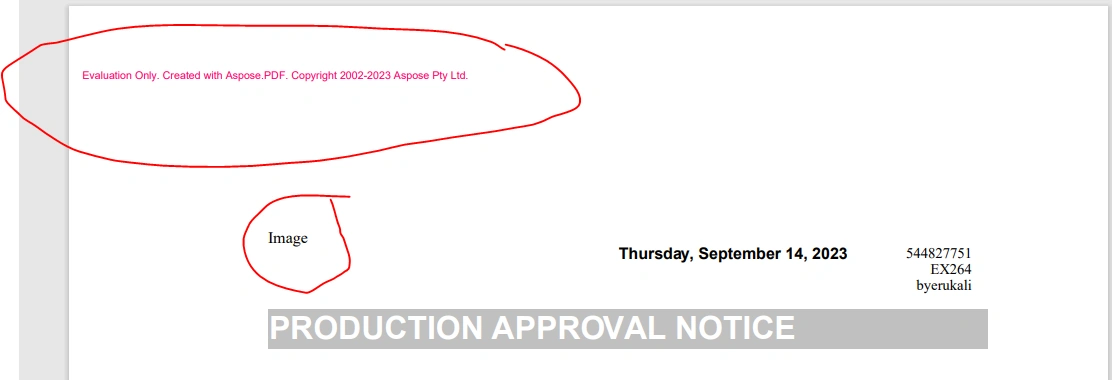
But Image is missing in PDF file and Aspose.Pdf text is displaying in red color and image is showing in HTML file.
Please suggest how to fix this issue.
THanks
Anand.
Saravanan GanesanPosted Sep 24, 2023, 4:57 PM
To resolve the issue with missing images and text color in Aspose.Pdf, ensure that the image paths in your HTML file are correctly referenced and that the CSS styles for text color are properly defined. Make sure that images are accessible from the specified path and that CSS styles are appropriately applied in your HTML.
Marvin ReidPosted Sep 20, 2023, 1:12 PM
A solution you can try which will keep the image is to convert Html to PDF using the DocumentConverter. Here is some code that you can try:
https://www.leadtools.com/help/sdk/tutorials/dotnet-console-convert-files-with-the-document-converter.html
Leon DPosted Sep 15, 2023, 6:27 AM
You may try this approach:
https://www.e-iceblue.com/Tutorials/Spire.PDF/Spire.PDF-Program-Guide/Convert-HTML-to-PDF-Customize-HTML-to-PDF-Conversion-by-Yourself.html