Hi Team
I need some help, i have on my power automate microsoft options(Approve, Reject and Reassign). I need a way where if for example i click Reject button from the email once receive(this comes after flow is triggered) it prompt me to a message dialog window to type reason for reject. Does anyone knows how to do this, need some help around this, below is my email workflow for using this trigger in power automate.
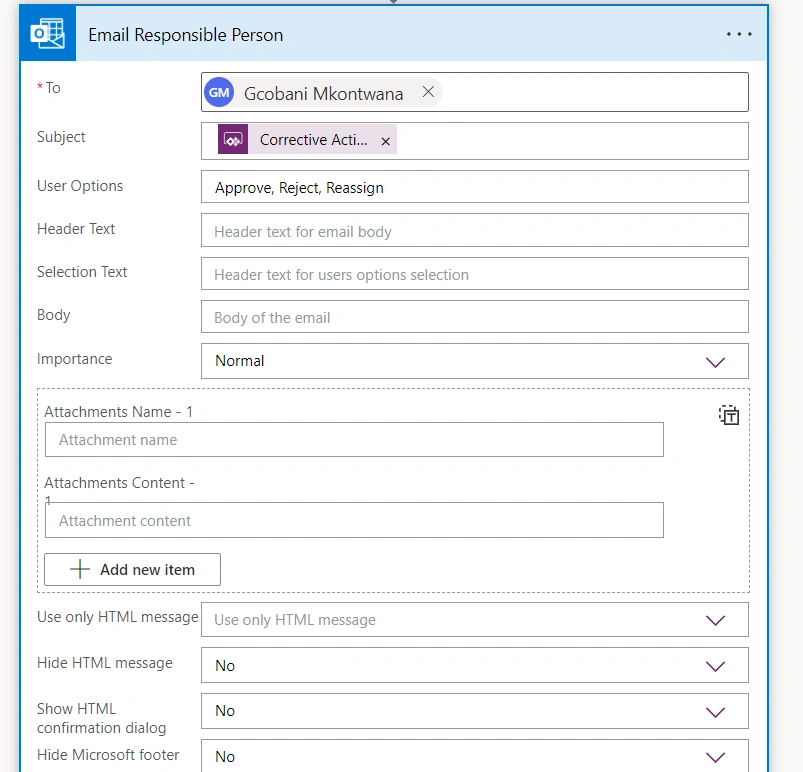
Guest UserPosted Apr 9, 2024, 1:51 PM
Hi Yadav
I am not sure if my trigger for this flow, as trying to follow you on the advice below is doing it correctly. But when i test, i do get reply to type but it must be for only Reject not both Approve and Reject. See my power automate work flow below;
Guest UserPosted Apr 9, 2024, 12:41 PM
Hi Yadav
I am using power automate that uses power apps, only operation i see from the list when i search is as the following, please advice which one meets my use case?
Abhishek YadavPosted Apr 9, 2024, 10:34 AM
To prompt a message dialog window for the user to type a reason for rejection when they click the Reject button in the email, you can use the "Prompt for input" action in Power Automate.
Here's an example of how you can set this up in your email workflow:
1. Once the email trigger is received, add a condition to check if the user has clicked the Reject button.
2. If the user has clicked the Reject button, add a "Prompt for input" action after the condition.
3. In the "Prompt for input" action, you can provide a message asking the user to type a reason for rejection. You can also configure the input type (text, number, date, etc.) and store the user input in a variable.
4. You can then use the reason provided by the user in the subsequent steps of your workflow, such as sending a notification or updating a record in a database.
By following these steps, you can prompt the user to provide a reason for rejection when they click the Reject button in the email. Let me know if you need more help with setting up this workflow.