Hello guys,
I was wondering if someone can maybe help me with the following intent:
I created an app which simply displays a table. It shows a table head and beyond that a list view which contains several items.
Is it possible, that if one clicks on one of these items, a progress bar is shown which loads smoothely in a certain time interval (lets say 30 seconds) from left to right?
Please see my screenshot below, maybe it's easier to understand what I am trying to do:
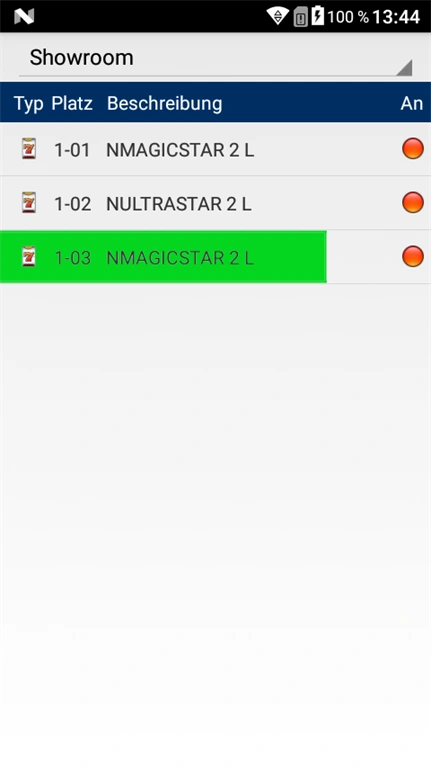
Finally, I don't know if it helps, but let me attach some code as well. I shortened it a little, if something is missing for understanding (like the list class) or if I removed to much, please let me know:
- public class TableActivity : Activity
- {
- ListView lv;
- ListAdapter adapter = null;
- protected override void OnCreate(Bundle bundle)
- {
- base.OnCreate(bundle);
- //...
- lv = FindViewById
(Resource.Id.geraeteListView); - adapter = new ListAdapter(this, Resource.Layout.List, geraeteliste.CurrentGeraeteliste, Intent.GetStringExtra("ServerIP"))
- {
- parentActivity = this
- };
- lv.Adapter = adapter;
- }
- private async void OnItemClick(object sender, AdapterView.ItemClickEventArgs e)
- {
- if (geraeteliste.CurrentGeraeteliste[e.Position].bespielt == "J") return;
- //…
- await Task.Delay(0);
- }
- }
- public class ListAdapter : ArrayAdapter
- {
- //...
- public override View GetView(int position, View convertView, ViewGroup parent)
- {
- View v = convertView;
- if (v == null)
- {
- LayoutInflater inflater = (LayoutInflater)Context.GetSystemService(Context.LayoutInflaterService);
- v = inflater.Inflate(Resource.Layout.List, parent, false);
- }
- //...
- v.FindViewById
(Resource.Id.typeImageView).SetImageResource(Resource.Drawable.Icon); - v.FindViewById
(Resource.Id.numberTextView).Text = Geraetelist[position].geraeteplatz; - v.FindViewById
(Resource.Id.descriptionTextView).Text = Geraetelist[position].geraeteinformation; - ImageView iv = v.FindViewById
(Resource.Id.bspImageView); - iv.SetImageResource(Geraetelist[position].bespielt == "N" ? Resource.Drawable.greenPoint : Resource.Drawable.redPoint);
- //…
- return v;
- }
- }
Can anyone maybe give me a short hint or something? How can I implement such a progress bar for every item on click?^^ Would be really happy for every helping effort.
Thanks in advance for every answer,
Best regards
Sam MettenmeyerPosted Nov 19, 2019, 10:02 AM
Unfortunately no, as I am only a student trainee and lacking a bit of knowledge. :( I found this repo myself, but unfortunately it is written in Java and made with Android Studio. So I installed Android Studio and tried to get it run to maybe be able to translate it into C#, but I even couldn't run the project once importet into Android Studio, as the run button was grey. :( And adding a virtual device with appropriate api-version (28) had no effect as well, I wasn't able to start the app nevertheless what I was doing.
That was why I was posting this into C# forum to maybe get some help or something like a C#-specific solution.^^
Guest UserPosted Nov 19, 2019, 9:35 AM