When I open the page, the data recorded
 Why I cannot display data

@page
@model MyStore.Pages.Clients.IndexModel
@{
}


List of Clients
New Client


            ID

            Name

            Email

            Phone

            Address

            Created At

            Action


    @foreach(var item in Model.listclients)
        {

                @item.id
                @item.name
                @item.email
                @item.phone
                @item.address
                @item.created_at

                    Edit
                    Delete


        }


This is the code
using Microsoft.AspNetCore.Mvc.RazorPages;
using System.Data.SqlClient;

namespace MyStore.Pages.Clients
{
    public class IndexModel : PageModel
    {
        public List listclients = new List();
        public void OnGet()
        {
            try
            {
                string connectionString = "Data Source=.\\sqlexpress;Initial Catalog=mystore;Integrated Security=True;Encrypt=True;Trust Server Certificate=True";
                using (SqlConnection connection = new SqlConnection(connectionString))
                {
                    connection.Open();
                    string sql = "SELECT * From clients";
                    using (SqlCommand command = new SqlCommand(sql, connection))
                    {
                        using (SqlDataReader reader = command.ExecuteReader())
                        {
                            while (reader.Read())
                            {
                                ClientInfo clientInfo = new ClientInfo();
                                clientInfo.id = "" + reader.GetInt32(0);
                                clientInfo.name = reader.GetString(1);
                                clientInfo.email = reader.GetString(2);
                                clientInfo.phone = reader.GetString(3);
                                clientInfo.address = reader.GetString(4);
                                clientInfo.created_at = reader.GetDateTime(5).ToString();
                                listclients.Add(clientInfo);
                            }
                        }
                    }

                }
            }

            catch (Exception ex)
            {
                Console.WriteLine("Exception : " + ex.ToString());
            }

        }
    }
    public class ClientInfo
    {
        public string id;
        public string name;
        public string email;
        public string phone;
        public string address;
        public string created_at;
    }
}
in the database does not appear. Are there any other files that should be related to this? i am using vb 2022 razor page .Net8
Sam HobbsPosted Apr 24, 2024, 8:14 PM
You need to determine where it is failing. The following are likely possibilities.
SqlConnectionSqlCommandI noticed that your
catchblock is usingConsole.WriteLine. That won't work in a website. Change that to something else, such asSystem.Diagnostics.Debug.WriteLine.hany mohamedPosted Apr 24, 2024, 8:13 AM
any update please
hany mohamedPosted Apr 23, 2024, 10:35 PM
any update please
hany mohamedPosted Apr 23, 2024, 3:50 PM
Dear Mr. Sam, thank you for your response. The project is actually working, but I cannot view the data recorded in the database. I have noticed that even if I change the connection statement to another database, the project is not affected, which means that it does not read the database at all. attached the database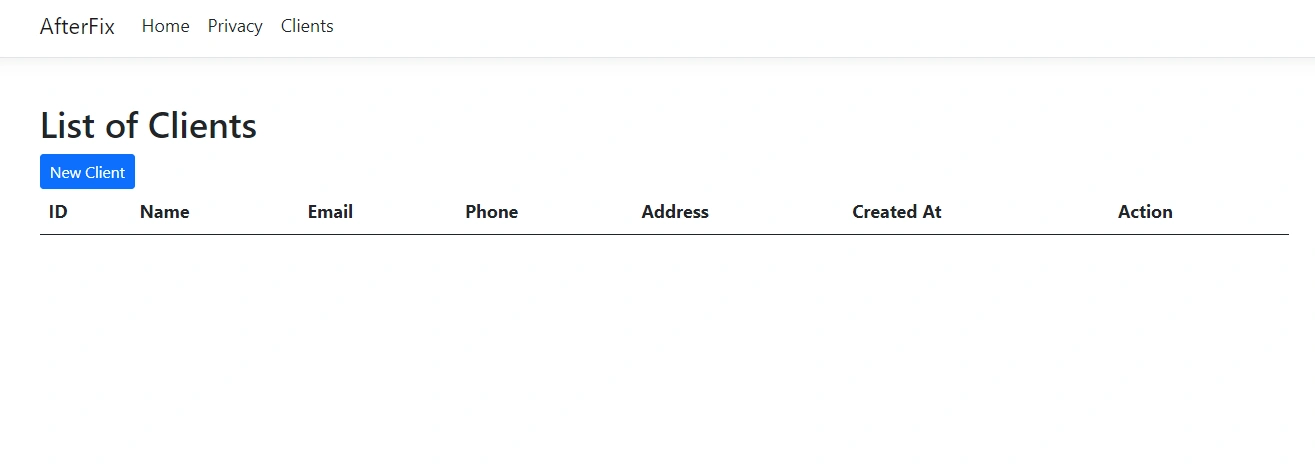
Sam HobbsPosted Apr 23, 2024, 2:26 PM
I downloaded your project and tried it. It does not work for me since the download does not include the database. I converted the project to use a different database and it works for me.
I suggest putting a breakpoint (F9) on the
connection.Open();then debugging it. When the breakpoint is hit single-step through the code to see what happens. If you do not know what breakpoints are and/or if you do not know how to single-step then read articles about debugging.hany mohamedPosted Apr 22, 2024, 4:33 PM
My dear brother Muhammad, thank you for your kind response. I have done everything as you requested and I still cannot display the data, but I want to know what is the link between the one that makes the page read the data and are there any other files in the program that must be configured. I am new in this field. Attached is the entire project.
Tahir AnsariPosted Apr 22, 2024, 3:27 PM
check the below steps for troubleshooting:
Check Database Connection: Ensure that your database connection string is correct and that your application can connect to the database. You can do this by testing the connection string outside of your application or by using debugging techniques within your application.
Verify SQL Query: Double-check your SQL query to ensure it's fetching the data you expect. You can run the SQL query directly against your database (using a SQL client or tool) to see if it returns any results.
Handle Exceptions: Instead of simply writing the exception to the console, consider logging it or returning an error message to the user interface so that you can identify any issues more easily.
Inspect Data: If you suspect that the issue lies with the data retrieval process, you can add debug statements or breakpoints to inspect the data as it's being retrieved from the database.
Ensure Data Exists: Make sure that there are records in your
clientstable in the database. If the table is empty, your code will not display any data.Check Permissions: Ensure that the user account specified in your connection string has the necessary permissions to read from the
clientstable.Tahir AnsariPosted Apr 22, 2024, 3:25 PM
Typo in anchor tags: You have used
herfinstead ofhrefin your anchor tags.Typo in table class attribute: You have written
calssinstead ofclassin the table element.You haven't imported the necessary namespaces. You should add
using System.Collections.Generic;at the beginning of your code file to use theListclass.