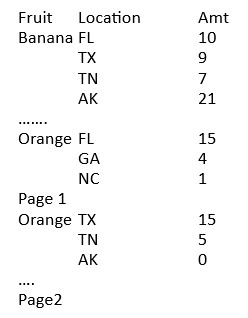
I have a field on a report and suppress if duplicated works.Also condiitonal supress with fomula {TableA.FieldA} = previous({TableA.FieldA}) works. If the group continues unto the next page I want to stop the supression for the first entry..
To explain: When the group orange has to continue on next page, I want to supress duplicate of orange on first page and repeat orange at the first entry on next page. Need to translate something like this to a function: if group not change and page change then show else if current value = previous value suppress.
Darveson WrightPosted Jul 26, 2023, 12:49 PM
Thanks. I create formula as follows and place in Page Header section.
Then second formula and place in Group header section
My knowledge of declaring variables is probably what causes the solution not to work. I achieve a similmar result by adding "If InRepeatedGroupHeader then false else true" in "Suppress" of Group Header section expert. Plus concatenate "continued " to the group header display.
Deepak RawatPosted Jul 17, 2023, 10:18 AM
To achieve the desired functionality of suppressing duplicates within a group but allowing the first entry to repeat on the next page, you can use a combination of conditional suppression and page-level variables in your reporting tool (e.g., Crystal Reports). Here's a general approach:
Create a page-level variable (let's call it
PageNumberVar) to keep track of the current page number.Within the group header section, reset the
PageNumberVarto the current page number using a formula like:PageNumberVar := PageNumber;.Use a conditional suppression formula in the group header section to suppress duplicates based on both group continuity and page change. The formula could look like this:
Explanation: The formula checks if the current value of
TableA.FieldAis the same as the previous value, indicating a duplicate. Additionally, it verifies if thePageNumberVaris equal to the previous page number (PageNumber - 1). This condition ensures that duplicates are suppressed only when the group continues onto the next page.PageNumberVarto the current page number again to ensure accurate tracking throughout the report:PageNumberVar := PageNumber;.By implementing these steps, you should be able to suppress duplicates within a group on the first page but allow the first entry to repeat on the next page when the group continues.
Please note that the specific implementation may vary depending on the reporting tool you are using. Consult the documentation or support resources for your reporting tool to understand the syntax and functionality of page-level variables and conditional suppression in that particular tool.