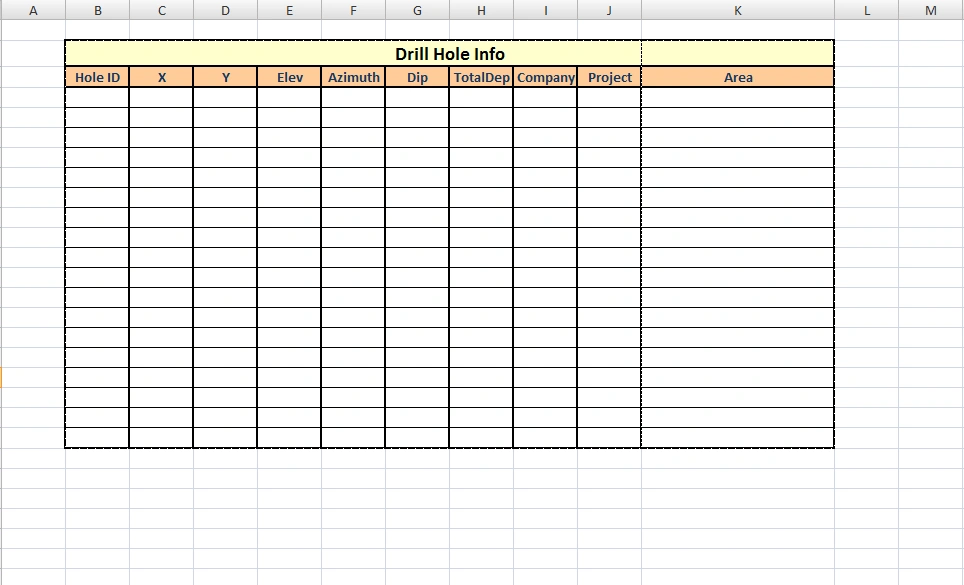
Can you please help me to figure out how I can insert DataGridView values into a pre defined excel template (Into Specific Cells)? I have a DataGridView on my windows Form which is getting the values from user input. Now I would like to enable users to export the DataGridView values into an excel file (A File like attached excel file image). As far as I know I have to create the headers and add them to the code programmatically but for the DataGridView part, honestly I have no idea how I can do that? As you can see the Form (Box) is starting from B2 to K2 and end from B21 to K21 Now my question is how i can start importing values from B4 - k4 and so on? Is there any way I can format the style of the cell (like Background color or font style and size) from C#? I mean generating a form like what is looking in attached Excel programmatically.
Thanks for your time in advance.
Behrouz HosseiniPosted May 29, 2012, 2:59 PM
Thanks for you reply but can you please tell me what is "saveFileExcel" and how did you instantiate it?
Satyapriya NayakPosted May 29, 2012, 2:22 PM
using System;
using System.Collections.Generic;
using System.ComponentModel;
using System.Data;
using System.Drawing;
using System.Linq;
using System.Text;
using System.Windows.Forms;
using System.Data.OleDb;
using System.IO;
namespace Export_to_Excel_in_windows
{
public partial class Form1 : Form
{
string ConnectionString = System.Configuration.ConfigurationSettings.AppSettings["dsn"];
OleDbCommand com;
DataSet ds;
OleDbDataAdapter oledbda;
DataTable dt;
string str;
public Form1()
{
InitializeComponent();
}
private void btndisplay_Click(object sender, EventArgs e)
{
try
{
OleDbConnection con = new OleDbConnection(ConnectionString);
con.Open();
str = "select * from emp";
com = new OleDbCommand(str, con);
ds = new DataSet();
oledbda = new OleDbDataAdapter(com);
oledbda.Fill(ds, "emp");
con.Close();
DataGridView1.DataSource = ds;
DataGridView1.DataMember = "emp";
}
catch (Exception ex)
{
MessageBox.Show(ex.Message);
}
}
private void btn_export_Click(object sender, EventArgs e)
{
//We have to add a reference to the Microsoft Excel object library.
//Right click on your project and select Add Reference menu. After that go to COM tab and select and add Microsoft Excel 12.0 object library.
Microsoft.Office.Interop.Excel._Application app = new Microsoft.Office.Interop.Excel.Application();
Microsoft.Office.Interop.Excel._Workbook workbook = app.Workbooks.Add(Type.Missing);
Microsoft.Office.Interop.Excel._Worksheet worksheet = null;
app.Visible = true;
try
{
worksheet = (Microsoft.Office.Interop.Excel.Worksheet)workbook.Sheets["Sheet1"];
worksheet = (Microsoft.Office.Interop.Excel.Worksheet)workbook.ActiveSheet;
worksheet.Name = "Exported from DataGridView";
for (int i = 1; i < DataGridView1.Columns.Count + 1; i++)
{
worksheet.Cells[1, i] = DataGridView1.Columns[i - 1].HeaderText;
}
for (int i = 0; i < DataGridView1.Rows.Count - 1; i++)
{
for (int j = 0; j < DataGridView1.Columns.Count; j++)
{
worksheet.Cells[i + 2, j + 1] = DataGridView1.Rows[i].Cells[j].Value.ToString();
}
}
string fileName = String.Empty;
saveFileExcel.Filter = "Excel files |*.xls|All files (*.*)|*.*";
saveFileExcel.FilterIndex = 2;
saveFileExcel.RestoreDirectory = true;
if (saveFileExcel.ShowDialog() == DialogResult.OK)
{
fileName = saveFileExcel.FileName;
workbook.SaveAs(fileName, Type.Missing, Type.Missing, Type.Missing, Type.Missing, Type.Missing, Microsoft.Office.Interop.Excel.XlSaveAsAccessMode.xlExclusive, Type.Missing, Type.Missing, Type.Missing, Type.Missing, Type.Missing);
}
else
return;
}
catch (System.Exception ex)
{
MessageBox.Show(ex.Message);
}
finally
{
app.Quit();
workbook = null;
app = null;
}
}
}
}
Thanks