
In a project I have created a Stored Procedure by collecting information from the Employees and Salaries tables respectively. I set @Year with int datatype as my first Parameter column. I also set @Month with varchar datatype as my second Parameter column. On the Windows Form when I enter the year and the month in the parameter textboxes I want the required data to display, but it could not. If I had used int datatype throughout it would have displayed the data.
Probably I would have to correct something in the stored procedure code which I do not know. Please I will appreciate if someone can help me succeed. I therefore, want to attach here with images of the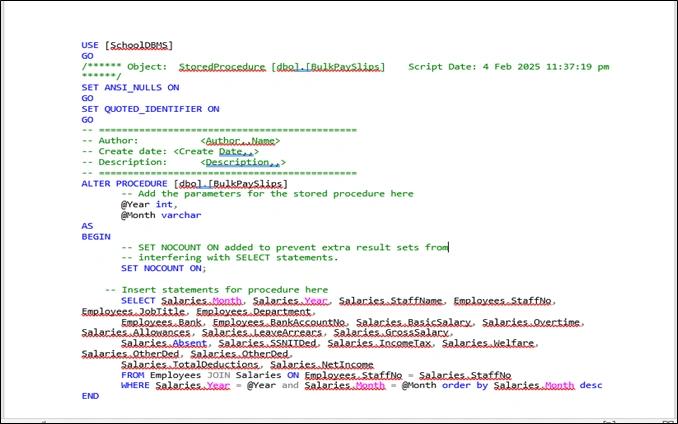
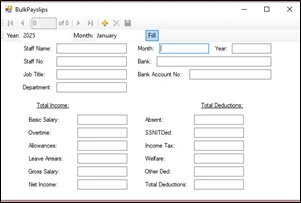 code and the form. Thanks
Tuhin PaulPosted Feb 5, 2025, 3:59 PM
Convert
@MonthtoINTin the QueryIf
Salaries.Monthis stored as anINT, you should convert the@Monthparameter to anINTin the query. This ensures consistency between the data types.Why This Works:
CASTfunction converts the@Monthparameter fromVARCHARtoINT, aligning it with theSalaries.Monthcolumn's data type.2. Change the Data Type of
@MonthtoINTIf
Salaries.Monthis consistently stored as anINT, the most efficient solution is to update the stored procedure to accept@Monthas anINT. This eliminates the need for runtime conversions.Steps to Implement:
Modify the stored procedure definition:
the application passes
@Monthas an integer value. By aligning the parameter type (@Month) with the column type (Salaries.Month), you eliminate the need for runtime conversions, improving query performance and reducing the risk of errors.3. Convert
Salaries.MonthtoVARCHAR(Not Recommended)If
Salaries.Monthis stored as anINTbut you want to compare it with aVARCHARparameter, you can cast the column toVARCHAR. However, this approach is not recommended because:When to Use This:
Only use this approach if
Salaries.Monthis stored as aVARCHARand you cannot change the database schema. Otherwise, avoid casting the column.4. Validate Input from the Application
Check that the application passes the correct data type for
@Month. For example:@Monthis expected to be an integer, ensure the application sends numeric values (e.g.,1instead of'01').@Monthis expected to be a string, ensure the application sends properly formatted strings (e.g.,'01').Example Validation in C#:
Sreenath KappoorPosted Feb 5, 2025, 5:19 AM
Hello David,
The issue seems to be related to the data type mismatch between
@Month(which isVARCHAR) andSalaries.Monthin your database. You mentioned that when both parameters areINT, the stored procedure works correctly. That meansSalaries.Monthmight be stored as anINTinstead ofVARCHAR.possible solutions
1: Convert @Month to INT in the WHERE clause
WHERE Salaries.Year = @Year

AND Salaries.Month = CAST(@Month AS INT)

ORDER BY Salaries.Month DESC;
2: Convert Salaries.Month to VARCHAR in the WHERE clause
WHERE Salaries.Year = @Year

AND CAST(Salaries.Month AS VARCHAR) = @Month

ORDER BY Salaries.Month DESC;
If
Salaries.Monthis stored asINT, change@MonthtoINTin the stored procedure. If it's stored asVARCHAR, ensure you're passing string values correctly in the Windows Form.If this does not work, please provide the table structure and what value is passed from the application.