Hi, I want to show data in grid function is calling but not show in the grid. I debug the code I can see the id value when the cursor reaches the $.ajax then directly go to the end of brackets, I don't know what is a problem any expert can you tell where I am wrong.
Any Expert can you tell me How I display this JSON format data in grid and Input Field if you feel any mistake kindly me How to resolve this issue.
**JSON Result:**
- {
- "listProducts": {
- "Customers": [],
- "P_Color": {
- "Products": [],
- "C_ID": 3,
- "C_Name_OR_Code": "Green "
- },
- "P_Size": {
- "Products": [],
- "S_ID": 2,
- "S_Size": "MediumNa "
- },
- "ProductDetail": {
- "ProductID": 6,
- "PDescription": "s",
- "Model": "s ",
- "Condition": "s ",
- "OS": "s",
- "DualSim": "s ",
- "TouchScreen": "ss ",
- "ScreenSize": "s ",
- "ProcessorType": "s ",
- "Camera": "s ",
- "RAM": "s ",
- "InternalMemory": "s ",
- "Wifi": "s ",
- "BatteryLife": "s ",
- "Discount": 54.0,
- "Other": "s",
- "ImageUrl": "~/upload/20095729TERI NAZAR Song LYRICS.jpg"
- },
- "ProductType": {
- "Products": [],
- "PType_ID": 1,
- "P_Name": "mobile ",
- "P_Description": "mobile",
- "Active": false
- },
- "ProductID": 6,
- "PName": "s ",
- "UnitWeight": 0.0,
- "UnitInStock": 4.0,
- "P_SizeID": 2,
- "P_Color_ID": 3,
- "PType_ID": 1,
- "ManificturedPrice": 52.0
- },
- "listProductDetails": [
- {
- "Product": {
- "Customers": [],
- "P_Color": {
- "Products": [],
- "C_ID": 3,
- "C_Name_OR_Code": "Green "
- },
- "P_Size": {
- "Products": [],
- "S_ID": 2,
- "S_Size": "MediumNa "
- },
- "ProductType": {
- "Products": [],
- "PType_ID": 1,
- "P_Name": "mobile ",
- "P_Description": "mobile",
- "Active": false
- },
- "ProductID": 6,
- "PName": "s ",
- "UnitWeight": 0.0,
- "UnitInStock": 4.0,
- "P_SizeID": 2,
- "P_Color_ID": 3,
- "PType_ID": 1,
- "ManificturedPrice": 52.0
- },
- "ProductID": 6,
- "PDescription": "s",
- "Model": "s ",
- "Condition": "s ",
- "OS": "s",
- "DualSim": "s ",
- "TouchScreen": "ss ",
- "ScreenSize": "s ",
- "ProcessorType": "s ",
- "Camera": "s ",
- "RAM": "s ",
- "InternalMemory": "s ",
- "Wifi": "s ",
- "BatteryLife": "s ",
- "Discount": 54.0,
- "Other": "s",
- "ImageUrl": "~/upload/20095729TERI NAZAR Song LYRICS.jpg"
- }
- ],
- }
**Get Product Function to fetch for one Value** //JSON format already share above
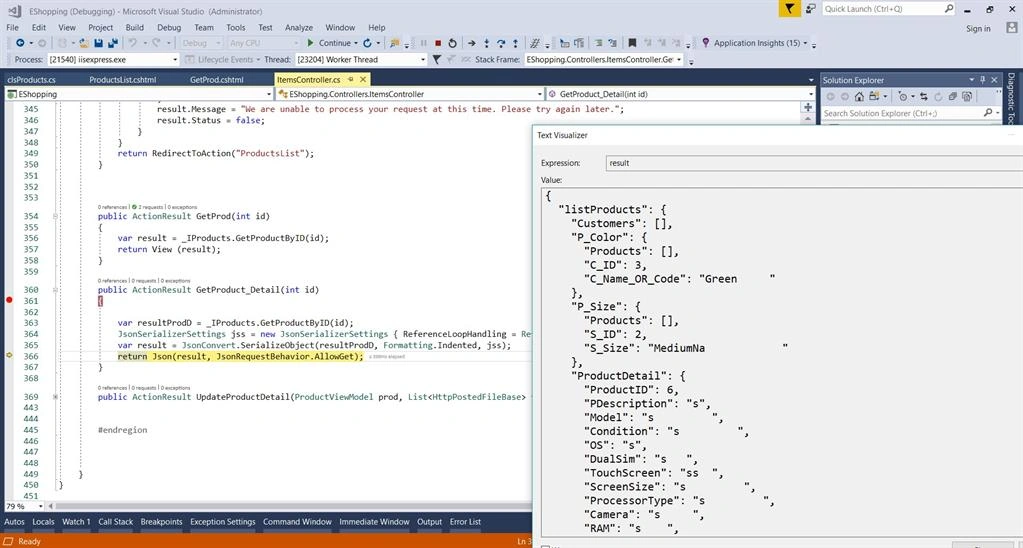
- public ActionResult GetProduct_Detail(int id)
- {
- var resultProdD = _IProducts.GetProductByID(id);
- JsonSerializerSettings jss = new JsonSerializerSettings { ReferenceLoopHandling = ReferenceLoopHandling.Ignore };
- var result = JsonConvert.SerializeObject(resultProdD, Formatting.Indented, jss);
- return Json(result, JsonRequestBehavior.AllowGet);
- }
**HTML View**
- <div class="vd_content-section clearfix" id="ecommerce-product-add">
- <div class="row">
- <div class="col-md-12">
- <div class="panel widget">
- <div class="panel-body">
- <form class="form-horizontal" action="#" role="form">
- <div class="panel-heading vd_bg-green">
- <h3 class="panel-title vd_white"> <span class="menu-icon"> <i class="fa fa-bar-chart-o">i> span> Products Product Detailh3>
- div>
- <br />
- <div class="row">
- <div class="col-md-4">
- <label class="col-xs-3 control-label">Namelabel>
- <div class="controls col-xs-9">
- <input type="text" class="input-border-btm" id="PName" />
- div>
- div>
- <div class="col-md-4">
- <label class="col-xs-3 control-label">Pricelabel>
- <div class="control-label col-xs-9">
- <input type="text" class="input-border-btm" id="ManificturedPrice" />
- div>
- div>
- <div class="col-md-4">
- <label class="col-xs-3 control-label">Weightlabel>
- <div class="control-label col-xs-9">
- <input type="text" class="input-border-btm" id="UnitWeight" />
- div>
- div>
- div>
- <div class="row">
- <div class="col-md-12">
- <div class="panel widget">
- <div class="panel-heading vd_bg-green">
- <h3 class="panel-title vd_white"> <span class="menu-icon"> <i class="fa fa-bar-chart-o">i> span> Products Details h3>
- div>
- <table id="ProdDetaillIist" class=" panel-body table table-striped table-hover table-responsive">
- <thead>
- <tr>
- <th>#th>
- <th>OSth>
- <th>Modelth>
- <th>Screen Sizeth>
- <th>Process Typeth>
- <th>Bettry Lifeth>
- <th>Camerath>
- <th>Modelth>
- <th>Conditionth>
- <th>Discountth>
- <th>Actionth>
- tr>
- thead>
- <tbody class="tbody">tbody>
- table>
- div>
- div>
- div>
- <div class="modal fade right" id="product_Detail" tabindex="-1" role="dialog" aria-labelledby="exampleModalLabel"
- aria-hidden="true" data-backdrop="false">
- <div class="modal-dialog modal-full-height modal-right modal-notify modal-info" role="document">
- <div class="modal-content">
- <div class="modal-lg">
- <div class="modal-body">
- <div class="row">
- <div class="col-md-12">
- <div class="panel widget">
- <div class="panel-body">
- <div class="panel-heading vd_bg-green">
- <h3 class="panel-title vd_white"> <span class="menu-icon"> <i class="fa fa-bar-chart-o">i> span> Products Detailh3>
- div>
- <br />
- @*<div class="row">
- <div class="col-md-4">
- <div class="controls col-md-6">
- <label class="control-label">Picturelabel>
- <img src="" alt="Not Found" height="70" width="70" />
- div>
- div>
- <div class="col-md-6">
- <i class="glyphicon glyphicon-plus">i> <span>Add files...span>
- <input type="file" name="file" required="required" multiple id="file" />
- div>
- div>*@
- <div class="row">
- <div class="col-md-12">
- <label class="control-label">Product IDlabel>
- <div class="controls col-xs-6">
- <input type="text" class="input-border-btm" id="ProductID" />
- div>
- div>
- div>
- <div class="row">
- <div class="col-lg-12">
- <label class="control-label">Descriptionlabel>
- <div class="controls col-xs-12">
- <input type="text" class="input-border-btm" id="PDescription" />
- div>
- div>
- div>
- <div class="row">
- <div class="col-md-6">
- <label class="col-xs-3 control-label">Modellabel>
- <div class="controls col-xs-9">
- <input type="text" class="input-border-btm" id="Model" />
- div>
- div>
- <div class="col-md-6">
- <label class="col-xs-3 control-label">OSlabel>
- <div class="controls col-xs-9">
- <input type="text" class="input-border-btm" id="OS" />
- div>
- div>
- div>
- <div class="row">
- <div class="col-md-6">
- <label class="col-xs-3 control-label">DualSimlabel>
- <div class="controls col-xs-9">
- <input type="text" class="input-border-btm" id="DualSim" />
- div>
- div>
- <div class="col-md-6">
- <label class="col-xs-3 control-label">TouchScreenlabel>
- <div class="control-label col-xs-9">
- <input type="text" class="input-border-btm" id="TouchScreen" />
- div>
- div>
- div>
- <div class="row">
- <div class="col-md-6">
- <label class="col-xs-3 control-label">ScreenSizelabel>
- <div class="control-label col-xs-9">
- <input type="text" class="input-border-btm" id="ScreenSize" />
- div>
- div>
- <div class="col-md-6">
- <label class="col-xs-3 control-label">PrcessorTypelabel>
- <input type="text" class="input-border-btm" id="PrcessorType" />
- div>
- div>
- div>
- <div class="row">
- <div class="col-md-6">
- <label class="col-xs-3 control-label">Cameralabel>
- <div class="control-label col-xs-9">
- <input type="text" class="input-border-btm" id="Camera" />
- div>
- div>
- <div class="col-md-6">
- <label class="col-xs-3 control-label">RAMlabel>
- <div class="control-label col-xs-9">
- <input type="text" class="input-border-btm" id="RAM" />
- div>
- div>
- div>
- <div class="modal-footer">
- <button type="button" class="btn btn-secondary" data-dismiss="modal">Closebutton>
- <input type="submit" value="Save Changes" class="btn vd_btn vd_bg-blue btn-icon btn-sm save-btn fa fa-save" id="btnSave" />
- <input type="submit" value="Update Changes" class="btn vd_btn vd_bg-blue btn-icon btn-sm save-btn fa fa-save" id="btnUpdate" />
- div>
- div>
- div>
- div>
- div>
- div>
- div>
- div>
- div>
- form>
- div>
- div>
- div>
- div>
- div>
**Jquery Function**
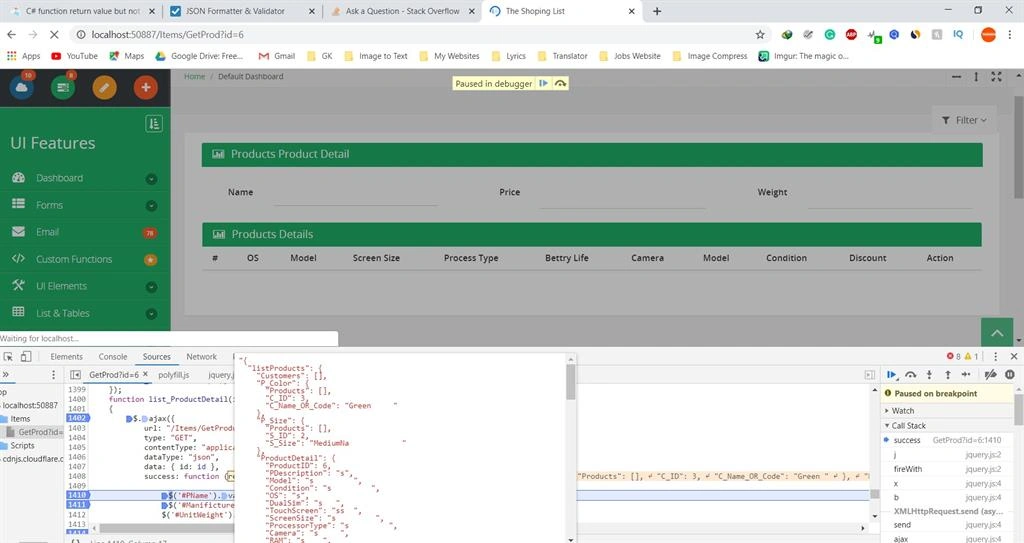
- $(document).ready(function () {
- debugger;
- var baseUrl = (window.location).href; // You can also use document.URL
- var id = baseUrl.substring(baseUrl.lastIndexOf('=') + 1);
- list_ProductDetail(id);
- });
- function list_ProductDetail(id)
- {
- $.ajax({
- url: "/Items/GetProduct_Detail",
- type: "GET",
- contentType: "application/json;charset=utf-8",
- dataType: "json",
- data: { id: id },
- success: function (result) {
- $('#PName').val(result.PName);
- $('#ManificturedPrice').val(result.ManificturedPrice);
- $('#UnitWeight').val(result.UnitWeight);
- $.each(result, function (key, item) {
- var html = '';
- html += '
'; - html += '
' + item.ProductID + '; - html += '
' + item.OS + ' ';- html += '
' + item.PrcessorType + ' ';- html += '
' + item.RAM + ' ';- html += '
' + item.ScreenSize + ' ';- html += '
' + item.TouchScreen + ' ';- html += '
' + item.BatteryLife + ' ';- html += '
' + item.Camera + ' ';- html += '
' + item.Model + ' ';- html += '
' + item.Condition + ' ';- html += '
' + item.Discount + ' ';- html += '
- });
- $('tbody').append(html);
- },
- error: function (errormessage) {
- alert(errormessage.responseText);
- },
- });
- }
1 Reply
Know the answer? Post it — somebody with the same question will find it here.
Sign in to answer this question
It is the same account you read, post and publish with — and you will come straight back to this page.
- html += '
Vinay SinghPosted Mar 25, 2020, 8:38 AM