I work on asp.net I face issue when export grid view have more than 2000 rows it download empty file pdf without data inside .
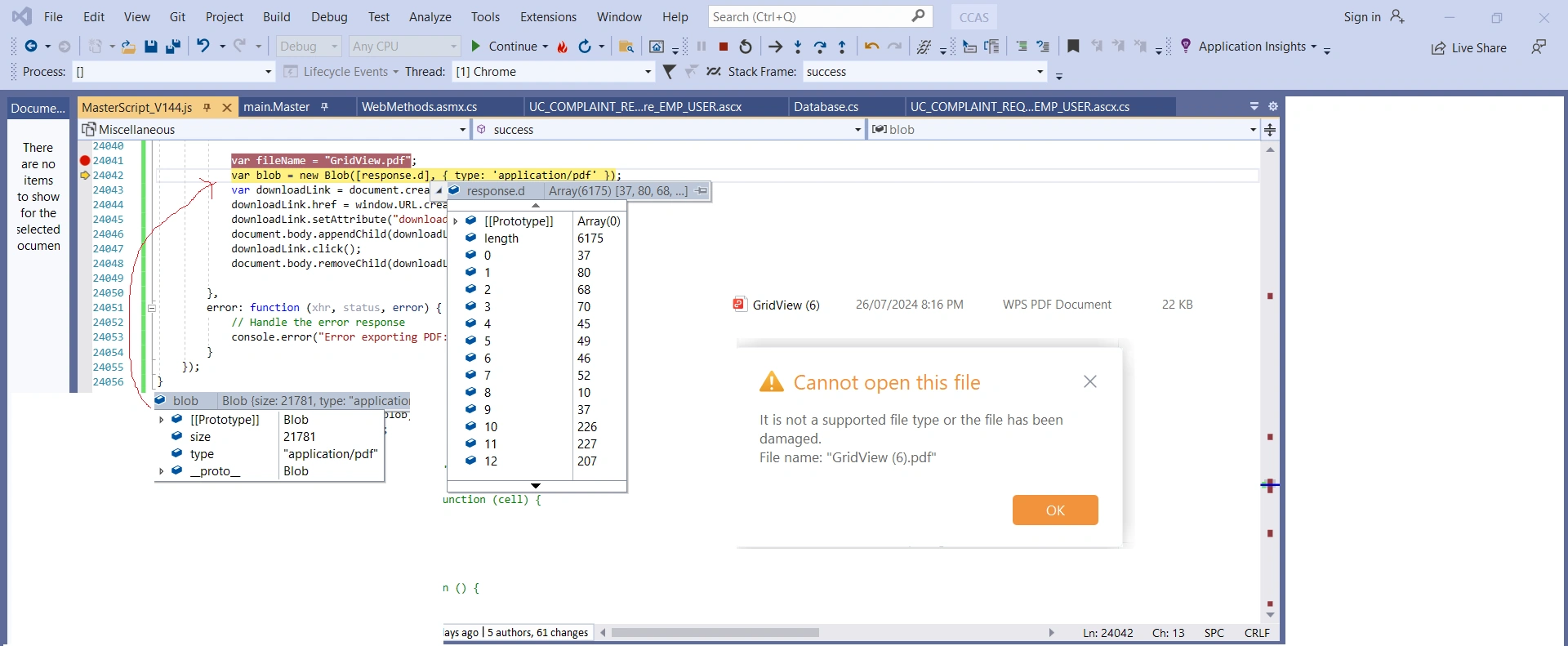
and when click on file not open and give me file not in correct format or may be damaged with size 22 byte
so How to solve this issue and generate pdf file have more data and open it.
I don't need to use base 64 because it small limit for data until 8000 characters
and data exported will have ore than this limit .
what I try as below :
function ExportGridViewToPdf() {
debugger;
var tableData = [];
var columns = [];
// Get the data from the GridView
$('#gvResults tr').each(function (index) {
if (index === 0) {
// Get the column names
$(this).find('th').each(function () {
columns.push($(this).text());
});
} else {
var rowData = [];
$(this).find('td').each(function () {
rowData.push($(this).text());
});
tableData.push(rowData);
}
});
// Make an AJAX call to the server-side method
$.ajax({
success: function (response) {
var fileName = "GridView.pdf";
var blob = new Blob([response.d], { type: 'application/pdf' });
var downloadLink = document.createElement("a");
downloadLink.setAttribute("download", fileName);
document.body.appendChild(downloadLink);
downloadLink.click();
document.body.removeChild(downloadLink);
},
error: function (xhr, status, error) {
// Handle the error response
console.error("Error exporting PDF: " + error);
}
});
}
[WebMethod]
public byte[] ExportGridViewToPdf(string[][] gridData, string[] columnNames)
{
    try
    {
        // Create a new PDF document
        var document = new Document(PageSize.A4, 25, 25, 30, 30);
        var ms = new MemoryStream();
        var writer = PdfWriter.GetInstance(document, ms);
        document.Open();

        // Add the table to the PDF document
        var table = new PdfPTable(columnNames.Length);
        table.WidthPercentage = 100;

        // Add the column headers
        foreach (var columnName in columnNames)
        {
            var cell = new PdfPCell(new Phrase(columnName));
            cell.BackgroundColor = new BaseColor(System.Drawing.Color.LightGray);
            table.AddCell(cell);
        }

        // Add the data rows
        foreach (var row in gridData)
        {
            foreach (var value in row)
            {
                table.AddCell(value);
            }
        }

        document.Add(table);
        document.Close();
        writer.Close();

        return ms.ToArray();
    }
    catch (Exception ex)
    {
        // Handle the exception
        throw new Exception("Error exporting GridView to PDF: " + ex.Message);
    }
}
the below is image for what I try with debug
Nikunj SatasiyaPosted Jul 27, 2024, 7:44 PM
Hi Ahmed,
It appears that you're facing issues when trying to export a large GridView to a PDF in an ASP.NET application. The problem might be occurring due to the data not being correctly passed to the server-side method or the method not being called at all.
1. Ensure AJAX Call is Set Up Properly
Your AJAX call doesn't seem to be setup properly as it lacks
urlandtypeproperties, and does not send data to the server-side method. Here’s how you can modify your AJAX call:2. Server-Side Code Modification
Make sure that your server-side method is correctly configured to handle the request. Also ensure that
[WebMethod]and[ScriptMethod(ResponseFormat = ResponseFormat.Json)]attributes are properly set up:Ensure that all the necessary PDF generation libraries (like iTextSharp) are correctly referenced in your project and are compatible with the version of .NET you are using.
Since you are handling a large amount of data, consider implementing a loading indicator or asynchronous processing notification on the client side to inform the user that the process is ongoing, especially if the generation might take some time.
Add logging on both the client-side and server-side to capture any failures or exceptions. This will help in identifying where the issue might be occurring (either during data transmission or PDF generation).
By ensuring these aspects are correctly implemented, your function should be able to handle the export of a large GridView to a PDF more effectively.
Jithu ThomasPosted Jul 27, 2024, 11:05 AM
The issue might be due to the way the data is handled in the AJAX call and on the server side. Let's ensure the following:
This is the updated version of the cliend side (JS)
C# server side script (web method) - Updated.
Try this.