

when I press the Insert Button. This Error Message Show in DataRow.
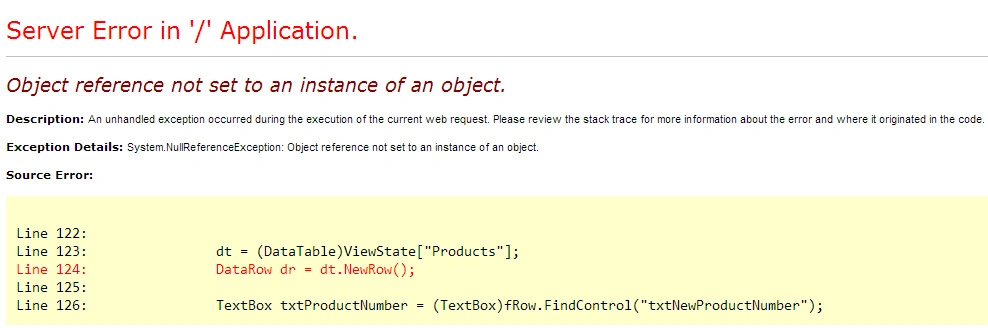
Here is my code.
runat="server" DataKeyNames="ProductID" OnRowEditing="gvProducts_RowEditing"
OnRowCancelingEdit="gvProducts_RowCancelingEdit" OnRowCommand="gvProducts_RowCommand"
OnRowUpdating="gvProducts_RowUpdating" OnRowDeleting="gvProducts_RowDeleting">
<%#Eval("ProductNumber")%>
<%#Eval("Name")%>
<%#Eval("ListPrice")%>
protected void gvProducts_RowCommand(object sender, GridViewCommandEventArgs e)
{
DataTable dt = new DataTable();
if (e.CommandName.Equals("Insert"))
{
GridViewRow fRow = gvProducts.FooterRow;
dt.Columns.Add("ProductNumber");
dt.Columns.Add("Name");
dt.Columns.Add("ListPrice");
dt = (DataTable)ViewState["Products"];
DataRow dr = dt.NewRow();
TextBox txtProductNumber = (TextBox)fRow.FindControl("txtNewProductNumber");
TextBox txtProductName = (TextBox)fRow.FindControl("txtNewProductName");
TextBox txtListPrice = (TextBox)fRow.FindControl("txtNewListPrice");
dr["ProductNumber"] = txtProductNumber.Text;
dr["Name"] = txtProductName.Text;
dr["ListPrice"] = txtProductName.Text;
dt.Rows.Add(dr);
ViewState["Products"] = dt;
gvProducts.DataSource = ViewState["Products"];
gvProducts.DataBind();
}
}
2 Replies
Know the answer? Post it — somebody with the same question will find it here.
Sign in to answer this question
It is the same account you read, post and publish with — and you will come straight back to this page.
Sunny ShaikhPosted Sep 5, 2014, 2:20 AM
dt = (DataTable)ViewState["Products"];
Vasanth KrishnanPosted Sep 4, 2014, 9:20 AM