I am trying to export data from database to word document. But it breaks in the loop action. How can we loop multiple rows? It works very well without loop. But when it loops, it gives error.
Object oMissing = System.Reflection.Missing.Value;
Object oTrue = true;
Object oFalse = false;
Word.Application oWord = new Word.Application();
Word.Document oWordDoc = new Word.Document();

oWord.Visible = true;
Object oTemplatePath = System.Windows.Forms.Application.StartupPath + "\\GeziListesi.docx";
oWordDoc = oWord.Documents.Add(ref oTemplatePath, ref oMissing, ref oMissing, ref oMissing);

foreach(Word.Field myMergeField in oWordDoc.Fields) {
    iTotalFields++;

    Word.Range rngFieldCode = myMergeField.Code;
    String fieldText = rngFieldCode.Text;

    if (fieldText.StartsWith(" MERGEFIELD")) {
        Int32 endMerge = fieldText.IndexOf("\\");
        Int32 fieldNameLength = fieldText.Length - endMerge;
        String fieldName = fieldText.Substring(11, endMerge - 11);

        OleDbConnection conn = new OleDbConnection("Provider=Microsoft.ACE.OLEDB.12.0;Data Source=gezievrak2541.mdb; Mode = ReadWrite");

        if (conn.State == ConnectionState.Closed) {
            conn.Open();
        }

        using(OleDbCommand cmd = new OleDbCommand("Select * from kurumbilgi25, gezibilgileri25", conn)) {
            using(OleDbDataReader dr = cmd.ExecuteReader()) {
                while (dr.Read()) {

                    fieldName = fieldName.Trim();

                    if (fieldName == "kurumu") {
                        myMergeField.Select();
                        oWord.Selection.TypeText(dr["kurumbilgi25.kurumu"].ToString());
                    }
                    if (fieldName == "gtarihi") {
                        myMergeField.Select();
                        oWord.Selection.TypeText(DateTime.Parse(dr["gtarihi"].ToString()).ToShortDateString());
                    }

                    if (fieldName == "tcno") {
                        myMergeField.Select();
                        oWord.Selection.TypeText(dr["tcno"].ToString());
                    }
                    if (fieldName == "adsoyad") {
                        myMergeField.Select();
                        oWord.Selection.TypeText(dr["adi"].ToString() + " " + dr["soyadi"].ToString());
                    }
                    if (fieldName != "sinifi") {
                        //myMergeField.Select();
                        oWord.Selection.TypeText(" ");

                    }
                    if (fieldName == ("sinifi")) {
                        myMergeField.Select();
                        oWord.Selection.TypeText(dr["sinifi"].ToString());
                    }

                    if (fieldName == "unvan") {
                        myMergeField.Select();
                        oWord.Selection.TypeText(dr["gezilistemiz25.unvani"].ToString());
                    }
                    if (fieldName == "tarih") {
                        myMergeField.Select();
                        oWord.Selection.TypeText(DateTime.Now.ToShortDateString());
                    }
                    if (fieldName == "mudur") {
                        myMergeField.Select();
                        oWord.Selection.TypeText(dr["mudur"].ToString());
                    }
                    if (fieldName == "unvan2") {
                        myMergeField.Select();
                        oWord.Selection.TypeText(dr["kurumbilgi25.unvani"].ToString());
                    }
                    GC.Collect();
                    GC.WaitForPendingFinalizers();
                    GC.Collect();
                    GC.WaitForPendingFinalizers();

                }
            }
        }
    }
}
Mehmet FatihPosted Jun 16, 2023, 1:58 PM
They are true. It reads the first row in the database correctly. It gives an error while reading the next row.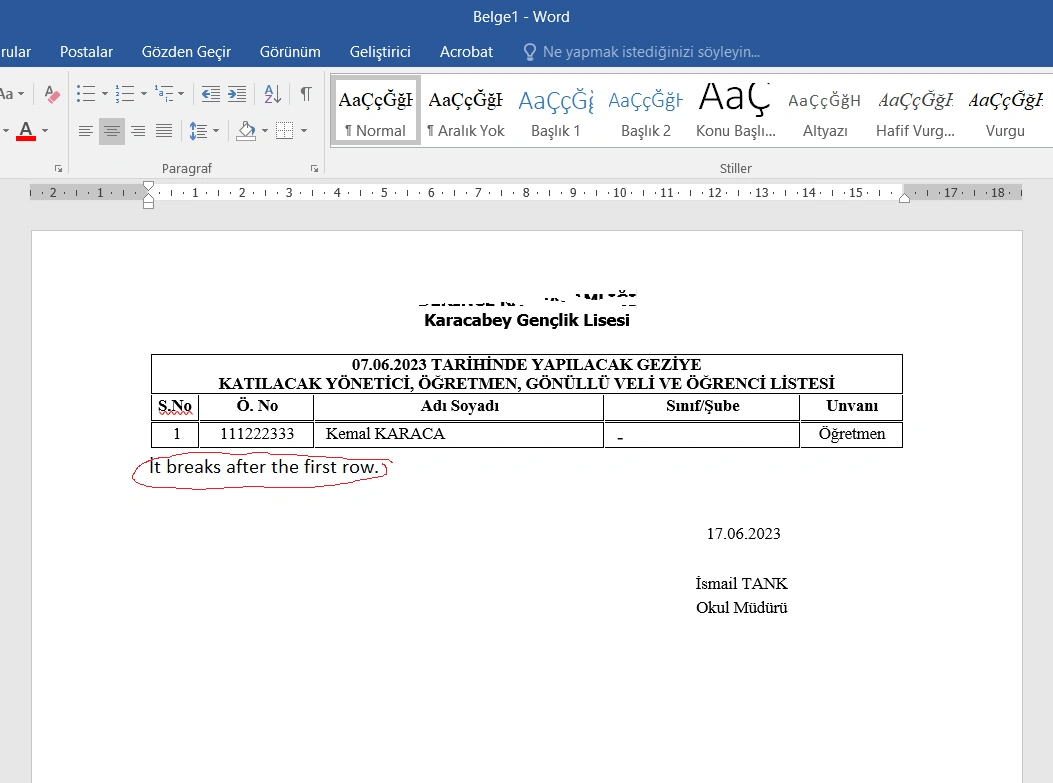
Tuhin PaulPosted Jun 16, 2023, 2:03 AM
Review the SQL query being executed within the loop (Select * from kurumbilgi25, gezibilgileri25). This query returns the desired data and that the table names are correct. Also the field names (e.g., "kurumu", "gtarihi", "tcno") in your database match the field names used in the Word document's merge fields. Any discrepancies can cause issues when trying to populate the Word document.
Mehmet FatihPosted Jun 15, 2023, 11:52 AM
Thanks both of you. But I tried both of them. It is the same result. In the second codes it gives this error. It gives the error object deleted when pulling the next data.
Error CS1061 'Field' does not contain a definition of 'Range' and no accessible extension method 'Range' can be reached that accepts a first argument of type 'Field' (maybe you are missing a use or reference to the constraint?)
Amit MohantyPosted Jun 15, 2023, 8:06 AM
try this once
Rajkiran SwainPosted Jun 15, 2023, 7:42 AM