Hello,
i am developing a form with two graphic objects and two texts on it. So its like two windows. I am using the drawing namespace and pictureBox item. Unfortinutely the program, when i run it schows me only one window with the text on it. But I want to see 2 windows. What am I doing wrong?
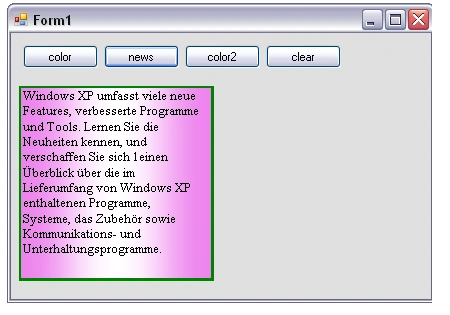
using System;
using System.Drawing;
using System.Drawing.Text;
using System.Drawing.Drawing2D;
using System.Windows.Forms;

namespace AdvancedDrawingMultilineText
{
    public partial class Form1 : Form
    {
        public Form1()
        {
            InitializeComponent();
        }
        private void button1_Click(object sender, EventArgs e)
        {
            this.Invalidate(true);
            this.pictureBox1.Paint += new System.Windows.Forms.PaintEventHandler(this.Fillrectangle01);
            this.pictureBox2.Paint += new System.Windows.Forms.PaintEventHandler(this.Fillrectangle02);
        }
        private void button2_Click(object sender, EventArgs e)
        {
            this.Invalidate(true);
            this.pictureBox1.Paint += new System.Windows.Forms.PaintEventHandler(this.Fillrectangle01t);
            this.pictureBox2.Paint += new System.Windows.Forms.PaintEventHandler(this.Fillrectangle02t);
        }

        private void button3_Click(object sender, EventArgs e)
        {
            //not impotant
            //this.pictureBox2.Paint += new System.Windows.Forms.PaintEventHandler(this.Fillrectangle02);
        }
        private void button4_Click(object sender, EventArgs e)
        {
            //this.draw5();
        }

        private void Fillrectangle01(object sender, PaintEventArgs e)
        {
            Pen itsme = new Pen(Color.Green, 5);
            //Draw
            int x = 5;
            int y = 5;
            int width = 190;
            int height = 190;
            rect01 = new Rectangle(x, y, width, height);
            e.Graphics.DrawRectangle(itsme, rect01);
            //Fill
            int x1 = 5;
            int y1 = 5;
            int width1 = 190;
            int height1 = 190;
            SolidBrush drawBrush = new SolidBrush(Color.Black);
            rect02 = new Rectangle(x1, y1, width1, height1);
            LinearGradientBrush Brush = new LinearGradientBrush(rect02, Color.Violet, Color.White, LinearGradientMode.Horizontal);
            Brush.SetSigmaBellShape(0.5f);
            e.Graphics.FillRectangle(Brush, this.rect02);

        }
        private void Fillrectangle01t(object sender, PaintEventArgs e)
        {
            Font drawfont = new Font("Times New Roman", 10);
            SolidBrush drawBrush = new SolidBrush(Color.Black);

            string multiline = "Windows XP umfasst viele neue Features, verbesserte Programme und Tools. Lernen Sie die Neuheiten kennen, und verschaffen Sie sich 1einen Überblick über die im Lieferumfang von Windows XP enthaltenen Programme, Systeme, das Zubehör sowie Kommunikations- und Unterhaltungsprogramme.";
            e.Graphics.DrawString(multiline, drawfont, drawBrush, rect02);
        }

        private void Fillrectangle02(object sender, PaintEventArgs e)
        {
            Pen itsme = new Pen(Color.Green, 5);
            //Draw
            int x = 215;
            int y = 5;
            int width = 190;
            int height = 190;
            rect03 = new Rectangle(x, y, width, height);
            e.Graphics.DrawRectangle(itsme, rect03);
            //Fill
            int x1 = 215;
            int y1 = 5;
            int width1 = 190;
            int height1 = 190;
            SolidBrush drawBrush = new SolidBrush(Color.Black);
            rect04 = new Rectangle(x1, y1, width1, height1);
            LinearGradientBrush Brush = new LinearGradientBrush(rect04, Color.DarkViolet, Color.White, LinearGradientMode.Horizontal);
            Brush.SetSigmaBellShape(0.5f);
            e.Graphics.FillRectangle(Brush, this.rect04);
        }
        private void Fillrectangle02t(object sender, PaintEventArgs e)
        {
            Font drawfont = new Font("Times New Roman", 10);
            SolidBrush drawBrush = new SolidBrush(Color.Black);

            string multiline = "Windows XP umfasst viele neue Features, verbesserte Programme und Tools. Lernen Sie die Neuheiten kennen, und verschaffen Sie sich 1einen Überblick über die im Lieferumfang von Windows XP enthaltenen Programme, Systeme, das Zubehör sowie Kommunikations- und Unterhaltungsprogramme.";
            e.Graphics.DrawString(multiline, drawfont, drawBrush, rect04);
        }
        /*not impotant
        private void draw4()
        {
            Graphics g = this.CreateGraphics();
            g.FillRectangle(Brushes.Azure, 215, 50, 200, 200);

        }
        private void draw5()
        {
            Graphics g = this.CreateGraphics();
            g.Clear(Color.LightGray);
        }
        */
        public System.Drawing.Rectangle rect01 { get; set; }
        public System.Drawing.Rectangle rect02 { get; set; }
        public System.Drawing.Rectangle rect03 { get; set; }
        public System.Drawing.Rectangle rect04 { get; set; }
    }
}
Naimish MakwanaPosted May 14, 2024, 4:19 AM
It seems like you’re trying to draw two rectangles and fill them with text when you click on
button1andbutton2. However, the issue might be that you’re attaching thePaintevent handlers inside the button click events. This means that thePaintevent handlers (which draw the rectangles and text) are not attached until the buttons are clicked.If you want the rectangles and text to be drawn as soon as the form loads, you should attach the
Paintevent handlers in theForm1constructor after theInitializeComponent()call. Here’s how you can do it:Also, you might want to call
Invalidateon thePictureBoxcontrols instead of the form itself in your button click events. This will cause thePictureBoxcontrols to be redrawn:Try these modifications and see if they solve your problem.
Thanks
Rasul HuseynovPosted May 13, 2024, 4:59 PM
Hi Andreas,
Probably the picturebox objects are defined on top of each other. I checked your form1.cs file.
Please check it the form1.designer.cs, I added my form1.designer.cs (please pay attention, not the form1.cs). Note that I did not add all buttons.
My screen results: