Hi,
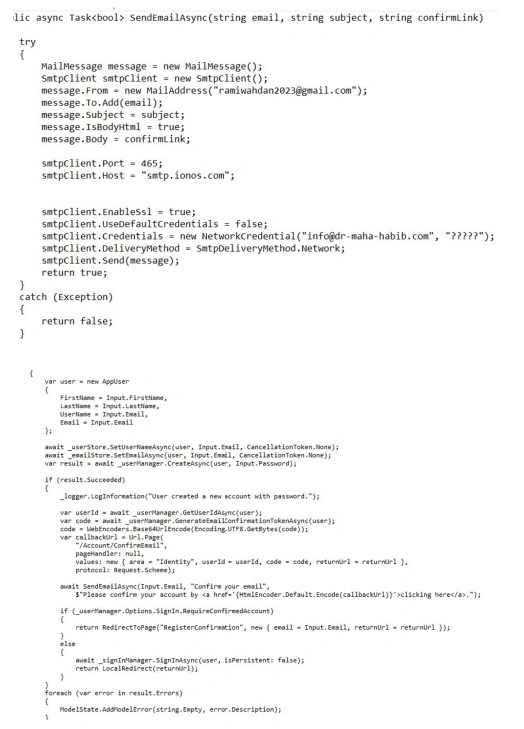
I have the below code so i can send link to confirm registration of user through email but I am always getting a message that this is not a real email.
Hi,
I have the below code so i can send link to confirm registration of user through email but I am always getting a message that this is not a real email.
Know the answer? Post it — somebody with the same question will find it here.
Sign in to answer this question
It is the same account you read, post and publish with — and you will come straight back to this page.
Abhishek YadavPosted Sep 1, 2023, 6:14 AM
Generate a verification link: When a user registers, generate a unique verification code or token that will be used to confirm their registration. This token should be securely stored in your database along with the user's details.
Send confirmation email: After successful registration, send an email to the user's provided email address containing a link to verify their account. This link should include the generated verification token as a query parameter.
Verify the account: When the user clicks on the verification link, they will be directed to a verification page on your website. This page can extract the verification token from the query parameter and check if it matches the token stored in the database.
Update account status: If the verification token matches, update the user's account status in the database as "verified" or update any other relevant fields.
Provide feedback to the user: Display a message on the verification page indicating whether the account was successfully verified or not. You can also redirect the user to the login page for them to log in after verifying their account.
This process ensures that the user's email address is valid and associated with their registration, preventing fake or unauthorized registrations.
Vishal YelvePosted Sep 1, 2023, 5:57 AM
Hi Rami,
do refer below links for your reference
https://www.aspsnippets.com/Articles/ASPNet-MVC-Send-user-Confirmation-email-after-Registration-with-Activation-Link.aspx
https://www.c-sharpcorner.com/blogs/account-confirmation-with-asp-net-mvc-identity-using-email-template3#:~:text=First%2C%20create%20a%20role%20and,which%20sends%20in%20the%20email.
https://www.codeproject.com/Tips/738090/ASP-NET-MVC-Confirm-Registration-Email
https://www.youtube.com/watch?v=yRP6C7fhAuE
Tahir AnsariPosted Sep 1, 2023, 5:26 AM
This could be due to a few reasons:
1. Syntax Error: Ensure that the email address you're using is in the correct format, i.e., `[email protected]`. Make sure there are no extra spaces or special characters in the email address.
2. Domain Validation: Some email providers or services may perform domain validation checks to see if the domain part of the email address (e.g., `example.com`) exists and is valid. Ensure that the domain you're using is a real and accessible domain.
3. Email Address Exists: The email address you're trying to use should actually exist. You can't send an email to an address that doesn't exist.
4. Anti-Spam Measures: Some email services have strict anti-spam measures, and they may reject emails if they suspect that the sender is not properly authenticated or if the email content looks suspicious. Ensure that you're sending the email through a legitimate email server with proper authentication.
5. Temporary/Disposable Email Addresses: Some services offer temporary or disposable email addresses that are designed for short-term use. These email addresses may not be suitable for sending registration confirmation emails.
6. SMTP Server Configuration: Check that your SMTP server and email configuration are set up correctly. Ensure that you have provided the correct SMTP server settings and credentials for sending emails.
7. Email Validation Libraries : If you're using an email validation library or function in your code, make sure it is not overly strict and allows for valid email addresses that might not conform to the most rigid specifications but are still legitimate.
8. Check Your Code : Review your code to make sure you are passing the email address correctly to your email-sending function or library. Ensure that you are not modifying the email address in a way that makes it invalid.