Skip to content
Loading
How to use jqueryui in your form for datepicker show?  
  •               
  •   
  •               
  •             "text/javascript">  
  •                 $(document).ready(function () {  
  •   
  •                     $('#Lockuntil').on('click', onClickCheckBox); // bind an event with checkbox on click. On click function onClickCheckBox will be called.  
  •   
  •                     onClickCheckBox(); // to hide or show on page load.c  
  •                 });  
  •   
  •                 function onClickCheckBox() // logic to show hide textbox based on checkbox's value.  
  •                 {  
  •                     if ($('#Lockuntil').is(":checked")) {  
  •                         $("#TextValue").show();  
  •                     }  
  •                     else {  
  •                         $("#TextValue").hide();  
  •                     }  
  •                 }  
  •               
  •  
    +2
  • Junaid Musla
    Hi,

    Try to write your script in the script section as below:
    1. @section ScriptSection{  
    2.       
    3.     "text/javascript">  
    4.   
    5.         $(document).ready(function () {       
    6.   
    7.             $('#Lockuntil').on('click', onClickCheckBox); // bind an event with checkbox on click. On click function onClickCheckBox will be called.  
    8.   
    9.             onClickCheckBox(); // to hide or show on page load.c  
    10.         });  
    11.   
    12.         function onClickCheckBox() // logic to show hide textbox based on checkbox's value.  
    13.         {  
    14.             if ($('#Lockuntil').is(":checked")) {  
    15.                 $("#TextValue").show();  
    16.             }  
    17.             else {  
    18.                 $("#TextValue").hide();  
    19.             }  
    20.         }  
    21.       
    22. }  
     
    Now, here is the code of your Ui control:
    1. <div class="row">  
    2.    <div class="form-group">  
    3.       <div class="col-sm-2">  
    4.           @Html.CheckBoxFor(model => model.Lockuntil, new { @class = "rb"id = "Lockuntil" })  
    5.           @Html.TextBoxFor(model => model.TextValue, new {  @class="datepicker"id = "TextValue" })  
    6.       div>  
    7.    div>  
    8. div>  

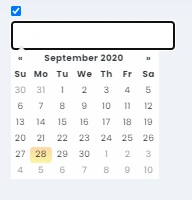
    I have tested this with model and it works fine. Datepicker is also visible.

    Screenshot
     
    +2
  • Hi Junaid
     
    The textbox is not showing the datepicker, this is my current logic.
    1. class="form-group row">  
    2.                     class="col-sm-2">  
    3.                         @Html.CheckBoxFor(model => model.Lockuntil, new { @class = "rb", data_toggle = "hide-element", data_target = "#datepicker", id = "checkBox" })  
    4.                         "text" onclick="onClickCheckBox()"/>  
    5.                     
      
  •                   
  •   
  •                   
  •                 "text/javascript">  
  •                     $(document).ready(function () {  
  •                         $('#checkBox').on('click', onClickCheckBox);  
  •                     });    
  •             function onClickCheckBox() {      
  •         if($(this).is(":checked")) {      
  •         $("#datepicker").show();      
  •         }     
  •         else     
  •         {      
  •        $("#datepicker").hide();    
  •     }     
  •  }  
  •                   
  •  
    +2
  • Junaid Musla
    Try this out:   
    1. $(document).ready(function () {  
    2.    $('#controlId').on('click', onClickCheckBox);   
    3. }  
    4. function onClickCheckBox() {    
    5.     if($(this).is(":checked")) {    
    6.         $("#datepicker").show();    
    7.     }   
    8.     else   
    9.     {    
    10.        $("#datepicker").hide();  
    11.     }   
    12. }    
    +2