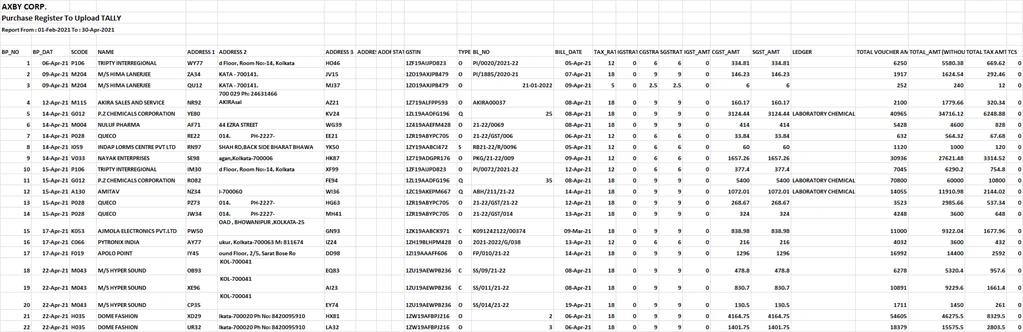
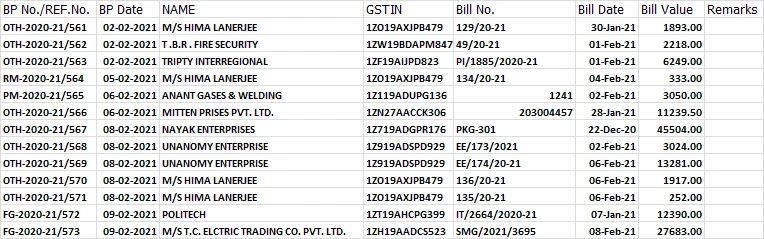
I've got a couple of different workbooks 1) newData.xlsx & 2) DATABASE.xlsx (image and file attached below)
I'm trying to check whether the Bill No. & Bill Date of the first row (i.e. row 6, as the relevant data starts from row 6) & last rows of the newData.xlsx file already exist in the DATABASE.xlsx file. The column numbers of both the target cells are different in both files.
How can I do this in the most efficient way possible using spire.xls & c#?
I've tried the below
- string queryFrom=@"D:\sample\newData.xlsx";
- string queryIn=@"D:\sample\Testing\DATABASE.xlsx";
- Workbook workbook = new Workbook();
- workbook.LoadFromFile(queryFrom);
- Worksheet sheet = workbook.Worksheets[0];
- var firstRowCellBillNo=sheet.Range["M6"].Value2.ToString().Trim();
- var firstRowCellBillDate=sheet.Range["N6"].Value2.ToString().Trim();
- var lastRowCellBillNo=sheet.Range["M"+(sheet.LastRow - 1)].Value2.ToString().Trim();
- var lastRowCellBillDate=sheet.Range["N"+(sheet.LastRow - 1)].Value2.ToString().Trim();
- Dictionary<string, string> dictionary = new Dictionary<string, string>();
- Dictionary<string, string> dictionary2 = new Dictionary<string, string>();
- if (!dictionary.ContainsKey(firstRowCellBillNo) && !dictionary.ContainsKey(lastRowCellBillNo))
- {
- dictionary.Add(firstRowCellBillNo.ToString(), firstRowCellBillDate.ToString());
- dictionary.Add(lastRowCellBillNo.ToString(), lastRowCellBillDate.ToString());
- }
- workbook.Dispose();
- Workbook wbk=new Workbook();
- wbk.LoadFromFile(queryIn);
- Worksheet sh=wbk.Worksheets[0];
- CellRange xlRange=sh.Range[1,1,sh.LastRow,sh.LastColumn];
- int rowCount = xlRange.RowCount;
- for (int i = 1; i < rowCount; i++)
- {
- var col1 = xlRange.Columns[4].CellList[i].Value2.ToString();
- var col2 = xlRange.Columns[5].CellList[i].Value2.ToString();
- if (!dictionary2.ContainsKey(col1))
- {
- dictionary2.Add(col1.ToString(), col2.ToString());
- }
- }
- //If ( the key value pair's of dictionary exist in dictionary2 )
- {
- Console.WriteLine("Data already exists in database!!");
- }
- //Else
- { Do some stuff }
- wbk.Dispose();
I think my above code approach is complicating things and not to mention unfinished.
Can anyone help me on this?
1st image newData.xlsx and 2nd image DATABASE.xlsx
Tamal BanerjeePosted May 28, 2021, 3:25 PM
Leon DPosted May 26, 2021, 1:36 AM