
I have a grid like structure in one of my page
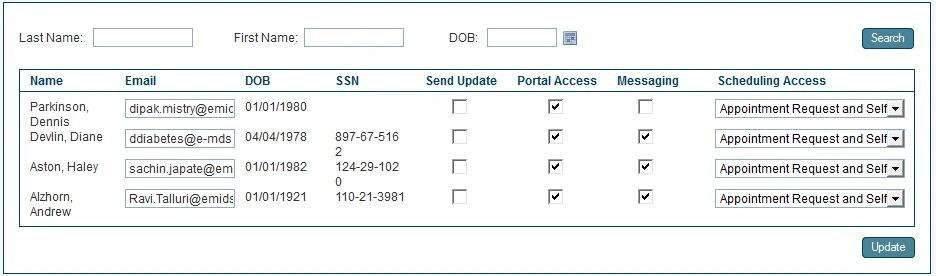
In my Cshtml,
@Html.TextBoxFor(model => model.PatientPreferences[index].Email, new { @id = "patEmail" + index })
My Problem is,when is click on search button without entering any values it displays all the values and when i change something and click on update its also working fine.but when i enter some first name and click on search It displayed the corresponding row except Email field it remain the first value like '[email protected]' For a work around what i did,
i have changed my cshtml to
@Html.TextBoxFor(model => model.PatientPreferences[index].Email, new { style = "display:none", @id = "patEmail" + index })
It works But wont be able to bind it to the model that is why its not updating...
Do anyone faced this problem ever???
Note:It works fine if change it from textbox to lable.
It works But wont be able to bind it to the model that is why its not updating...
Do anyone faced this problem ever???
Note:It works fine if change it from textbox to lable.
Rewant ChoudharyPosted Oct 4, 2012, 7:57 AM
in dynamic row you can give the name like
int count=0;
foreach (string key in FormClct.AllKeys)
{
if (key.Contains("option[1][name]"))
{
count++;
}
}
try
{
string optionstring = string.Empty;
string optionvalue, optionvalue1, optionvalue2, optionvalue3;
for (int i = 1; i <= count; i++)
{
optionstring = optionstring + FormClct["option[" + i + "][name]"].ToString() + "," + FormClct["option[" + i + "][type]"].ToString() + ",";
for (int j = 1; j <= 10; j++)
{
if (FormClct.AllKeys.Contains("option[" + i + "][values][" + j + "][name]"))
{
optionvalue = FormClct["option[" + i + "][values][" + j + "][name]"].ToString();
optionvalue1 = FormClct["option[" + i + "][values][" + j + "][value]"].ToString();
optionvalue2 = FormClct["option[" + i + "][values][" + j + "][weight]"].ToString();
optionvalue3 = FormClct["option[" + i + "][values][" + j + "][price]"].ToString();
optionstring += optionvalue + "," + optionvalue1 + "," + optionvalue2 + "," + optionvalue3;
}
}
optionstring += "&&";
}
}
get dyanamic value in controller
Prasant JinagaPosted Oct 3, 2012, 12:28 AM
Thanks for the reply But the Rows are not static its Dynamic So i wont be able to use Formcollection.
Thanks,
Prasant
Rewant ChoudharyPosted Oct 1, 2012, 3:34 AM
this is html structure so you can this text value in Controller also like
Note :Define Textbox Name attributes
[HttpPost]
public ActionResult CreateTEs(addStore AddModel, FormCollection FormClct)
{
string textboxvalue= FormClct["test"].ToString();
save this value to database
}