Hi
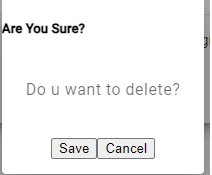
I have below TypeScript & Html but material UI effects are not shown. Simple dialog box is shown
import { Component, Inject } from '@angular/core';
import { MatDialog, MAT_DIALOG_DATA, MatDialogRef, MatDialogActions, MatDialogClose, MatDialogTitle, MatDialogContent, MatDialogModule} from '@angular/material/dialog';
@Component({
  selector: 'app-confirmation-dialog',
  standalone: true,
  imports: [MatDialogModule,MatDialogActions, MatDialogClose,MatDialogTitle,MatDialogContent],
  templateUrl: './confirmation-dialog.component.html',
  styleUrl: './confirmation-dialog.component.css'
})
Are You Sure?
{{message}}
Thanks
Naimish MakwanaPosted Jun 6, 2024, 9:00 AM
It seems like you’re trying to use Angular Material Dialog in your Angular application, but the Material UI effects are not being applied. Here are a few things you could check:
Angular Material Module Import: Make sure you have imported the
MatDialogModulein your module where this component is declared, not in the component itself. Theimportsarray should be in yourNgModule, not in@Component.Styles: Ensure that you have included the Angular Material theme in your styles. You can include it in your
styles.cssorstyles.scssfile at the root of your project like this:You can choose a theme that fits your application from the prebuilt themes.
Animations: Angular Material uses Angular’s animation library to provide smooth animations. Make sure you have added the
BrowserAnimationsModulein your app module. If you don’t want to add animations, you can useNoopAnimationsModuleinstead.Check for Errors: Check your browser’s console for any errors. Sometimes, the Material UI might not work as expected due to some errors or failed dependencies.
Remember, the
MatDialogis a service, so it should be included in theprovidersarray of yourNgModuleor component, and then injected into the constructor of your component, like this:Thanks
Vishal JoshiPosted Jun 6, 2024, 8:37 AM
Hello Ramco,
Please make sure you have exported MatDialogModule in app.module.ts file.
Check the below code in app.module.cs file
Also, Check component file imports the below:
Thanks
Vishal
Jayraj ChhayaPosted Jun 6, 2024, 6:57 AM
To ensure that Angular Material UI effects are displayed properly, make sure to include the necessary Angular Material modules in your Angular application. Check if the Angular Material theme is correctly imported in your styles.scss file. Additionally, confirm that the Angular Material dialog module is imported in your app module.