

XML stands for Extensible markup language. By using XML we can easily retrieve and store data and display the data without using databases in our applications. If we need to display dynamic data in our application it will take time to connect databases and retrieve data from databases but if we use XML to store data we can do operations with xml files directly without using databases. If we store data in database that is incompatible to some of the computer applications but if we store data in XML format it will support all applications. It is independent for all software applications and it is accessible with all applications.
How to create new Xml file.
Step-
- First we use namespace System.Xml;
- XmlDocument xmlDoc = new XmlDocument();
- Create root Node-
- XmlNode rootNode = xmlDoc.CreateElement("Contact");
- Create Sub node-
- XmlNode subNode = xmlDoc.CreateElement("Detail");
- Append root node and sub node-
- xmlDoc.AppendChild(rootNode);
- rootNode.AppendChild(subNode);
- XmlNode userNode = xmlDoc.CreateElement("Name");
- userNode.InnerText = txtName1.Text;
- subNode.AppendChild(userNode);
- xmlDoc.Save(HttpContext.Current.Server.MapPath("~/Upload") + "/" + "ContactPerson.xml");
How to read Xml file
- Namespace for dataset System.Data
- XmlTextReader object use for assign path of physical xml File.
- DataSet ds = new DataSet();
- ds.ReadXml(xmlreader);
- xmlreader.Close();
- Open Visual Studio.
- Click File menu -> click new Website(Name XMlTest)
- Go to solution explorer create XMlDemo.aspx page
Source Code(XMlDemo.aspx)
- <%@ Page Language="C#" AutoEventWireup="true" CodeFile="XMlDemo.aspx.cs" Inherits="XMlDemo" %>
- <!DOCTYPE html PUBLIC "-//W3C//DTD XHTML 1.0 Transitional//EN" "http://www.w3.org/TR/xhtml1/DTD/xhtml1-transitional.dtd">
- <html xmlns="http://www.w3.org/1999/xhtml">
- <head runat="server">
- <title></title>
- </head>
- <body>
- <form id="form1" runat="server">
- <div>
- <table>
- <tr>
- <td style="width: 100px">
- Name:</td>
- <td style="width: 100px">
- <asp:TextBox ID="txtName1" runat="server"></asp:TextBox>
- </td>
- </tr>
- <tr>
- <td style="width: 100px">
- Address:</td>
- <td style="width: 100px">
- <asp:TextBox ID="txtLocation1" runat="server"></asp:TextBox>
- </td>
- </tr>
- <tr>
- <td style="width: 100px">
- Email:</td>
- <td style="width: 100px">
- <asp:TextBox ID="txtEmail1" runat="server"></asp:TextBox>
- </td>
- </tr>
- <tr>
- <td style="width: 100px" valign="top">
- Phone:</td>
- <td style="width: 100px">
- <asp:TextBox ID="txtPhone1" runat="server" TextMode="MultiLine" Height="104px"></asp:TextBox>
- </td>
- </tr>
- <tr>
- <td></td>
- <td>
- <asp:Button ID="btnSubmit" runat="server" OnClick="btnSubmit_Click" Text="Submit" />
- </td>
- </tr>
- </table>
- <br />
- <asp:DataList ID="dlComments" Runat="server" Width="100%">
- <ItemTemplate>
- <hr size=0/> Name:
- <%# DataBinder.Eval(Container.DataItem, "name") %><br /> E-mail:
- <a href="mailto:<%# DataBinder.Eval(Container.DataItem, " email ") %>">
- <%# DataBinder.Eval(Container.DataItem, "email") %>
- </a><br /> Location:
- <%# DataBinder.Eval(Container.DataItem, "Address") %><br /> Email:
- <%# DataBinder.Eval(Container.DataItem, "EMail") %><br /> Phone:
- <%# DataBinder.Eval(Container.DataItem, "Phone") %>
- </ItemTemplate>
- </asp:DataList>
- </div>
- </form>
- </body>
- </html>
- using System;
- using System.Collections.Generic;
- using System.Linq;
- using System.Web;
- using System.Web.UI;
- using System.Web.UI.WebControls;
- using System.Configuration;
- using System.Data;
- using System.Data.SqlClient;
- using System.Xml;
- using System.IO;
- public partial class XMlDemo: System.Web.UI.Page
- {
- public static string constr = ConfigurationManager.ConnectionStrings["ConString"].ConnectionString;
- protected void Page_Load(object sender, EventArgs e)
- {
- if (!IsPostBack)
- {
- if (Directory.Exists(HttpContext.Current.Server.MapPath("~/Upload")))
- BindDatalist();
- }
- }
- protected void btnSubmit_Click(object sender, EventArgs e)
- {
- try
- {
- if (txtName1.Text != "" && txtEmail1.Text != "" && txtPhone1.Text != "" && txtLocation1.Text != "")
- {
- if (!Directory.Exists(HttpContext.Current.Server.MapPath("~/Upload"))) // if not created then it will create it.
- {
- Directory.CreateDirectory(HttpContext.Current.Server.MapPath("~/Upload"));
- XmlDocument xmlDoc = new XmlDocument();
- XmlNode rootNode = xmlDoc.CreateElement("Contact");
- XmlNode subNode = xmlDoc.CreateElement("Detail");
- xmlDoc.AppendChild(rootNode);
- rootNode.AppendChild(subNode);
- XmlNode userNode = xmlDoc.CreateElement("Name");
- userNode.InnerText = txtName1.Text;
- subNode.AppendChild(userNode);
- XmlNode userEmail = xmlDoc.CreateElement("Email");
- userEmail.InnerText = txtEmail1.Text;
- subNode.AppendChild(userEmail);
- XmlNode userPhone = xmlDoc.CreateElement("Phone");
- userPhone.InnerText = txtPhone1.Text;
- subNode.AppendChild(userPhone);
- XmlNode userAddress = xmlDoc.CreateElement("Address");
- userAddress.InnerText = txtLocation1.Text;
- subNode.AppendChild(userAddress);
- xmlDoc.Save(HttpContext.Current.Server.MapPath("~/Upload") + "/" + "ContactPerson.xml");
- BindDatalist();
- }
- else
- {
- string FileName = HttpContext.Current.Server.MapPath("~/Upload") + "/" + "ContactPerson.xml";
- //IDVal=XDocument.Load(HttpContext.Current.Server.MapPath("~/ContactFile") + "/" + "ContactPerson.xml");
- // int Id = (int)(from b in Contact.Descendants ("Detail") orderby (int)b.Element("ID") descending select (int)b.Element("ID")).FirstOrDefault() + 1;
- XmlDocument xmlDoc = new XmlDocument();
- xmlDoc.Load(FileName);
- XmlNode Root = xmlDoc.DocumentElement;
- System.Xml.XmlNode myXmlNode = xmlDoc.DocumentElement.FirstChild;
- XmlElement page = xmlDoc.CreateElement("Detail");
- XmlElement Name = xmlDoc.CreateElement("Name");
- XmlElement Email = xmlDoc.CreateElement("Email");
- XmlElement Phone = xmlDoc.CreateElement("Phone");
- XmlElement Address = xmlDoc.CreateElement("Address");
- XmlText textName = xmlDoc.CreateTextNode(txtName1.Text);
- XmlText txtEmail = xmlDoc.CreateTextNode(txtEmail1.Text);
- XmlText txtPhone = xmlDoc.CreateTextNode(txtPhone1.Text);
- XmlText txtAddress = xmlDoc.CreateTextNode(txtLocation1.Text);
- page.AppendChild(Name);
- page.AppendChild(Email);
- page.AppendChild(Phone);
- page.AppendChild(Address);
- Name.AppendChild(textName);
- Email.AppendChild(txtEmail);
- Phone.AppendChild(txtPhone);
- Address.AppendChild(txtAddress);
- xmlDoc.DocumentElement.InsertBefore(page, myXmlNode);
- xmlDoc.Save(FileName);
- BindDatalist();
- }
- }
- }
- catch (Exception ex)
- {}
- finally
- {
- txtLocation1.Text = "";
- txtPhone1.Text = "";
- txtEmail1.Text = "";
- txtName1.Text = "";
- }
- }
- private void BindDatalist()
- {
- XmlTextReader xmlreader = new XmlTextReader(HttpContext.Current.Server.MapPath("~/Upload") + "/" + "ContactPerson.xml");
- DataSet ds = new DataSet();
- ds.ReadXml(xmlreader);
- xmlreader.Close();
- if (ds.Tables.Count != 0)
- {
- dlComments.DataSource = ds;
- dlComments.DataBind();
- }
- else
- {
- dlComments.DataSource = null;
- dlComments.DataBind();
- }
- }
- }
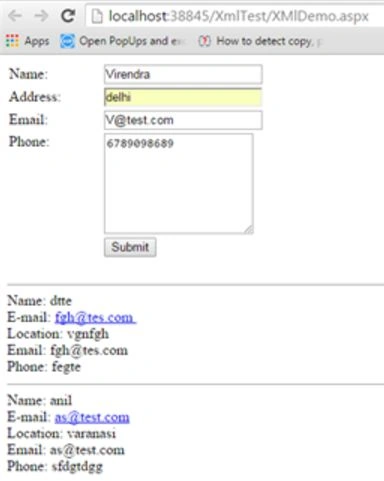
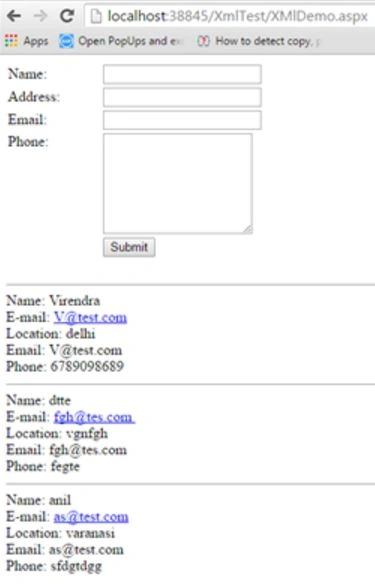
Pradeep SahooPosted May 20, 2016, 7:07 AM
Good one....
Pradeep SahooPosted May 18, 2016, 12:47 PM
Good share..
Bhuvanesh MohankumarPosted May 18, 2016, 7:43 AM
Good one...