

In this post, I have created an example of animation with triggers, This time, we are talking about triggers.
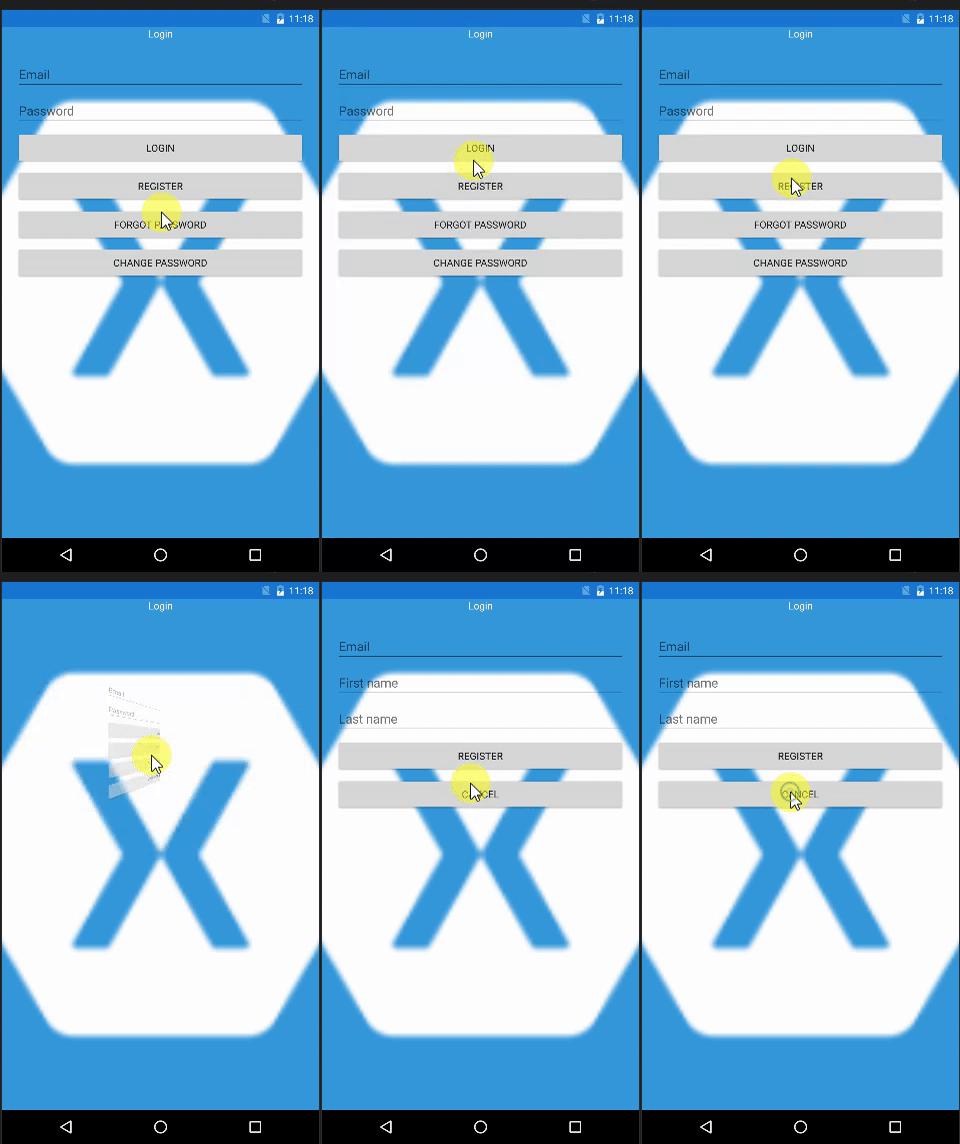
Xamarin.Forms have a powerful class named Trigger. I want to show you stack layout flipping with animation which I have created with Trigger.
First, let us create a folder named Triggers. Then, create a class with the name SwitchLayout.
Then, write the following code in that.
- public class SwitchLayout : TriggerAction<Button>
- {
- public enum AnimationDirection
- { Left, Right }
- protected override async void Invoke(Button sender)
- {
- View Viewhide = null;
- View Viewshow = null;
- if (TargetElement != null)
- {
- // This is For Finding TargetView
- Viewshow = ((View)sender.Parent.Parent).FindByName<View>(TargetElement);
- if (Viewshow != null)
- {
- // This is For Finding SourceView
- if (SourceElement != null)
- {
- Viewhide = ((View)sender.Parent.Parent).FindByName<View>(SourceElement);
- if (Viewhide != null)
- {
- await PerformAnimation(Viewhide, Viewshow);
- }
- }
- }
- }
- }
- public string SourceElement { get; set; }
- public string TargetElement { get; set; }
- public AnimationDirection Direction { get; set; }
- private async Task PerformAnimation(View ViewElementHide, View ViewElementShow)
- {
- int hideStart = 0;
- int hideStop = 0;//if you want to use another rotate animation So you Comment Out and remove 0//(Direction == AnimationDirection.Left ? -90 : 90);
- int showStart = 0;//if you want to use another rotate animation So you Comment Out and remove 0//(Direction == AnimationDirection.Left ? 90 : 270);
- int showStop = 0;//if you want to use another rotate animation So you Comment Out and remove 0//(Direction == AnimationDirection.Left ? 0 : 360);
- await ViewElementHide.RotateYTo(hideStart, 0);
- await ViewElementShow.RotateYTo(showStart, 0);
- await ViewElementShow.ScaleTo(0.2, 0);
- ViewElementShow.IsVisible = true; // This is rotated at 90 or 270 degrees
- // Animate
- ViewElementHide.FadeTo(0.5, 100, Easing.SinOut);
- ViewElementHide.ScaleTo(0.2, 100, Easing.Linear);
- await ViewElementHide.RotateYTo(hideStop, 150, Easing.Linear);
- ViewElementShow.FadeTo(1, 100, Easing.SinIn);
- ViewElementShow.ScaleTo(1, 150, Easing.Linear);
- await ViewElementShow.RotateYTo(showStop, 150, Easing.Linear);
- ViewElementHide.IsVisible = false;
- }
- }
Here is the XAML code.
You need to add the reference like this.
xmlns:triggers="clr-namespace:FlipAnimation.Triggers"
- <ContentPage.Content>
- <Grid>
- <Grid.RowDefinitions>
- <RowDefinition Height="*" />
- </Grid.RowDefinitions>
- <Grid.ColumnDefinitions>
- <ColumnDefinition Width="*" />
- </Grid.ColumnDefinitions>
- <Image Opacity="1"
- Source="icon.png"
- Aspect="AspectFill"/>
- <Grid>
- <Grid.Padding>
- <OnPlatform x:TypeArguments="Thickness">
- <OnPlatform.iOS>
- 0, 20, 0, 0
- </OnPlatform.iOS>
- <OnPlatform.Android>
- 0, 0, 0, 0
- </OnPlatform.Android>
- </OnPlatform>
- </Grid.Padding>
- <Grid.RowDefinitions>
- <RowDefinition Height="Auto" />
- <RowDefinition Height="Auto" />
- <RowDefinition Height="*" />
- </Grid.RowDefinitions>
- <StackLayout Grid.Row="0">
- <Label Text="Login"
- TextColor="White"
- HorizontalTextAlignment="Center" />
- </StackLayout>
- <StackLayout Grid.Row="1">
- <!--If you want to use Loader and Error Message so you can comment out this-->
- <!--<ActivityIndicator x:Name="actInd" IsRunning="False" IsVisible="False" Color="Blue" />
- <Label x:Name="lblBusyMsg" IsVisible="False" Text="My Message" >
- <Label.Font>
- <OnPlatform x:TypeArguments="Font">
- <OnPlatform.iOS>Small</OnPlatform.iOS>
- </OnPlatform>
- </Label.Font>
- </Label>
- <Label x:Name="labelErrorMessage" IsVisible="False" Text="MY Message" TextColor="Red">
- <Label.Font>
- <OnPlatform x:TypeArguments="Font">
- <OnPlatform.iOS>Small</OnPlatform.iOS>
- </OnPlatform>
- </Label.Font>
- </Label>-->
- </StackLayout>
- <StackLayout x:Name="stLog"
- Grid.Row="1" Grid.Column="0"
- IsVisible="True"
- Padding="20,20,20,20"
- >
- <Entry Placeholder="Email" Text="" />
- <Entry Placeholder="Password" Text=""
- IsPassword="True" />
- <Button Text="Login" Clicked="Login_Clicked" />
- <Button Text="Register" >
- <Button.Triggers>
- <EventTrigger Event="Clicked">
- <triggers:SwitchLayout SourceElement="stLog" TargetElement="stReg" Direction="Right" />
- </EventTrigger>
- </Button.Triggers>
- </Button>
- <Button Text="Forgot Password">
- <Button.Triggers>
- <EventTrigger Event="Clicked">
- <triggers:SwitchLayout SourceElement="stLog" TargetElement="stForgotPass" Direction="Right" />
- </EventTrigger>
- </Button.Triggers>
- </Button>
- <Button Text="Change Password">
- <Button.Triggers>
- <EventTrigger Event="Clicked">
- <triggers:SwitchLayout SourceElement="stLog" TargetElement="stChangePass" Direction="Right" />
- </EventTrigger>
- </Button.Triggers>
- </Button>
- </StackLayout>
- <StackLayout x:Name="stReg" Grid.Row="1" Grid.Column="0" IsVisible="False" Padding="20" >
- <Entry Placeholder="Email" Text="" />
- <Entry Placeholder="First name" Text="" />
- <Entry Placeholder="Last name" Text="" />
- <Button Text="Register" Clicked="Register_Clicked" />
- <Button Text="Cancel">
- <Button.Triggers>
- <EventTrigger Event="Clicked">
- <triggers:SwitchLayout SourceElement="stReg" TargetElement="stLog" Direction="Left" />
- </EventTrigger>
- </Button.Triggers>
- </Button>
- </StackLayout>
- <StackLayout x:Name="stForgotPass" Grid.Row="1" Grid.Column="0" IsVisible="False" Padding="20" >
- <Entry Placeholder="Email"
- Text="" />
- <Button Text="Send email" Clicked="ForgetPass_Clicked"/>
- <Button Text="Cancel">
- <Button.Triggers>
- <EventTrigger Event="Clicked">
- <triggers:SwitchLayout SourceElement="stForgotPass" TargetElement="stLog" Direction="Left" />
- </EventTrigger>
- </Button.Triggers>
- </Button>
- </StackLayout>
- <StackLayout x:Name="stChangePass" Grid.Row="1" Grid.Column="0" IsVisible="False" Padding="20" >
- <Entry Placeholder="Old password"
- IsPassword="True" />
- <Entry Placeholder="New password" IsPassword="True" />
- <Entry Placeholder="Confirm password" IsPassword="True" />
- <Button Text="OK" Clicked="ChangePass_Clicked"/>
- <Button Text="Cancel">
- <Button.Triggers>
- <EventTrigger Event="Clicked">
- <triggers:SwitchLayout SourceElement="stChangePass" TargetElement="stLog" Direction="Left" />
- </EventTrigger>
- </Button.Triggers>
- </Button>
- </StackLayout>
- </Grid>
- </Grid>
- </ContentPage.Content>
If you want to watch this demo video, click here.
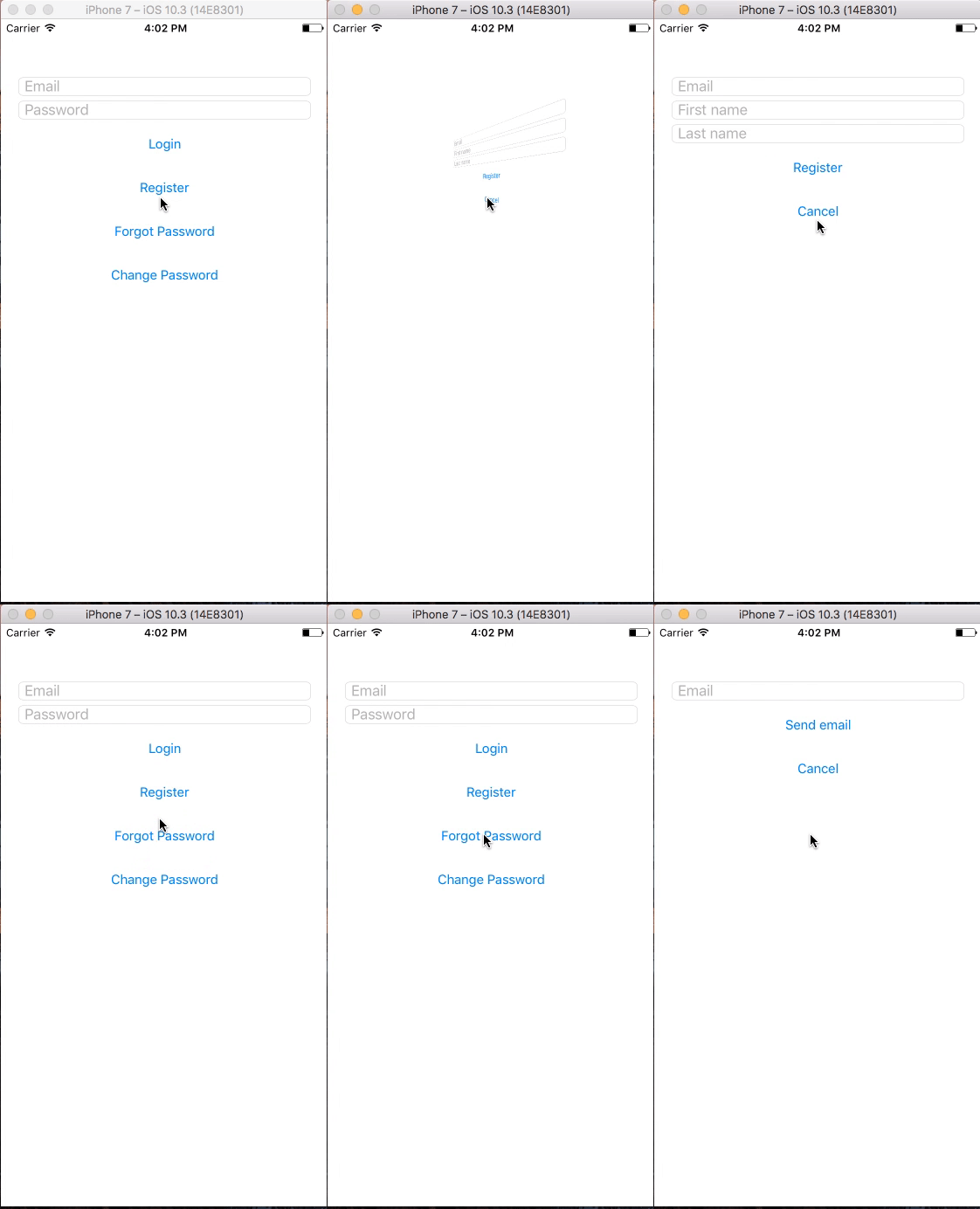
For complete source code, click here
Join the conversation! Your thoughts help the community grow.