

This blog demonstrates how to create an application to generate random number encrypted passwords. We will create one Windows Form application in C# which generates a unique encrypted password.
So, let's open Visual Studio and follow these steps.
Step 1
Open Visual Studio.
Step 2
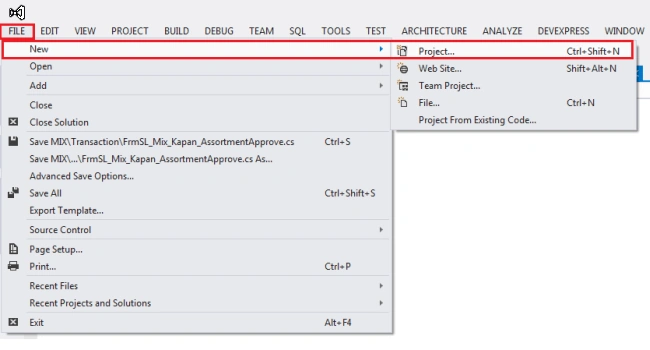
Go to File >> New >> Project.
Step 3
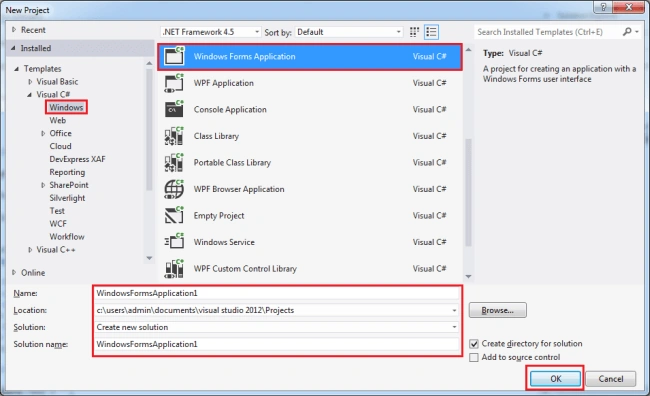
Now, choose Visual C# and select Windows. Then, select Windows Forms Application. Now, you can give your application name and click on OK button.
Step 4
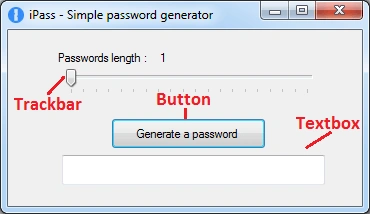
Design the form like this.
Step 5
Create one static method with the name "Shuffle" in code-behind.
This Shuffle method returns a string parameter with the position changed for all the characters.
- static string Shuffle(string input) {
- var q = from c in input.ToCharArray()
- orderby Guid.NewGuid()
- select c;
- string s = string.Empty;
- foreach(var r in q)
- s += r;
- return s;
- }
Step 6
Now, write the following code in ValueChanged event of Tickbar control.
- private void trckbar_length_ValueChanged(object sender, EventArgs e) {
- passLength = trckbar_length.Value + 1; //trackbar value starts from 0, so I add +1 to make it understandable;
- lbl_passlength.Text = passLength.ToString();
- }
Step 7
After this, write the following code in click event of the "Generate password" button.
- private void btn_generatepass_Click(object sender, EventArgs e)
- {
- txb_password.Text = "";
- string text = "aAbBcCdDeEfFgGhHiIjJhHkKlLmMnNoOpPqQrRsStTuUvVwWxXyYzZ01234567890123456789,;:!*$@-_=,;:!*$@-_=";
- text = Shuffle(text); //shuffle the above symbols using shuffle() method.
- text = text.Remove(passLength); //cut the string size according to the chosen trackbar value.
- txb_password.Text = text;
- }
Now, let's write full C# code, so you can understand it very well.
C# Code
- using System;
- using System.Collections.Generic;
- using System.ComponentModel;
- using System.Data;
- using System.Drawing;
- using System.Linq;
- using System.Text;
- using System.Threading.Tasks;
- using System.Windows.Forms;
- namespace iPass {
- public partial class MainForm: Form {
- int passLength = 0;
- public MainForm() {
- InitializeComponent();
- }
- //Shuffle method that returns a string parameter with all the characters' position changed.
- static string Shuffle(string input) {
- var q = from c in input.ToCharArray()
- orderby Guid.NewGuid()
- select c;
- string s = string.Empty;
- foreach(var r in q)
- s += r;
- return s;
- }
- private void btn_generatepass_Click(object sender, EventArgs e) {
- txb_password.Text = "";
- string text = "aAbBcCdDeEfFgGhHiIjJhHkKlLmMnNoOpPqQrRsStTuUvVwWxXyYzZ01234567890123456789,;:!*$@-_=,;:!*$@-_=";
- text = Shuffle(text); //shuffle the above symbols using shuffle() method.
- text = text.Remove(passLength); //cut the string size according to the chosen trackbar value.
- txb_password.Text = text;
- }
- private void trckbar_length_ValueChanged(object sender, EventArgs e) {
- passLength = trckbar_length.Value + 1; //trackbar value starts from 0, so I add +1 to make it understandable;
- lbl_passlength.Text = passLength.ToString();
- }
- }
- }
Step 8
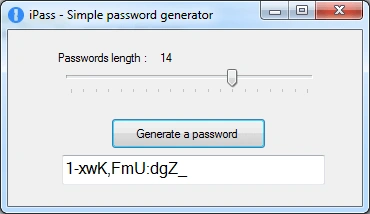
Run this project.
Summary
This Password Generator will generate a unique random password using characters, letters, numbers, and special characters so it can't be decrypted easily.
Frederik WennerstrømPosted Aug 20, 2020, 4:26 PM
Are these 100% unique?
Samyak NilPosted Jun 2, 2018, 6:29 AM
What is txb_password , lbl_password, trcbar_length