

In C#, a thread serves as the smallest unit of execution within a process. It functions as a pathway through a program's code and has the ability to run independently, enabling concurrent execution of multiple tasks. Threads play a vital role in allowing applications to perform multiple operations simultaneously, thereby enhancing performance and responsiveness.
Key aspects to consider regarding threads in C#
Here are several key aspects to consider regarding threads in C#:
- Multithreading: C# provides support for multithreading, enabling programs to have multiple threads executing concurrently. Each thread operates independently, possessing its own stack and instruction pointer. This allows for parallel execution of tasks.
- Creation: Threads in C# can be created using various methods. The `Thread` class from the `System.Threading` namespace allows for manual creation and management of threads. Alternatively, constructs such as the `Task` class or asynchronous methods (`async` and `await` keywords) offer more convenient and high-level threading operations.
- Execution: Once a thread is created, it can be initiated by invoking its `Start` method. The runtime system schedules the thread for execution, and it begins running its designated code. Threads can execute any valid C# code, including method calls, loops, and conditional statements.
- Synchronization: When multiple threads access shared resources concurrently, synchronization mechanisms become necessary to ensure data consistency and prevent race conditions. C# provides various synchronization primitives, such as locks (`lock` keyword), monitors (`Monitor` class), mutexes (`Mutex` class), semaphores (`Semaphore` class), and events (`ManualResetEvent`, `AutoResetEvent`), to coordinate access to shared resources among threads.
- Termination: Threads can terminate either upon completing their execution or by explicitly invoking the `Abort` method. Proper management of thread termination is crucial to prevent resource leaks and ensure the stability of the application.
- Threading Models: C# supports both foreground and background threads.
An "autoreset" thread in C# commonly involves the utilization of synchronization primitives such as AutoResetEvent or ManualResetEvent to synchronize the execution of threads. These synchronization primitives enable threads to communicate with each other and regulate their execution flow.
Implement an "autoreset" thread
You can follow these steps to implement an "autoreset" thread using AutoResetEvent.
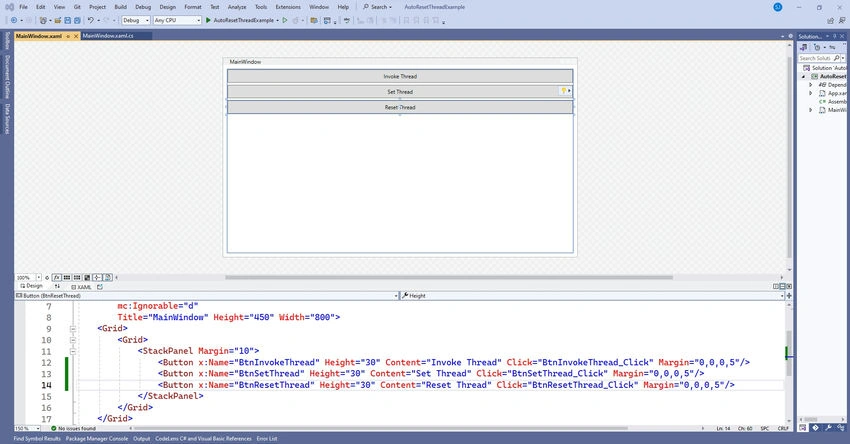
Step 1. Xaml View
<Window x:Class="AutoResetThreadExample.MainWindow"
        xmlns="http://schemas.microsoft.com/winfx/2006/xaml/presentation"
        xmlns:x="http://schemas.microsoft.com/winfx/2006/xaml"
        xmlns:d="http://schemas.microsoft.com/expression/blend/2008"
        xmlns:mc="http://schemas.openxmlformats.org/markup-compatibility/2006"
        xmlns:local="clr-namespace:AutoResetThreadExample"
        mc:Ignorable="d"
        Title="MainWindow" Height="450" Width="800">
    <Grid>
        <StackPanel Margin="10">
            <Button x:Name="BtnInvokeThread" Content="Invoke Thread" Click="BtnInvokeThread_Click" Margin="0,0,0,5"/>
            <Button x:Name="BtnSetThread" Content="Set Thread" Click="BtnSetThread_Click" Margin="0,0,0,5"/>
            <Button x:Name="BtnResetThread" Content="Reset Thread" Click="BtnResetThread_Click" Margin="0,0,0,5"/>
        </StackPanel>
    </Grid>
</Window>
Step 2. Backend code
using System;
using System.Threading;
using System.Windows;

namespace AutoResetThreadExample
{
    public partial class MainWindow : Window
    {
        AutoResetEvent autoResetThreadEvent = new AutoResetEvent(false);
        bool shouldStop = false;
        Thread thread;

        public MainWindow()
        {
            InitializeComponent();
        }

        private void WorkerThread()
        {
            while (autoResetThreadEvent.WaitOne())   // Wait for signal to proceed or timeout (here, we wait indefinitely)
            {
                Console.WriteLine("Thread is running...");
                autoResetThreadEvent.Reset();

                // Perform some work here

                Console.WriteLine("Thread woke up!");
            }
        }

        private void BtnInvokeThread_Click(object sender, RoutedEventArgs e)
        {
            thread = new Thread(WorkerThread);
            thread.Start();
        }

        private void BtnSetThread_Click(object sender, RoutedEventArgs e)
        {
            // Signal the AutoResetEvent to wake up the thread
            autoResetThreadEvent.Set();
        }

        private void BtnResetThread_Click(object sender, RoutedEventArgs e)
        {
            // Reset the AutoResetEvent so that subsequent WaitOne calls will block
            autoResetThreadEvent.Reset();
        }
    }
}
Let's analyze the significant sections of the code:
1. Using Directive: using System.Windows
- This directive imports the `System. Windows` namespace, which encompasses types related to Windows-based applications. It includes the `Window` class utilized for creating WPF windows.
2. Namespace and Class
- namespace AutoResetThreadExample { ... }`: Defines a namespace named `AutoResetThreadExample`.
- public partial class MainWindow: Window { ... }`: Defines a partial class named `MainWindow`, which represents the main window of the WPF application. It inherits from the `Window` class provided by WPF.
3. Fields
- AutoResetEvent autoResetThreadEvent = new AutoResetEvent(false);`: Declares an `AutoResetEvent` named `autoResetThreadEvent` initialized with `false`. This event is employed for signaling between threads.
- bool shouldStop = false;`: Declares a boolean flag named `shouldStop`, which is not utilized in this example.
- Thread thread;`: Declares a field to hold a reference to a `Thread` object.
4. Constructor
- public MainWindow() { ... }`: Constructor for the `MainWindow` class. It initializes the main window of the application and calls the `InitializeComponent()` method, which is typically auto-generated by the WPF designer.
5. WorkerThread Method
- private void WorkerThread() { ... }`: This method represents the entry point of the worker thread. It runs in a loop, waiting for the `autoResetThreadEvent` to be signaled using `WaitOne()`. When signaled, it performs some work and then waits again.
6. Event Handlers
- private void BtnInvokeThread_Click(object sender, RoutedEventArgs e) { ... }`: Event handler for the button click event. It initiates a new thread by creating an instance of the `Thread` class and passing the `WorkerThread` method as a parameter to its constructor.
Join the conversation! Your thoughts help the community grow.