

Basically cursor is a mouse pointer. Mouse Pointer means "a point which is controlled by the mouse". Cursor is a indicator which is handled by the mouse on the computer screen. By default cursor shapes like as arrow, but we can make the user defined cursor according to our choice.
How to make user defined cursor
Open visual studio--->WindowsFormsApplication(c#)--->go on solution explorer--->WindowsFormsApplication1--->right click--->add--->new item.
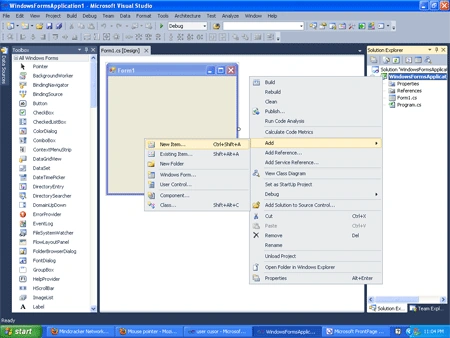
Then choose cursor file--->add.
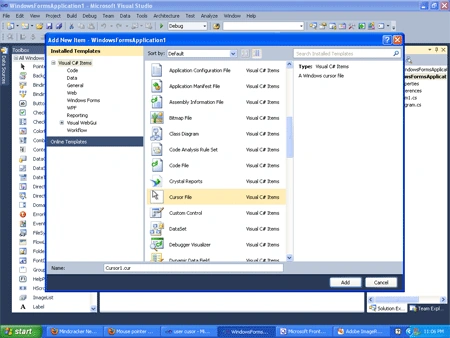
Now one can make cursor according to our choice (likes below image)--->save file.
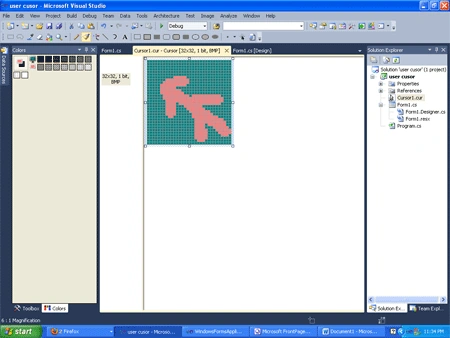
Then coding on form load
using System;
using System.Collections.Generic;
using System.ComponentModel;
using System.Data;
using System.Drawing;
using System.Linq;
using System.Text;
using System.Windows.Forms;
namespace user_cusor
{
public partial class Form1 : Form
{
public Form1()
{
InitializeComponent();
}
}
private void Form1_Load(object sender, EventArgs e)
{
this.Cursor=new Cursor("e:\\cursor1.cur");
}
}
}
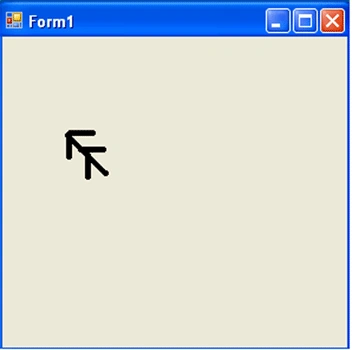
Output
Run the application (press F5).
Join the conversation! Your thoughts help the community grow.