
Let us see the steps on how to perform this task in android .Create new project with a valid name, once everything ready our projects looks like below screen.
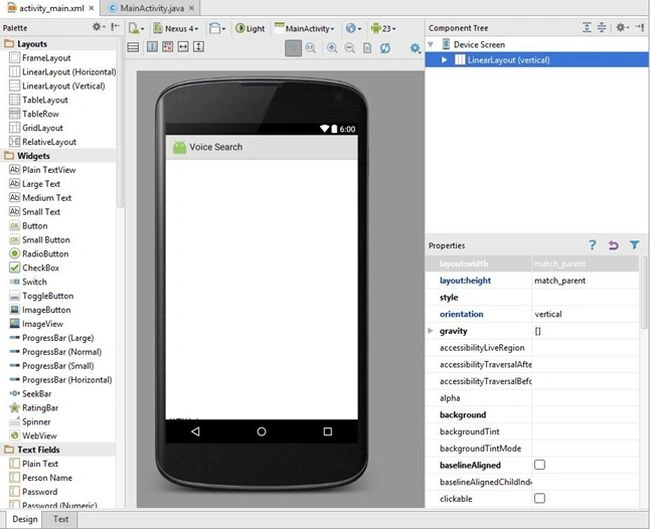
App->res->layout->activity_main.xml
- <LinearLayout
- xmlns:android="http://schemas.android.com/apk/res/android"
- xmlns:tools="http://schemas.android.com/tools" android:layout_width="match_parent" android:layout_height="match_parent" android:orientation="vertical" >
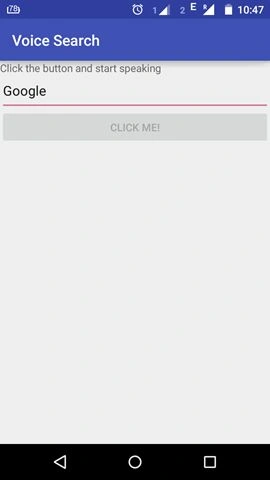
- <TextView android:id="@+id/textView1" android:layout_width="fill_parent" android:layout_height="wrap_content" android:paddingBottom="4dip" android:text="Click the button and start speaking" />
- <EditText android:id="@+id/editText1" android:layout_width="match_parent" android:layout_height="wrap_content" android:ems="10" >
- <requestFocus/>
- </EditText>
- <Button android:id="@+id/speakButton" android:layout_width="fill_parent" android:onClick="speakButtonClicked" android:layout_height="wrap_content" android:text="Click Me!" />
- </LinearLayout>
- package com.example.pavithra.voicesearch;
- import android.content.Intent;
- import android.content.pm.PackageManager;
- import android.content.pm.ResolveInfo;
- import android.speech.RecognizerIntent;
- import android.support.v7.app.AppCompatActivity;
- import android.os.Bundle;
- import android.text.Editable;
- import android.text.TextWatcher;
- import android.view.View;
- import android.widget.AdapterView;
- import android.widget.ArrayAdapter;
- import android.widget.Button;
- import android.widget.EditText;
- import android.widget.ListView;
- import android.widget.TextView;
- import android.widget.Toast;
- import java.util.ArrayList;
- import java.util.List;
- public class MainActivity extends AppCompatActivity
- {
- EditText ed;
- TextView tv;
- private static final int REQUEST_CODE = 1234;
- Button speak;@
- Override
- protected void onCreate(Bundle savedInstanceState)
- {
- super.onCreate(savedInstanceState);
- setContentView(R.layout.activity_main);
- final Button speak = (Button) findViewById(R.id.speakButton);
- ed = (EditText) this.findViewById(R.id.editText1);
- tv = (TextView) this.findViewById(R.id.textView1);
- // Disable button if no recognition service is present
- PackageManager pm = getPackageManager();
- List < ResolveInfo > activities = pm.queryIntentActivities(new Intent(RecognizerIntent.ACTION_RECOGNIZE_SPEECH), 0);
- if (activities.size() == 0)
- {
- speak.setEnabled(false);
- speak.setText("Recognizer not present");
- }
- ed.addTextChangedListener(new TextWatcher()
- {@
- Override
- public void beforeTextChanged(CharSequence s, int start, int count, int after)
- {
- // TODO Auto-generated method stub
- }@
- Override
- public void onTextChanged(CharSequence s, int start, int before, int count)
- {
- // TODO Auto-generated method stub
- }@
- Override
- public void afterTextChanged(Editable s)
- {
- // TODO Auto-generated method stub
- speak.setEnabled(false);
- }
- });
- }
- /**
- * Handle the action of the button being clicked
- */
- public void speakButtonClicked(View v)
- {
- startVoiceRecognitionActivity();
- }
- /**
- * Fire an intent to start the voice recognition activity.
- */
- private void startVoiceRecognitionActivity()
- {
- Intent intent = new Intent(RecognizerIntent.ACTION_RECOGNIZE_SPEECH);
- intent.putExtra(RecognizerIntent.EXTRA_LANGUAGE_MODEL, RecognizerIntent.LANGUAGE_MODEL_FREE_FORM);
- intent.putExtra(RecognizerIntent.EXTRA_PROMPT, "Voice searching...");
- startActivityForResult(intent, REQUEST_CODE);
- }
- /**
- * Handle the results from the voice recognition activity.
- */
- @
- Override
- protected void onActivityResult(int requestCode, int resultCode, Intent data)
- {
- if (requestCode == REQUEST_CODE && resultCode == RESULT_OK)
- {
- // Populate the wordsList with the String values the recognition engine thought it heard
- final ArrayList < String > matches = data.getStringArrayListExtra(RecognizerIntent.EXTRA_RESULTS);
- if (!matches.isEmpty())
- {
- String Query = matches.get(0);
- ed.setText(Query);
- speak.setEnabled(false);
- }
- }
- super.onActivityResult(requestCode, resultCode, data);
- }
- }
Santhakumar MunuswamyPosted Nov 22, 2015, 11:15 AM
Good one
Suresh MPosted Oct 29, 2015, 12:41 AM
Nice
Nivetha GPosted Oct 27, 2015, 9:54 AM
Its good
Vinodh NarayananPosted Oct 26, 2015, 7:57 AM
good one thanks for sharing