

Today, we will learn how to update a table using Join in SQL Server. We have two tables - Bank and SwitCode.
Bank Table
Given below is the script for creating the Bank table.
- CREATE TABLE [dbo].[Bank](
- [id] [int] NOT NULL,
- [BankName] [nvarchar](50) NULL,
- [SwitCode] [nvarchar](50) NULL,
- CONSTRAINT [PK_Bank] PRIMARY KEY CLUSTERED
- (
- [id] ASC
- )WITH (PAD_INDEX = OFF, STATISTICS_NORECOMPUTE = OFF, IGNORE_DUP_KEY = OFF, ALLOW_ROW_LOCKS = ON, ALLOW_PAGE_LOCKS = ON) ON [PRIMARY]
- ) ON [PRIMARY]
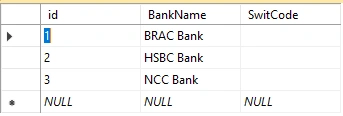
Fig: Bank table with data
SwitCode Table
Following is the script for creating the SwitCode table.
- CREATE TABLE [dbo].[SwitCode](
- [id] [int] NOT NULL,
- [Bank_id] [int] NOT NULL,
- [Code] [nvarchar](50) NULL,
- CONSTRAINT [PK_SwiftCode] PRIMARY KEY CLUSTERED
- (
- [id] ASC
- )WITH (PAD_INDEX = OFF, STATISTICS_NORECOMPUTE = OFF, IGNORE_DUP_KEY = OFF, ALLOW_ROW_LOCKS = ON, ALLOW_PAGE_LOCKS = ON) ON [PRIMARY]
- ) ON [PRIMARY]
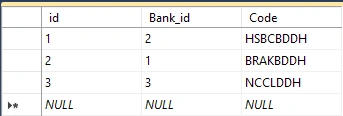
Fig: SwitCode table with data.
Condition
SwitCode has to update from SwitCode table using Bank_id.
Below is the query.
- UPDATE T
- SET T.SwitCode=SC.Code
- FROM Bank T
- INNER JOIN SwitCode SC ON SC.Bank_id=T.id
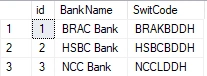
After executing the above query, we will get the desired output.
Dharmendra Kumar PanditPosted Aug 21, 2019, 1:20 AM
Thank you sir. It's so simple to understand......
Vivek BhandariPosted Mar 19, 2019, 3:56 AM
Worked perfectly for me.UPDATE TABLE_A a INNER JOIN TABLE_B b ON a.col1 = b.col2 SET a.col_which_you_want_update = b.col_from_which_you_update;
Hadshana KamalanathanPosted Jul 16, 2018, 8:14 PM
Thank you for sharing