

Introduction
In today’s digital age, securing user passwords is essential to protect against data breaches and unauthorized access. Two fundamental concepts used to achieve this are salt and hash. This blog will provide a brief overview of these concepts, explain why they are important, and show how to implement them using C#.

What is a Salt?
A salt is a randomly generated value that is added to a password before hashing it. It ensures that even if two users have the same password, their stored hashes will be different. This prevents attackers from using precomputed hash tables (also known as rainbow tables) to crack passwords.
Key Points of Salt
Unique for every password.
Randomly generated for each password entry.
It is stored alongside the hash but doesn’t need to be secret.
C# Example of Salt Generation
public static byte[] GenerateSalt(int length = 32)
{
    byte[] salt = new byte[length];
    using (var rng = new RNGCryptoServiceProvider())
    {
        rng.GetBytes(salt); // Fills salt array with random bytes
    }
    return salt;
}
What is a Hash?
A hash is the result of passing the salted password through a cryptographic algorithm. Hashing is one-way, meaning it cannot be reversed to retrieve the original password. This is why hashing is preferred for storing passwords securely.
Key Points of Hash
Irreversible: You can't get the original password back from the hash.
Consistent: The same input always produces the same output.
Combination with salt: Used in combination with salt to store passwords securely.
C# Example of Password Hashing
public static byte[] HashPassword(string password, byte[] salt, int iterations = 10000, int hashLength = 32)
{
    using (var rfc2898 = new Rfc2898DeriveBytes(password, salt, iterations, HashAlgorithmName.SHA256))
    {
        return rfc2898.GetBytes(hashLength); // Returns hashed password
    }
}
How do Salt and Hash Work Together?
The combination of salt and hash provides a robust mechanism for securing passwords. Here's the process:
Generate a Salt: A unique salt is generated for the password.
Hash the Password with the Salt: The password is hashed using the generated salt.
Store Both: Both the salt and the hash are stored securely (usually in a database).
C# Example of Storing and Verifying a Password
public static (string storedSalt, string storedHash) StorePassword(string plainPassword)
{
    // Step 1: Generate a salt
    byte[] salt = GenerateSalt();

    // Step 2: Hash the password with the salt
    byte[] hashedPassword = HashPassword(plainPassword, salt);

    // Step 3: Convert to Base64 for storage
    string storedSalt = Convert.ToBase64String(salt);
    string storedHash = Convert.ToBase64String(hashedPassword);

    // In practice, store the salt and hashed password in a database
    return (storedSalt, storedHash);
}

public static bool VerifyPassword(string enteredPassword, string storedSalt, string storedHash)
{
    // Convert stored salt and hash back to byte arrays
    byte[] salt = Convert.FromBase64String(storedSalt);
    byte[] hash = Convert.FromBase64String(storedHash);

    // Hash the entered password with the same salt
    byte[] enteredPasswordHash = HashPassword(enteredPassword, salt);

    // Compare the hashes (constant-time comparison)
    return AreHashesEqual(enteredPasswordHash, hash);
}

private static bool AreHashesEqual(byte[] hash1, byte[] hash2)
{
    if (hash1.Length != hash2.Length) return false;
    int result = 0;
    for (int i = 0; i < hash1.Length; i++)
    {
        result |= hash1[i] ^ hash2[i];
    }
    return result == 0;
}
Complete Workflow
Storing the Password
When a user sets or changes their password, generate a salt and hash the password with it.
Store both the salt and the hashed password in the database.
Verifying the Password
When the user logs in, retrieve the stored salt and hash from the database.
Hash the entered password with the same salt.
Compare the newly generated hash with the stored hash. If they match, the password is correct.
Full Code Example
using System;
using System.Security.Cryptography;
using System.Xml.Linq;

namespace SecurePasswordStoragePOC
{
    class Program
    {
        static void Main(string[] args)
        {
            string password = "password@123";
            string filePath = "PasswordData.xml";

            // Store password in XML
            StorePasswordToXml(password, filePath);
            Console.WriteLine("Password stored successfully.\n");

            // Check the password
            bool isPasswordCorrect = CheckPasswordFromXml(password, filePath);

            Console.WriteLine($"Password: {password}");
            Console.WriteLine($"Is Password Correct: {isPasswordCorrect}");

            Console.ReadLine();
        }

        // Store password in XML
        public static void StorePasswordToXml(string plainPassword, string filePath)
        {
            // Generate salt
            byte[] salt = PasswordSecurity.GenerateSalt();
            // Hash the password
            byte[] hashedPassword = PasswordSecurity.HashPassword(plainPassword, salt);

            // Convert to Base64 for easy storage
            string saltBase64 = Convert.ToBase64String(salt);
            string hashedPasswordBase64 = Convert.ToBase64String(hashedPassword);

            // Create XML data
            XElement passwordData = new XElement("PasswordData",
                new XElement("Salt", saltBase64),
                new XElement("HashedPassword", hashedPasswordBase64));

            // Save the XML data to a file
            passwordData.Save(filePath);
            Console.WriteLine("Password data saved to XML file.");
        }

        // Check password from XML file
        public static bool CheckPasswordFromXml(string enteredPassword, string filePath)
        {
            // Load the XML file
            XElement passwordData = XElement.Load(filePath);

            // Retrieve the stored salt and hashed password from XML
            string saltBase64 = passwordData.Element("Salt").Value;
            string storedHashBase64 = passwordData.Element("HashedPassword").Value;

            // Convert Base64 strings back to byte arrays
            byte[] storedSalt = Convert.FromBase64String(saltBase64);
            byte[] storedHash = Convert.FromBase64String(storedHashBase64);

            // Verify the entered password
            return PasswordSecurity.VerifyPassword(enteredPassword, storedHash, storedSalt);
        }
    }
    public static class PasswordSecurity
    {
        // Generate a random salt
        public static byte[] GenerateSalt(int length = 32)
        {
            var salt = new byte[length];
            using (var rng = new RNGCryptoServiceProvider())
            {
                rng.GetBytes(salt); // Fill the salt array with cryptographically strong random bytes
            }
            return salt;
        }

        // Hash the password using PBKDF2 with SHA-256
        public static byte[] HashPassword(string password, byte[] salt, int iterations = 10000, int hashLength = 32)
        {
            using (var rfc2898 = new Rfc2898DeriveBytes(password, salt, iterations, HashAlgorithmName.SHA256))
            {
                return rfc2898.GetBytes(hashLength); // Return the hashed password
            }
        }

        // Verify the password by hashing the input and comparing with stored hash
        public static bool VerifyPassword(string enteredPassword, byte[] storedHash, byte[] storedSalt, int iterations = 10000)
        {
            byte[] enteredPasswordHash = HashPassword(enteredPassword, storedSalt, iterations);
            return AreHashesEqual(enteredPasswordHash, storedHash);
        }

        // Constant-time comparison of two hashes to prevent timing attacks
        private static bool AreHashesEqual(byte[] hash1, byte[] hash2)
        {
            if (hash1.Length != hash2.Length) return false;
            int result = 0;
            for (int i = 0; i < hash1.Length; i++)
            {
                result |= hash1[i] ^ hash2[i];
            }
            return result == 0;
        }
    }
}
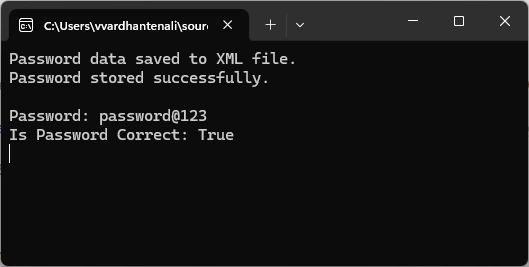
Console Output
Explanation of code example
StorePasswordToXml: This method will create or update an XML file (PasswordData.xml) with the stored password's salt and hashed value.
CheckPasswordFromXml: This method reads the XML file, retrieves the stored salt and hash, hashes the provided password, and compares it with the stored hash. If they match, it returns True; otherwise, it is false.
Summary
Salt: A unique random value added to a password before hashing, ensuring uniqueness even for identical passwords.
Hash: A one-way cryptographic function that transforms data into a fixed-size string, used for securely storing passwords.
Purpose: Together, salt and hash protect against brute-force attacks and rainbow table attacks and make password storage more secure.
By using this method, you can ensure that your application’s password storage is safe, even in the event of a breach.
Join the conversation! Your thoughts help the community grow.