

In this blog, I'm going to develop a small POC in React using React-Dom-Router. Routing becomes very important as an application grows, especially for handling the navigation from one component to another. I will be covering the basics using Stateful and Stateless components.
Follow the below npm commands.
- npm install -g create-react-app // To install react library for React development
- npx create-react-app my-app_Demo //create new react application
- npm install --save react-router-dom // router comes in different package
Let's import the route-related class.
- import { BrowserRouter as Router, NavLink, Route, Switch } from 'react-router-dom';
BrowserRouter
It's like a parent React component which keeps an eye on the URL changes.
- <Router>
- <NavLink>Your Code goes here</NavLink>
- <Route path="/blog" exact strict component={Blog} />
- lt;/Router>
Route
Based on the URL passed by the parent, it will render other component as per as its matching component.
- <Route path="/blog" exact strict component={Blog} />
NavLink
It's just a new version of <Link>. To use an active route class, we commonly use NavLink.
- <NavLink to="/about" className="nav-link" exact activeStyle={{ color: "black" }} >
It's a simple navigation button; on click of this link, it will redirect to the "/about" component.
exact
This means the URL should be "localhost:3000/about". If you don't put the exact one, it can throw an error. If http://localhost:3000/ is used, it will match "/" and render the Home component as well.
Note
Use exact only when there are no nested routes for the specified path. Here's the complete code.
- import React, { Component } from "react";
- import "./App.css";
- import { BrowserRouter as Router, NavLink, Route , Switch } from "react-router-dom";
- import Contact from "./Contact";
- import Blog from "./blogs";
- import App2 from './RouterPara';
- import UrlPara from './UrlPara';
- class App extends Component {
- render() {
- return (
- <Router>
- <div className="App">
- <nav className="navbar navbar-expand-lg navbar-light bg-light navbar-static-top">
- {/* <a className="navbar-brand" href="https://rajendrataradale.wordpress.com/author/rajendrataradale/">
- RT's Knowledge World
- </a> */}
- <NavLink to="/" className="navbar-brand" exact activeStyle={{ color: "black" }}>
- RT's Knowledge World
- </NavLink>
- <button className="navbar-toggler" type="button" data-toggle="collapse" data-target="#navbarNav" aria-controls="navbarNav" aria-expanded="false" aria-label="Toggle navigation">
- <span className="navbar-toggler-icon" />
- </button>
- <div className="collapse navbar-collapse" id="navbarNav">
- <ul className="navbar-nav">
- <li className="nav-item active">
- <NavLink to="/" className="nav-link" exact activeStyle={{ color: "black" }}>
- Home
- </NavLink>
- </li>
- <li className="nav-item">
- <NavLink to="/about" className="nav-link" exact activeStyle={{ color: "black" }}>
- About
- </NavLink>
- </li>
- <li className="nav-item">
- <NavLink to="/blog" className="nav-link" exact activeStyle={{ color: "black" }}>
- Blogs
- </NavLink>
- </li>
- <li className="nav-item">
- <NavLink to="/contact" className="nav-link" exact activeStyle={{ color: "black" }}>
- Site Admin
- </NavLink>
- </li>
- <li className="nav-item">
- <NavLink to="/data" className="nav-link" exact activeStyle={{ color: "black" }}>
- Test Data
- </NavLink>
- </li>
- <li className="nav-item">
- <NavLink to="/urlpara/255066" className="nav-link" exact activeStyle= {{ color: "black" }}>
- Test URL Parameters
- </NavLink>
- </li>
- </ul>
- </div>
- </nav>
- <hr className="my-4" />
- <div>
- <Switch>
- <Route path="/" exact strict render={()=> { return (
- <div className="jumbotron container row">
- <h1 className="display-4">Welcome Home!</h1>
- <p className="lead">
- Unless you try to do something beyond what you have already mastered, you will never grow
- </p>
- <hr className="my-4" />
- <p>
- Sometimes it’s necessary to go a long distance out of the way in order to come back a short distance correctly.
- </p>
- <br />
- <a className="btn btn-primary btn-lg" href="https://rajendrataradale.wordpress.com/author/rajendrataradale/" role="button">
- Learn more
- </a>
- </div>
- ); }} />
- <Route path="/about" exact strict render={()=> { return (
- <div className="card">
- <div className="card-header">Rajendra Taradale</div>
- <div className="card-body">
- <blockquote className="blockquote mb-0">
- <p>
- Over 8 Years of experience in IT Industry. Hands-on experience in all phases of Software Development Life Cycle (SDLC) in Web and Windows Applications under Agile Framework (Scrum, Kanban, and SAFe-Scaled)
- </p>
- <footer className="blockquote-footer">
- Welcome
- <cite title="Source Title">
- RT's Knowledge World
- </cite>
- </footer>
- </blockquote>
- </div>
- </div>
- ); }} />
- <Route path="/blog" exact strict component={Blog} />
- <Route path="/contact" exact strict component={Contact} />
- <Route path="/data" exact strict component={App2} />
- <Route path="/urlpara/:id" exact strict component={UrlPara} />
- </Switch>
- </div>
- </div>
- </Router>
- );
- }
- }
- export default App;
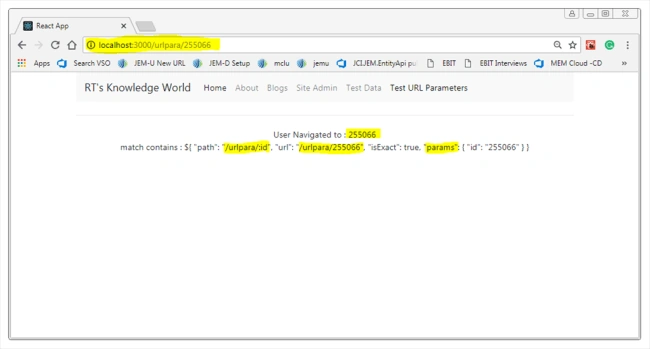
match: will help you to read the URL parameters.
- <Router>
- <NavLink to="/urlpara/255066" className="nav-link" exact>Test URL Parameters</NavLink>
- <Route path="/urlpara/:id" exact strict component={UrlPara} />
- </Router>
The component code goes as below for reading the URL parameters.
- import React, { Component } from 'react';
- class UrlPara extends Component {
- render() {
- return (
- <div>
- User Navigated to : {this.props.match.params.id}
- <p>
- match contains : ${JSON.stringify(this.props.match,null,4)}
- </p>
- </div>
- );
- }
- }
- export default UrlPara;
Let's see the output in the browser.
Switch()
Also, we need to make sure that only one component renders at a time.
- <Switch>
- <Route path="/blog" exact strict component={Blog} />
- <Route path="/contact" exact strict component={Contact} />
- </Switch>
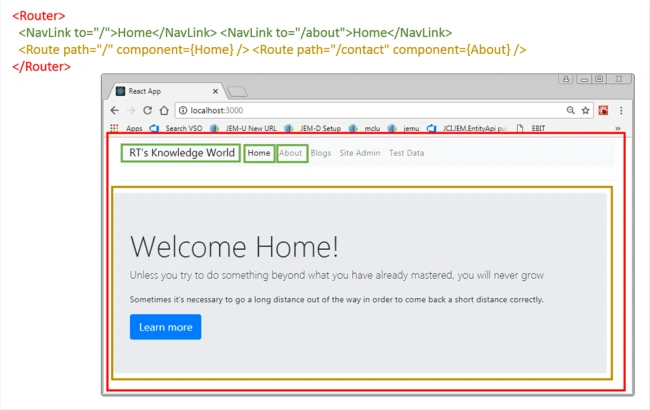
Above is the complete demo POC with a highlighted section of React routing concepts.
Join the conversation! Your thoughts help the community grow.