

When you need to handle many items at the same time in .NET, two common options are Parallel.ForEachAsync and Task.WhenAll. Both run tasks in parallel, but they manage concurrency differently — and that difference can greatly affect performance.
Let’s look at how each one works and compare them with a real-world example.
The source code can be downloaded from GitHub. Tools that I have used
1. VS 2026 Insider
2. .NET 8.0
3. Console App
Parallel.ForEachAsync: Controlled Parallelism
Parallel.ForEachAsync (introduced in .NET 6) provides built-in throttling via MaxDegreeOfParallelism. It schedules work intelligently, without creating a separate task for every item.
Example
await Parallel.ForEachAsync(data, new ParallelOptions
{
    MaxDegreeOfParallelism = Environment.ProcessorCount
}, async (item, token) =>
{
    await ProcessItemAsync(item);
});
Key Idea
Runs only a limited number of iterations in parallel — typically one per CPU core.
Task.WhenAll: Fire-and-Wait for All Tasks
Task.WhenAll simply runs all tasks at once and waits until every one of them completes.
Example
var tasks = data.Select(item => ProcessItemAsync(item));
await Task.WhenAll(tasks);
Key Idea
Starts one task per item, no throttling — great for small workloads, but dangerous at scale.
Custom Throttled: Task.WhenAll – using SemaphoreSlim to limit concurrency for async workloads
static async Task ForEachAsync<T>(
        IEnumerable<T> source,
        int maxDegreeOfParallelism,
        Func<T, Task> action)
{
    using var semaphore = new SemaphoreSlim(maxDegreeOfParallelism);

    var tasks = source.Select(async item =>
    {
        await semaphore.WaitAsync();
        try
        {
            await action(item);
        }
        finally
        {
            semaphore.Release();
        }
    });

    await Task.WhenAll(tasks);
}
//usage:
Usage:
  var boundedTime = await MeasureTimeAsync(async () =>
  {
      await ForEachAsync(data, maxDegreeOfParallelism: 50, SimulateWorkAsync);
  });
Observations from Your Benchmark
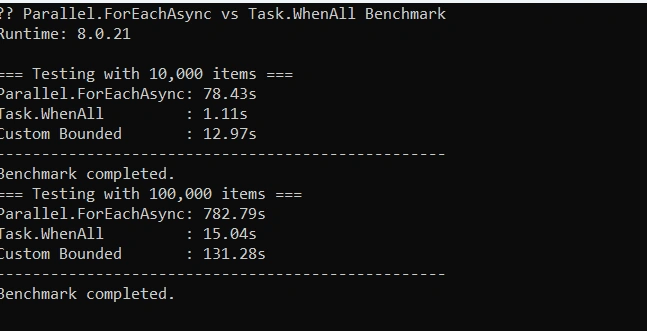
| Method | 10,000 items | 100,000 items | Notes |
|---|---|---|---|
| Parallel.ForEachAsync | 78.43s | 782.79s | Very slow because concurrency is limited to Environment.ProcessorCount (e.g., 8). Great for CPU-bound tasks, but for async I/O it’s throttling too much. |
| Task.WhenAll | 1.11s | 15.04s | Extremely fast because all 10K or 100K tasks run concurrently. Ideal for async I/O. Memory usage is high but delay is very small. |
| Custom Bounded (SemaphoreSlim) | 12.97s | 131.28s | Middle ground. Controlled concurrency (e.g., 50 tasks at a time). Prevents thread pool overload while still allowing high concurrency. |
Why the Numbers Look This Way?
Parallel.ForEachAsync
Limited by MaxDegreeOfParallelism = CPU count (~8 on most machines)
Each task waits 50ms (simulated I/O) before completing
So 10,000 / 8 × 50ms ≈ 78s — matches your result
Task.WhenAll
Launches 10,000 tasks immediately
Task.Delay is non-blocking → tasks don’t consume threads
Finishes in ~1s (10K) and 15s (100K)
Custom Bounded
Limited concurrency (50 in your example)
10,000 / 50 × 50ms ≈ 10s — matches closely (12.97s)
100,000 / 50 × 50ms ≈ 100s — matches closely (131.28s)
Key Takeaways
CPU-bound tasks → Parallel.ForEachAsync wins
Async I/O tasks with thousands of operations → Task.WhenAll is fastest, but can risk memory pressure
Large async workloads with controlled concurrency → Custom SemaphoreSlim approach is safest
Note: Adjust maxDegreeOfParallelism in your custom method depending on CPU cores and I/O type
Conclusion
Task.WhenAll consistently outperforms Parallel.ForEachAsync and the custom bounded implementation by a significant margin, especially as the number of items increases. Parallel.ForEachAsync shows the worst performance, likely due to its unbounded concurrency and overhead per iteration. The custom bounded approach offers a middle ground, limiting concurrency to reduce resource contention, resulting in much better performance than Parallel.ForEachAsync but still slower than Task.WhenAll. Overall, Task.WhenAll is the most efficient approach for high-concurrency async operations in this scenario.
Happy Coding!
Join the conversation! Your thoughts help the community grow.