

UAParser is an open source library for parsing the browser user agent. It’s a lightweight and easy to use library with a minified file size of ~11KB; as the library name says, the primary purpose of UAParser is to parse the user agent and get the relevant information about the browser, engine, operating system, device and CPU architecture.
Please find the library located at Github: UAParser.js
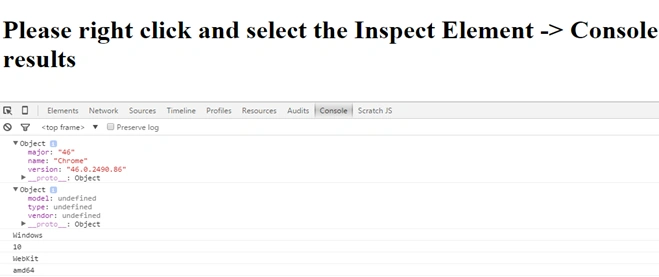
Below are the results of the parsed user agent information. The below information is based on readme.md of ua-parser library.
- {
- ua: "",
- browser:
- {
- name: "",
- version: ""
- },
- engine:
- {
- name: "",
- version: ""
- },
- os:
- {
- name: "",
- version: ""
- },
- device:
- {
- model: "",
- type: "",
- vendor: ""
- },
- cpu:
- {
- architecture: ""
- }
- }
- <script type="text/javascript" src="ua-parser.min.js">
- </script>
- var parser = new UAParser();
- var browserInfo = parser.getResult();
- console.log(parser.getOS().name);
- console.log(parser.getOS().version);
- console.log(parser.getEngine());
- console.log(parser.getBrowser().name);
- console.log(parser.getBrowser().version);
- <!doctype html>
- <html>
- <head>
- <script type="text/javascript" src="ua-parser.min.js">
- </script>
- <script type="text/javascript">
- var parser = new UAParser();
- var result = parser.getResult();
- console.log(result.browser);
- console.log(result.device);
- console.log(result.os.name);
- console.log(result.os.version);
- console.log(result.engine.name);
- console.log(result.cpu.architecture);
- </script>
- </head>
- <body>
- <h1>Please right click and select the Inspect Element -> Console option to view the user agent results</h1>
- </body>
- </html>
Join the conversation! Your thoughts help the community grow.