

Introduction
This particular blog will help you to setup and use TypeScript in a Blazor client project.
What is TypeScript ?
TypeScript is a strongly typed programing language built on top of Javascript. TypeScript have lot of pros over the Javascript which includes the power of Object Oriented Programing. TypeScript supports concepts from Object Oriented Programing and will be able to build a scalable and well organised code compared to JavaScript. TypeScript is always very much predictable. Everything in it always stays in the same way it was defined, if you decalre a variable with a type as boolean , it will always stays as boolean.
How to integrate TypeScript with Blazor?
In order to integrate TypeScript with blazor we can follow the below steps,
- Install Microsoft.TypeScript.MSBuild nuget package in Blazor client project
- Create a TypeScript File in the project
- Create a class and the method which to be invoed from blazor C# code
ex
namespace common {
    class Prompt {
        public showAlert() {
            alert("thhis is a test");
        }
    }
}
Now we need to create a method which will return an instance of Prompt class.
ex
export function getPromptInstance(): Prompt {
    return new Prompts();
}
Thats all from TypeScript side. Now lets move to C# side.
- Create a Blazor component from where we need to access this type script method
- Invoke the getPromptInstance() to get the instance of Prompt class from the razor or cs file using IJSRuntime object.
ex
var promptObject = await this._jSRuntime.InvokeAsync<IJSObjectReference>("common.getPromptInstance");
Now we can invoke the showAlert() using the prompt object
ex
await promptObject.InvokeVoidAsync("showAlert");
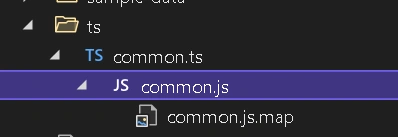
Rebuild the solution and make sure .js and .js.map version of newly added TypeScript file has been created as below
Simon BurgessPosted Aug 4, 2023, 2:14 PM
Using the js as below from your ts, results in console error Error: Microsoft.JSInterop.JSException: Could not find 'common.getPromptInstance' ('common' was undefined).
Simon BurgessPosted Aug 4, 2023, 2:13 PM
Var common;(function (common) { var Prompts = /** @class */ (function () { function Prompts() { } Prompts.prototype.showAlert = function () { alert("thhis is a test"); }; return Prompts; }()); function getPromptInstance() { return new Prompts(); } common.getPromptInstance = getPromptInstance; })(common || (common = {})); //# sourceMappingURL=JSMapRoot.razor.js.map