
The "datalist" Tag in HTML5
The <datalist> tag is used with the input field for providing a list of suggestions or autocompletes property. A
user can select a value from the list of values or can input their own value. Now we
use the <datalist> tag in our application. We write the following code:
- <!DOCTYPE HTML>
- <html>
- <body>
- City
- <input list="city" type="text" />
- <datalist id="city">
- <option value="Varanasi">
- <option value="Jhansi">
- <option value="Delhi">
- <option value="Gurgaon">
- </datalist>
- </body>
- </html>

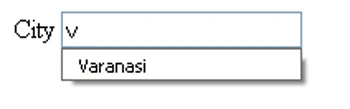
Now we enter the city name. Here we note that when we press v (Button v) to write Varanasi as city name, then a drop-down list is displayed with Varanasi as an option. This happens with all four city names which are
defined as an option for the list. Suppose, I want to write Varanasi as city name, Then the output will look like the below figure:
Join the conversation! Your thoughts help the community grow.