

This article defines how to use TextBox validation using JQuery in ASP.NET.Taking three TextBox and one Button control on the form. The form looks like this.
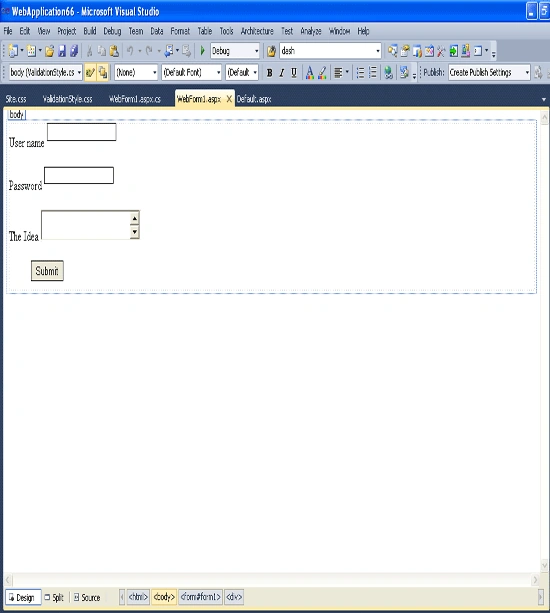
Figure1
In this example we
use three JQueries as follows:
jquery-1.3.2.js
jquery-latest.js
jquery.validate.js
Now attach these JQueries using below link to attach jquery file.
http://www.vbdotnetheaven.com/uploadfile/rohatash/7155/
Example
<%@ Page Language="C#" AutoEventWireup="true" CodeBehind="WebForm1.aspx.cs" Inherits="WebApplication66.WebForm1" %>
<!DOCTYPE html PUBLIC "-//W3C//DTD XHTML 1.0 Transitional//EN" "http://www.w3.org/TR/xhtml1/DTD/xhtml1-transitional.dtd">
<html xmlns="http://www.w3.org/1999/xhtml">
<head runat="server">
<title>Validation Example using JQuery</title>
<link rel="stylesheet" href="Styles/ValidationStyle.css" type="text/css" />
<script type="text/javascript" src="Scripts/jquery-1.3.2.js"></script>
<script type="text/javascript" src="Scripts/jquery-latest.js"></script>
<script type="text/javascript" src="Scripts/jquery.validate.js"></script>
<%--this javascriptis used to show the message after valid statement.--%>
<script type="text/javascript">
jQuery.validator.setDefaults({
debug: true,
success: "valid"
}); ;
</script>
<%--write the following javascript for passing the parameter for jquery--%>
<script type="text/javascript">
$(document).ready(function() {
$("#form1").validate({
rules: {
<%=txtUserName.UniqueID %>: {
minlength: 5,
required: true
},
<%=txtPassword.UniqueID %>: {
minlength: 5,
required: true
},
<%=TextIdea.UniqueID %>: {
//minlength: 5,
required: true
}
}, messages: {
<%=txtUserName.UniqueID %>:{
required: "Plaese enter your name",
minlength: "User name must be atleaet of 5 characters"
},
<%=txtPassword.UniqueID %>:{
required: "Plaese enter your password",
minlength: "Password must be atleaet of 5 characters"
},
<%=TextIdea.UniqueID %>:{
required: "Plaese enter your Ideas",
minlength: "Password must be atleaet of 5 characters"
}
}
});
});
</script>
</head>
<body>
<form id="form1" runat="server">
<div>
User name
<asp:TextBox ID="txtUserName" runat="server"
Height="21px" MaxLength="5"></asp:TextBox>
<br />
<br />
Password <asp:TextBox ID="txtPassword"
runat="server" TextMode="Password" MaxLength="5" ></asp:TextBox>
<br />
<br />
The Idea
<asp:TextBox ID="TextIdea" runat="server" TextMode="MultiLine"></asp:TextBox>
<br />
<br />
<asp:Button ID="btnSubmit" runat="server" Text="Submit" />
Css(StyleSheet) File
body
{
}
#field
{
margin-left: .5em;
float: right;
}
#field, label
{
float: left;
font-family: Arial, Helvetica, sans-serif;
font-size: small;
}
br
{
clear: both;
}
input
{
border: 1px solid black;
margin-bottom: .5em;
}
input.error
{
border: 1px solid red;
}
label.error
{
position:absolute;
background: url('unchecked.gif') no-repeat;
padding-left: 20px;
margin-left: .3em;
vertical-align: middle;
background-color: #FFEBE8;
border: solid 1px red;
width: 170px;
}
label.valid
{
/*position:inherit;
background: url('checked.gif') no-repeat;
display: block;
width: 16px;
height: 16px;
border: none;
vertical-align:top;*/
position:absolute;
background: url('checked.gif') no-repeat;
padding-left: 20px;
margin-left: .3em;
vertical-align:top;
background-color: #FFEBE8;
border:none;
width: 0px;
height: 16px;
}
Now run the application and test it.
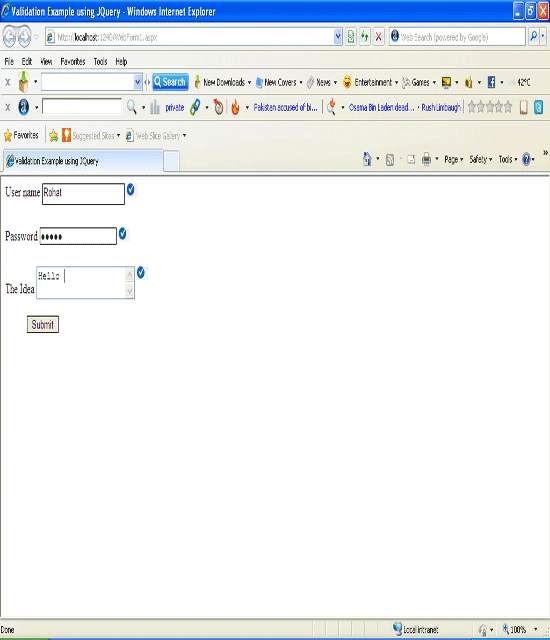
Figure2
kalu singh raoPosted Jul 18, 2016, 9:55 AM
Nice...
sas asPosted Jul 16, 2013, 9:47 AM
very good post but how to validate dropdownlist in asp.net . I am using min its working on tab change but the prob is on selection change check/unchecked image or error message not updated. please help. thanks in advance.
uthira samyPosted May 22, 2013, 3:10 AM
Good