

Text to Speech Conversion in Android
Procedure
- Open Eclipse IDE.
- Take a new project.
- Make a MainActivity.java file.
- Make an activity_main.xml file for layout design.
- In xml file, one button & one edit text should be there.
- Code is given below:
MainActivity.java
package com.example.texttospeech;
import android.os.Bundle;
import android.app.Activity;
import android.content.Intent;
import android.speech.tts.TextToSpeech;
import android.speech.tts.TextToSpeech.OnInitListener;
import android.view.Menu;
import android.view.View;
import android.view.View.OnClickListener;
import android.widget.Button;
import android.widget.EditText;
import android.widget.Toast;
public class MainActivity extends Activity implements OnInitListener {
EditText ee;
Button b1;
TextToSpeech tts;
@Override
protected void onCreate(Bundle savedInstanceState) {
super.onCreate(savedInstanceState);
setContentView(R.layout.activity_main);
ee=(EditText)findViewById(R.id.editText1);
b1=(Button)findViewById(R.id.button1);
b1.setOnClickListener(new OnClickListener() {
@Override
public void onClick(View v) {
// TODO Auto-generated method stub
String str=ee.getText().toString();
tts.speak(str,TextToSpeech.QUEUE_FLUSH,null);
}
});
Intent i =new Intent();
i.setAction(TextToSpeech.Engine.ACTION_CHECK_TTS_DATA);
startActivityForResult(i, 1);
}
@Override
protected void onActivityResult(int requestCode, int resultCode, Intent data) {
// TODO Auto-generated method stub
super.onActivityResult(requestCode, resultCode, data);
if(requestCode==1)
{
if(resultCode==TextToSpeech.Engine.CHECK_VOICE_DATA_PASS)
{
tts= new TextToSpeech(this,this);
}
else
{
Intent i=new Intent();
i.setAction(TextToSpeech.Engine.ACTION_INSTALL_TTS_DATA);
startActivity(i);
}
}
}
@Override
public void onInit(int status) {
// TODO Auto-generated method stub
if(status==TextToSpeech.SUCCESS)
{
Toast.makeText(getApplicationContext(), "engine installed",1000).show();
}
if(status==TextToSpeech.ERROR)
{
Toast.makeText(getApplicationContext(),
"engine not installed",
1000).show();
}
}
}
activity_main.xml
<RelativeLayout xmlns:android="http://schemas.android.com/apk/res/android"
xmlns:tools="http://schemas.android.com/tools"
android:layout_width="match_parent"
android:layout_height="match_parent"
android:paddingBottom="@dimen/activity_vertical_margin"
android:paddingLeft="@dimen/activity_horizontal_margin"
android:paddingRight="@dimen/activity_horizontal_margin"
android:paddingTop="@dimen/activity_vertical_margin"
tools:context=".MainActivity" >
<EditText
android:id="@+id/editText1"
android:layout_width="wrap_content"
android:layout_height="wrap_content"
android:layout_marginTop="70dp"
android:ems="10"
android:inputType="textPersonName" />
<Button
android:id="@+id/button1"
android:layout_width="wrap_content"
android:layout_height="wrap_content"
android:layout_alignRight="@+id/editText1"
android:layout_below="@+id/editText1"
android:layout_marginRight="49dp"
android:layout_marginTop="101dp"
android:text="Button" />
</RelativeLayout>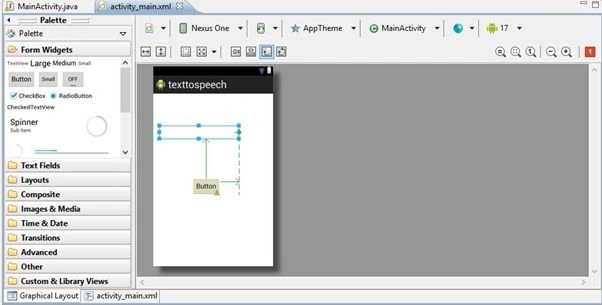
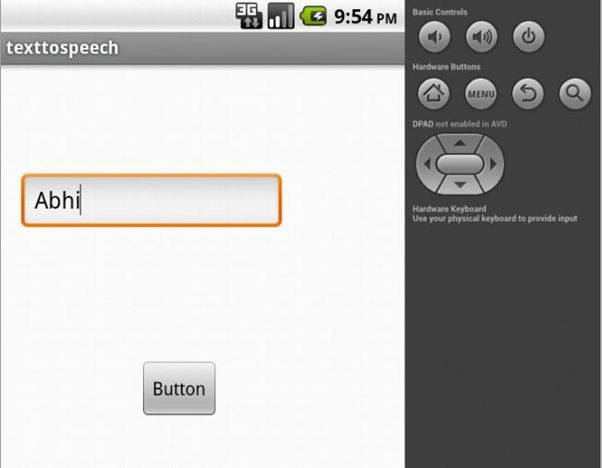
Output
Write the text in edit text. Then click on
button.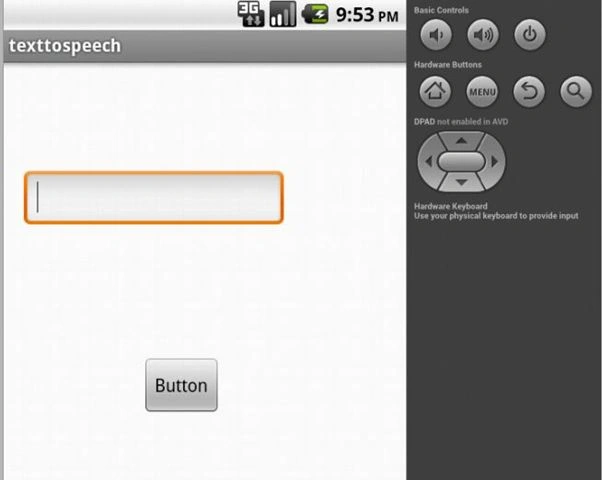
Join the conversation! Your thoughts help the community grow.