

Introduction
Ternary operator is an important part of most programming languages. AngularJS also supports the ternary operator in expressions.
- The ternary operator is used with Angular directives, such as ng-class and ng-style.
- Ternary operator was added to Angular 1.1.5 and used from version 1.1.5 and up. This is how we use it.
condition ? value1 : value2 - If the condition is true, then value1 is returned, otherwise the value2 is returned.
Sample Code - Listing 1
- <script src="angular.js"></script>
- <script>
- var app = angular.module('App', []);
- app.controller('ternaryController', function($scope) {
- $scope.EmployeeList = ['Tripat Bala singh', 'Mritunjay', 'Sushil', 'Omprakash'
- 'Ravi', 'Nishant', 'Arpan', 'Dinesh', 'Rishi'
- ];
- $scope.myObj = {
- "color": "black",
- "background-color": "#eee",
- "font-size": "15px",
- "padding": "2px"
- }
- $scope.myObj1 = {
- "color": "white",
- "background-color": "gray",
- "font-size": "15px",
- "padding": "2px"
- }
- });
- </script>
- <body ng-app="App">
- <div ng-controller="ternaryController">
- <div style="width:50%;text-align:center" ng-repeat="employee in EmployeeList">
- <h3 ng-style="($index+1)%2==0?myObj:myObj1">{{employee}}</h3>
- </div>
- </div>
- </body>
The output of the above code looks like Figure 1.

Figure 1
Some other examples are below.
Listing 2
- $scope.EmployeeDetails = [{"Name": "Tripat Bala singh",""Email":"[email protected]" },
- {"Name": null, "Email": "[email protected]"}]
- <p ng-style="myObj"><span>Welcome</span>
- {{(EmployeeDetails[0].Name!=null)?EmployeeDetails[0].Name:EmployeeDetails[0].Email}}</p>
- <p ng-style="myObj1"><span>Welcome</span>
- {{(EmployeeDetails[1].Name!=null)?EmployeeDetails[1].Name:EmployeeDetails[1].Email}}<p>
The output looks like Figure 2.
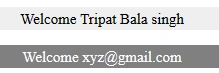
Figure 2
You can also use this ternary operator with attributes, like ng-if or ng-show. See the below example.
ng-show = " { { ( condition ) ? true : false } } "
- <span ng-show="{{(EmployeeDetails[0].Name!=null) ? true : false}}">
- "{{EmployeeDetails[0].Name}}"</span>
- <span ng-show="{{(EmployeeDetails[1].Name!=null) ? true : false}}"> "{{EmployeeDetails[1].Name}}"</span>
If employee name is not null, then employee name will be shown, otherwise not.
The output looks like Figure 3.

Figure 3
Summary
Figure 3
Summary
In this blog, I discussed how we can use ternary operator using AngularJS.
Laxmidhar SahooPosted Nov 19, 2018, 12:20 AM
A good article thanks