

Description:
About Classes used -
#1: StreamReader class provides an access to read the data from Stream such as Text File.
#2: StreamWriter class provides an access to write the data from Stream such as Text File.
Namespace Required - System.IO, System.Diagnostics
Controls Used -
1. TextBox Control (txtOutput)
2. ListBox Control (lbInput)
2. Button Control (btnCopy, btnInputFile)
Here I implemented the Code for converting multiple Text Documents into single Text Document.
The Code:
1. Variable Declarations
StreamReader rdr; //StreamReader Object for Reading File
StreamWriter wrt; //StreamWriter Object for Writing File
Listing 1
2. Select the Input Text Files (code for “Select Input Files” Button).
using (OpenFileDialog
file = new OpenFileDialog())
{
file.Filter = "Only Text
Documents|*.txt";
//Allow to select multiple files
file.Multiselect = true;
//Show the Dialog Box & Select the Files
file.ShowDialog();
//Add the selected File Names to ListBox
lbInput.Items.AddRange(file.FileNames);
}
Listing 2
3. Copy Data from Multiple Text Files to Single Text File (code for “Copy All” Button).
//Output File
wrt = new StreamWriter(txtOutput.Text,
false);
//Copy All Data From Input file to Output file
foreach (String var in lbInput.Items)
{
//Input File
rdr = new StreamReader(var);
//Start of New File
wrt.WriteLine(Environment.NewLine +
"File Name : " + var + Environment.NewLine);
//Copy the Content of Input File(s) to Output File
wrt.Write(rdr.ReadToEnd().ToString());
}
//Close the StreamWriter instance
wrt.Close();
MessageBox.Show("File
Copied Successfully....");
//Open the Output file
Process.Start(txtOutput.Text);
Listing 3
4. Now execute the Application and see the result (Figure 1).
Intended Result:
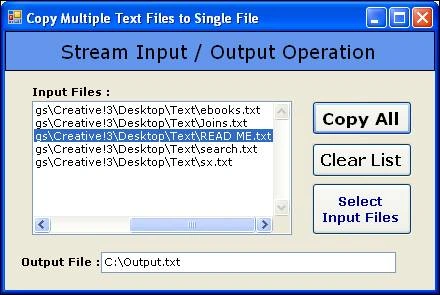
Figure 1
Summary:
In this piece of writing, using C# environment, we have seen basic stream input/output operation for copying multiple text files to single text file using StreamWriter & StreamReader classes.
Join the conversation! Your thoughts help the community grow.