

We all know how to display dynamic data for Asp.net(<%>,<%#%>), Razor Based(@). Similarly, in Visualforce Apex the syntax is
{! }
Let's see some syntax in Visualforce Apex with output
Step to Open developer console over your SalesForce developer account,
- Profile -> Developer Console
- File -> New -> Visualforce Page
Now just add new Visualforce Page,
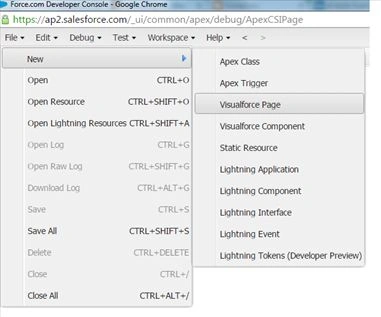
I have given the name of Visualforce page as MyFirstSyntax.
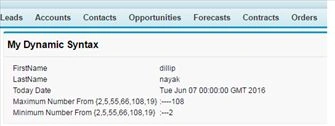
I have just written the syntax for displaying (My Name,Today Date,Max Number,Min Number). Please find the below code and paste same over your visualforce page. Then just click the preview button and it will redirect you to newly created Visualforce.
Like,
https://c.ap2.visual.force.com/apex/MyFirstSyntax
- <apex:page>
- <apex:pageBlock title="My Dynamic Syntax">
- <table>
- <tr>
- <td>
- FirstName
- </td>
- <td>
- {!$User.FirstName}
- </td>
- </tr>
- <tr>
- <td>LastName
- </td>
- <td>{!$User.LastName}</td>
- </tr>
- <tr>
- <td>
- Today Date
- </td>
- <td>
- {!ToDay()}
- </td>
- </tr>
- <tr>
- <td>
- Maximum Number From {2,5,55,66,108,19}
- </td>
- <td>
- :----{!Max(2,5,55,66,108,19)}
- </td>
- </tr>
- <tr>
- <td>
- Minimum Number From {2,5,55,66,108,19}
- </td>
- <td>
- :---{!Min(2,5,55,66,108,19)}
- </td>
- </tr>
- </table>
- </apex:pageBlock>
- </apex:page>
Join the conversation! Your thoughts help the community grow.