

In this blog, we will create a simple Windows application for maintaining check details using Visual Studio.
Process Flow
- Create table & store procedure
- Create Application
- Report Generation
Create table & store procedure
- CREATE TABLE [dbo].[ChequeDetails] (
- [ChequeDetailsId] NUMERIC (20) IDENTITY (1, 1) NOT NULL,
- [ChequeNumber] NVARCHAR (50) NULL,
- [GivenTo] NVARCHAR (50) NULL,
- [GivenDate] NVARCHAR (20) NULL,
- [ValidUpto] NVARCHAR (20) NULL,
- [Amount] NUMERIC (20, 2) NULL,
- [Notes] NVARCHAR (MAX) NULL,
- [CreatedBy] INT NULL,
- [CreatedDateTime] DATETIME NULL,
- [ModifiedBy] INT NULL,
- [ModifiedDateTime] DATETIME NULL,
- [IsDeleted] BIT NULL,
- PRIMARY KEY CLUSTERED ([ChequeDetailsId] ASC)
- );
- CREATE TABLE [dbo].[UserMaster] (
- [UserId] INT IDENTITY (1, 1) NOT NULL,
- [UserName] VARCHAR (20) NULL,
- [Password] NVARCHAR (MAX) NULL,
- [FirstName] VARCHAR (50) NULL,
- [LastName] VARCHAR (50) NULL,
- [Gender] TINYINT NULL,
- [EmailId] VARCHAR (250) NULL,
- [PhoneNumber] VARCHAR (10) NULL,
- [IsActiveUser] BIT NULL,
- [IsUserDeleted] BIT NULL,
- PRIMARY KEY CLUSTERED ([UserId] ASC)
- );
- CREATE PROCEDURE Proc_ChequeDetails
- @Mode varchar(10),
- @ChequeDetailsId NUMERIC(20)= NULL,
- @ChequeNumber nvarchar(50) = NULL,
- @GivenTo nvarchar(50) = NULL,
- @GivenDate nvarchar(20) = NULL,
- @ValidUpto nvarchar(20) = NULL,
- @Notes nvarchar(max) = NULL,
- @Amount NUMERIC(20,2) = NULL,
- @UserId int = NULL,
- @IsDeleted bit = NULL
- AS
- BEGIN
- IF(@Mode='INSERT')
- BEGIN
- INSERT INTO dbo.ChequeDetails(ChequeNumber,GivenTo,GivenDate,ValidUpto,Amount,Notes,CreatedBy,CreatedDateTime,ModifiedBy,ModifiedDateTime,IsDeleted)
- VALUES(@ChequeNumber,@GivenTo,@GivenDate,@ValidUpto,@Amount,@Notes,@UserId,GETDATE(),@UserId,GETDATE(),0)
- SELECT 1 IsSuccess,'Cheque added Successfully!' as OutputMessage
- SELECT ChequeDetailsId,ChequeNumber,GivenTo,GivenDate,ValidUpto,Amount,Notes,CreatedBy,CreatedDateTime,ModifiedBy,ModifiedDateTime FROM dbo.ChequeDetails
- END
- IF(@Mode='UPDATE')
- BEGIN
- UPDATE dbo.ChequeDetails SET ChequeNumber=@ChequeNumber,GivenTo=@GivenTo,GivenDate=@GivenDate,ValidUpto=@ValidUpto,Amount=@Amount,Notes=@Notes,
- ModifiedBy=@UserId,ModifiedDateTime=GETDATE()
- WHERE ChequeDetailsId=@ChequeDetailsId
- SELECT 1 IsSuccess,'Cheque added Successfully!' as OutputMessage
- SELECT ChequeDetailsId,ChequeNumber,GivenTo,GivenDate,ValidUpto,Amount,Notes,CreatedBy,CreatedDateTime,ModifiedBy,ModifiedDateTime FROM dbo.ChequeDetails
- END
- IF(@Mode='DELETE')
- BEGIN
- UPDATE dbo.ChequeDetails SET IsDeleted=@IsDeleted,ModifiedBy=@UserId,ModifiedDateTime=GETDATE()
- WHERE ChequeDetailsId=@ChequeDetailsId
- SELECT 1 IsSuccess,'Cheque added Successfully!' as OutputMessage
- SELECT ChequeDetailsId,ChequeNumber,GivenTo,GivenDate,ValidUpto,Amount,Notes,CreatedBy,CreatedDateTime,ModifiedBy,ModifiedDateTime FROM dbo.ChequeDetails
- END
- IF(@Mode='GETALL')
- BEGIN
- SELECT ChequeDetailsId,ChequeNumber,GivenTo,GivenDate,ValidUpto,Amount,Notes,CreatedBy,CreatedDateTime,ModifiedBy,ModifiedDateTime FROM dbo.ChequeDetails
- END
- IF(@Mode='SEARCH')
- BEGIN
- SELECT ChequeDetailsId,ChequeNumber,GivenTo,GivenDate,ValidUpto,Amount,Notes,CreatedBy,CreatedDateTime,ModifiedBy,ModifiedDateTime,IsDeleted FROM dbo.ChequeDetails
- END
- END
- CREATE PROCEDURE [dbo].[Proc_Report]
- AS
- BEGIN
- select cd.ChequeNumber,cd.Amount,cd.GivenTo as ChequeGivenTo,
- cd.GivenDate as [ChequeGivenDate],cd.ValidUpto as [ChequeValidUpto],DATEDIFF(DAY,CAST(GETDATE() AS DATE),
- (CASE WHEN TRY_PARSE(ValidUpto AS smalldatetime) IS NULL THEN TRY_PARSE((SUBSTRING(ValidUpto,4,2)
- + '/' + SUBSTRING(ValidUpto,1,2) + '/' +SUBSTRING(ValidUpto,7,4)) AS smalldatetime) ELSE TRY_PARSE(ValidUpto AS smalldatetime) END)) AS [RemainingDays],
- cd.Notes,umc.FirstName+' '+umc.LastName as [ChequeCreatedBy],cd.CreatedDateTime as [ChequeCreatedDateTime],
- umm.FirstName+' '+umm.LastName as [ChequeModifiedBy],cd.ModifiedDateTime as [ChequeModifiedDateTime] from dbo.ChequeDetails cd
- left join dbo.UserMaster umc on cd.CreatedBy=umc.UserId
- left join dbo.UserMaster umm on cd.ModifiedBy=umm.UserId
- order by cd.ModifiedDateTime desc
- END
- CREATE PROCEDURE [dbo].[Proc_ValidateUser]
- @Mode varchar(50),
- @UserName varchar(20),
- @Password varchar(max)
- AS
- BEGIN
- IF @Mode='VALIDATEUSER'
- BEGIN
- IF EXISTS(SELECT 1 FROM dbo.UserMaster WHERE LOWER(UserName)=LOWER(@UserName) OR PhoneNumber=@UserName)
- BEGIN
- IF EXISTS(SELECT 1 FROM dbo.UserMaster WHERE (LOWER(UserName)=LOWER(@UserName) OR PhoneNumber=@UserName) AND ISNULL(IsActiveUser,0)=1)
- BEGIN
- IF EXISTS(SELECT 1 FROM dbo.UserMaster WHERE (LOWER(UserName)=LOWER(@UserName) OR PhoneNumber=@UserName) AND Password=@Password COLLATE SQL_Latin1_General_CP1_CS_AS)
- BEGIN
- SELECT 'true' AS IsAuthenticated,UserId,'!' AS UserFullName,'Login Successfully!' AS ErrorMessage
- FROM dbo.UserMaster WHERE (LOWER(UserName)=LOWER(@UserName) OR PhoneNumber=@Username) AND Password=@Password
- END
- ELSE
- BEGIN
- SELECT 'false' AS IsAuthenticated,0 AS UserId,'Wrong Password!' AS ErrorMessage
- END
- END
- ELSE
- BEGIN
- SELECT 'false' AS IsAuthenticated,0 AS UserId,'User Name is not Active!' AS ErrorMessage
- END
- END
- ELSE
- BEGIN
- SELECT 'false' AS IsAuthenticated,0 AS UserId,'User Name not Exist!' AS ErrorMessage
- END
- END
- END
Create Application
Open Visual Studio New > Project > Window Desktop > Select Windows Form Application.
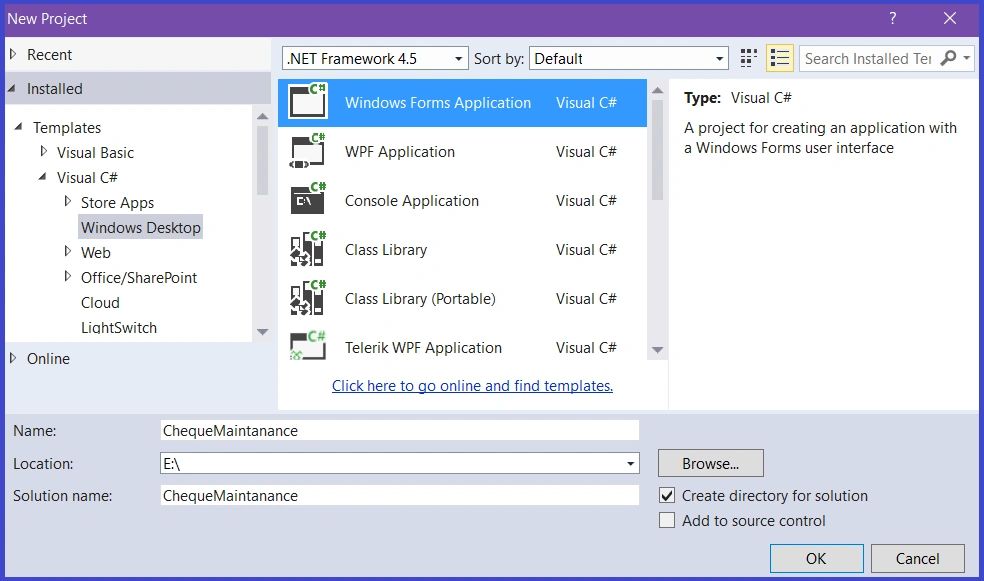
After the project name hit OK and it will go to the solution explorer window.
Right click the project and select New> New Item.
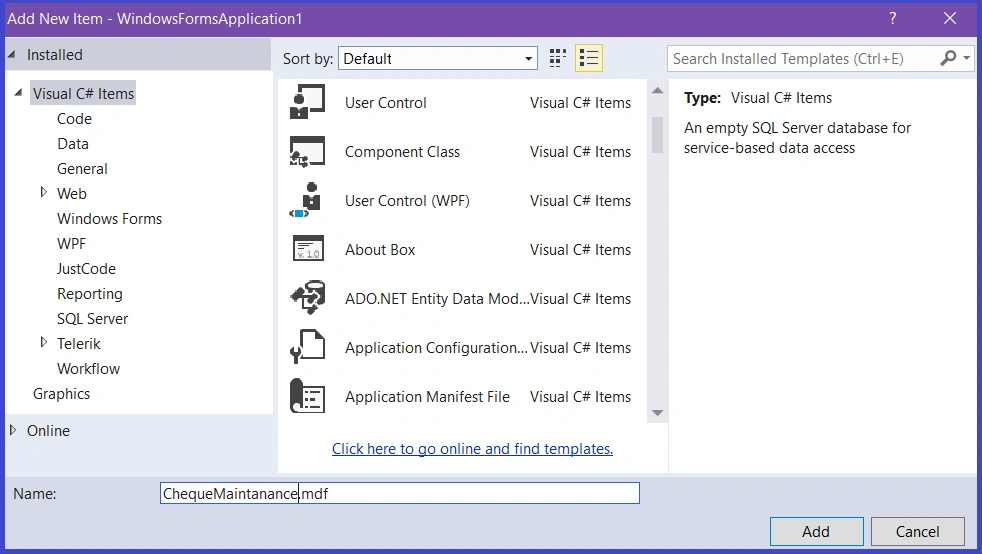
I have added all files like the below structure
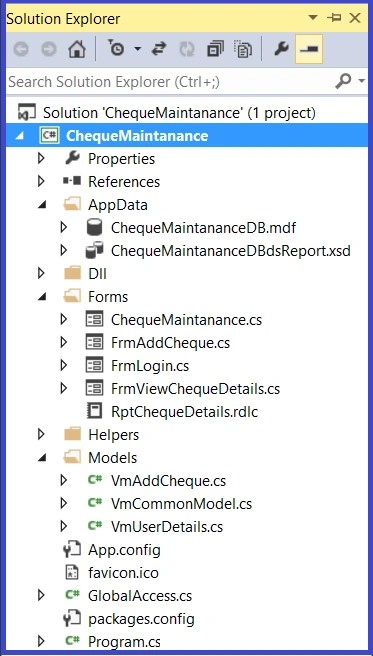
If you are going to use MDF, after creating this file run the above query in Visual Studio.
I have authenticated a simple username & password.

Only after login is validation, it the Parent form (MDI Form)
- if (TxtUserName.Text == "" || string.IsNullOrEmpty(TxtUserName.Text)) {
- LblMessage.Text = "Please Enter User Name";
- TxtUserName.Focus();
- return;
- }
- if (TxtPassword.Text == "" || string.IsNullOrEmpty(TxtPassword.Text))
- {
- LblMessage.Text = "Please Enter Password";
- TxtPassword.Focus();
- return;
- }
- try
- {
- var dsResult = new DataSet();
- var vmResult = new VmUserDetails();
- SqlParameter[] sqlParam = new SqlParameter[3];
- sqlParam[0] = new SqlParameter("@Mode", "VALIDATEUSER");
- sqlParam[1] = new SqlParameter("@UserName", TxtUserName.Text);
- sqlParam[2] = new SqlParameter("@Password", TxtPassword.Text);
- dsResult = objHelper.GetDatasetFromProcedure("dbo.Proc_ValidateUser", sqlParam);
- if (dsResult != null && dsResult.Tables.Count > 0)
- {
- if (dsResult.Tables[0].Rows.Count > 0)
- {
- vmResult = dsResult.Tables[0].ToList<VmUserDetails>().ToList().FirstOrDefault();
- }
- }
- if (vmResult.IsAuthenticated)
- {
- FrmChequeMaintanance frmMain = new FrmChequeMaintanance();
- GlobalAccess.GlobalUserId = vmResult.UserId;
- GlobalAccess.GlobalUserFullName = vmResult.UserFullName;
- frmMain.Text = "Welcome " + vmResult.UserFullName;
- this.Hide();
- }
- else
- {
- LblMessage.Text = vmResult.ErrorMessage;
- return;
- }
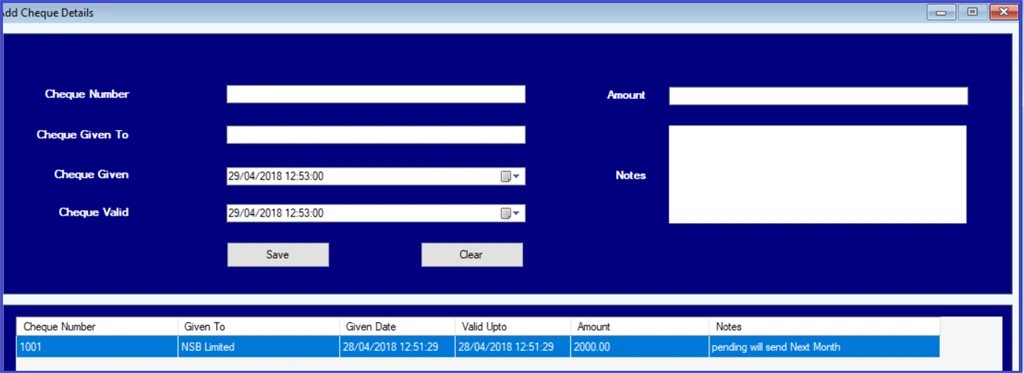
Data is saved into the database and pending to data grid control.
- var objAddCheque = new VmAddCheque();
- if (TxtChequeNumber.Text == "" || string.IsNullOrEmpty(TxtChequeNumber.Text))
- {
- LblMessageFaliure.Text = "Please Enter Cheque Number";
- TxtChequeNumber.Focus();
- return;
- }
- if (TxtGivenTo.Text == "" || string.IsNullOrEmpty(TxtGivenTo.Text))
- {
- LblMessageFaliure.Text = "Please Enter the Name of the Person whom you gave this Cheque";
- TxtGivenTo.Focus();
- return;
- }
- if (TxtGivenDate.Text == "" || string.IsNullOrEmpty(TxtGivenDate.Text))
- {
- LblMessageFaliure.Text = "Please Select Cheque Issued date";
- TxtGivenDate.Focus();
- return;
- }
- if (TxtValidUpto.Text == "" || string.IsNullOrEmpty(TxtValidUpto.Text))
- {
- LblMessageFaliure.Text = "Please Select Cheque Expiry date";
- TxtValidUpto.Focus();
- return;
- }
- if (TxtAmount.Text == "" || string.IsNullOrEmpty(TxtAmount.Text))
- {
- LblMessageFaliure.Text = "Please Fill the Cheque Amount";
- TxtAmount.Focus();
- return;
- }
- objAddCheque.Mode = "INSERT";
- objAddCheque.ChequeNumber = TxtChequeNumber.Text;
- objAddCheque.GivenTo = TxtGivenTo.Text;
- objAddCheque.GivenDate = TxtGivenDate.Text;
- objAddCheque.ValidUpto = TxtValidUpto.Text;
- objAddCheque.Amount = Convert.ToDecimal(TxtAmount.Text);
- objAddCheque.Notes = RtfNotes.Text;
- SaveDatas(objAddCheque);
Report Generation
For the report concept I have used default Visual Studio report of rdlc. If you need, you can add any external reporting tool like crystal report, Telerik report…etc.

- this.procReportBindingSource.DataMember = "Proc_Report";
- this.procReportBindingSource.DataSource = this.chequeMaintananceDBdsReportBindingSource;
- //
- // chequeMaintananceDBdsReportBindingSource
- //
- this.chequeMaintananceDBdsReportBindingSource.DataSource = this.chequeMaintananceDBdsReport;
- this.chequeMaintananceDBdsReportBindingSource.Position = 0;
- //
- // chequeMaintananceDBdsReport
- //
- this.chequeMaintananceDBdsReport.DataSetName = "ChequeMaintananceDBdsReport";
- this.chequeMaintananceDBdsReport.SchemaSerializationMode = System.Data.SchemaSerializationMode.IncludeSchema;
- //
- // PnlReport
- //
- this.PnlReport.BackColor = System.Drawing.Color.SeaShell;
- this.PnlReport.BorderStyle = System.Windows.Forms.BorderStyle.FixedSingle;
- this.PnlReport.Controls.Add(this.RptChequeDetails);
- this.PnlReport.Location = new System.Drawing.Point(13, 12);
- this.PnlReport.Name = "PnlReport";
- this.PnlReport.Size = new System.Drawing.Size(1457, 711);
- this.PnlReport.TabIndex = 1;
Join the conversation! Your thoughts help the community grow.