

Introduction
Here is a Windows Forms app that creates a Simple Arithmetic Calculator UI app using .NET and C#.
Sample Program
- using System;
- using System.Collections.Generic;
- using System.ComponentModel;
- using System.Data;
- using System.Drawing;
- using System.Linq;
- using System.Text;
- using System.Windows.Forms;
- namespace calculator1
- {
- public partial class Form1 : Form
- {
- int a=0;
- int b,c;
- string msg;
- public Form1()
- {
- InitializeComponent();
- }
- private void Form1_Load(object sender, EventArgs e)
- {
- }
- private void b1_Click(object sender, EventArgs e)
- {
- t1.Text = t1.Text + b1.Text;
- }
- private void b2_Click(object sender, EventArgs e)
- {
- t1.Text = t1.Text + b2.Text;
- }
- private void b3_Click(object sender, EventArgs e)
- {
- t1.Text = t1.Text + b3.Text;
- }
- private void b5_Click(object sender, EventArgs e)
- {
- t1.Text = t1.Text + b5.Text;
- }
- private void b6_Click(object sender, EventArgs e)
- {
- t1.Text = t1.Text + b6.Text;
- }
- private void b7_Click(object sender, EventArgs e)
- {
- t1.Text = t1.Text + b7.Text;
- }
- private void b9_Click(object sender, EventArgs e)
- {
- t1.Text = t1.Text + b9.Text;
- }
- private void b10_Click(object sender, EventArgs e)
- {
- t1.Text = t1.Text + b10.Text;
- }
- private void b11_Click(object sender, EventArgs e)
- {
- t1.Text = t1.Text + b11.Text;
- }
- private void b13_Click(object sender, EventArgs e)
- {
- t1.Text = t1.Text + b13.Text;
- }
- private void b4_Click(object sender, EventArgs e)
- {
- a = Convert.ToInt32(t1.Text);
- t1.Text = "";
- msg = "+";
- }
- private void b8_Click(object sender, EventArgs e)
- {
- a = Convert.ToInt32(t1.Text);
- t1.Text = "";
- msg = "-";
- }
- private void b12_Click(object sender, EventArgs e)
- {
- a = Convert.ToInt32(t1.Text);
- t1.Text = "";
- msg = "*";
- }
- private void b15_Click(object sender, EventArgs e)
- {
- a = Convert.ToInt32(t1.Text);
- t1.Text = "";
- msg = "/";
- }
- private void b16_Click(object sender, EventArgs e)
- {
- t1.Text = "";
- }
- private void b14_Click(object sender, EventArgs e)
- {
- if (msg == "+")
- {
- b = Convert.ToInt32(t1.Text);
- c = a + b;
- }
- if (msg == "-")
- {
- b = Convert.ToInt32(t1.Text);
- c = a - b;
- }
- if (msg == "*")
- {
- b = Convert.ToInt32(t1.Text);
- c = a * b;
- }
- if (msg == "/")
- {
- b = Convert.ToInt32(t1.Text);
- c = a / b;
- }
- t1.Text = c.ToString();
- }
- }
- }
Explanation
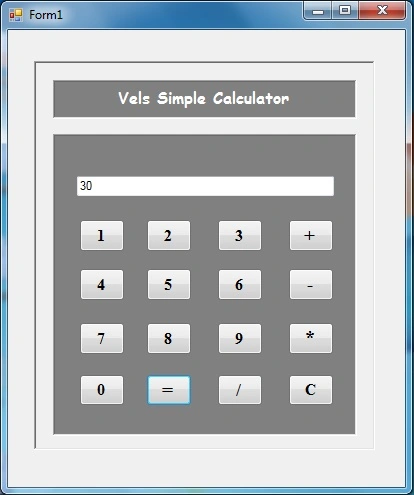
The UI of the Simple Arithmetic Calculator looks like the following where you can see, there is a button for numbers and operators. Just run the program, select your numbers and operators and run it.
진수 김Posted Nov 5, 2021, 10:30 AM
Uploading your Control Setting is more helpful, ex) your texting control "Vels simple Calculator" or GroupBox
Mildred MondragonPosted Mar 26, 2021, 10:06 PM
Your stupid