

Besides the TextView view, which you will likely use the most often, there are some other basic controls that you will find yourself frequently using that is simple Button control. We can also styled the button using the system's default button background, which is often different from one device to another and from one version of the platform to another.
Basic Button : Represents a push-button widget
Lets look the examples of simple button's in Android
Step for creating Basic Button
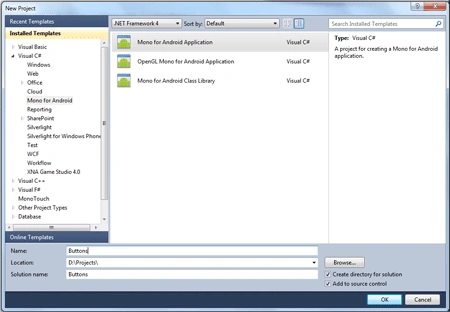
- Start new Android application
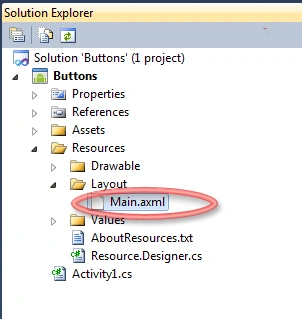
- Go to Main.axml and make following changes
<?xml version="1.0" encoding="utf-8"?>
<LinearLayout xmlns:android="http://schemas.android.com/apk/res/android"
android:orientation="vertical"
android:layout_width="fill_parent"
android:layout_height="fill_parent"
>
<Button
android:id="@+id/MyButton"
android:layout_width="fill_parent"
android:layout_height="wrap_content"
/>
</LinearLayout>
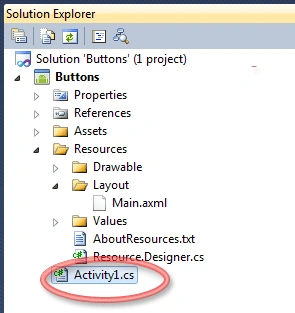
- Go to Activity1.cs class make following
changes
public class Activity1 : Activity
{
int count = 1;
protected override void OnCreate(Bundle bundle)
{
base.OnCreate(bundle);
SetContentView(Resource.Layout.Main);
Button button = FindViewById<Button>(Resource.Id.MyButton);
button.Click += delegate { button.Text = string.Format("{0} clicks!", count++); };
}
}
As above we create a simple button and create a button click event for it when you click on the button it will count the click and display to the user
- Run the application
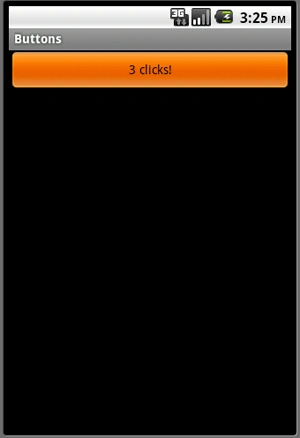
Counting will increase automatically when you click on the button as you see above the counting was 3 now when you will click 3 more times on the button it will incease by 3 like below picture shows: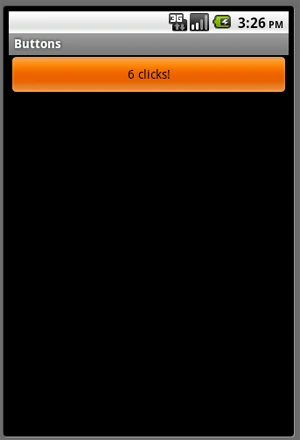
Thank You......
Join the conversation! Your thoughts help the community grow.