

Description:
As I'm newbie to Windows Presentation Foundation (WPF), I like to start WPF by learning some Animation Techniques first. So here I put my first code showing simple animation with FontSize Property.
About Classes used -
#1: DoubleAnimation class allows animate between two targeted values of type System.Double.
Namespace Required - System.Windows.Media.Animation
Controls Used -
1. Button Control (btnAnimate)
Here I implemented a Code for simple animation of FontSize Property of using DoubleAnimation class.
(Important Note: - Here I only include a portion of code that is required understand the concept of Animation Class)
The Code:
1. XAML Code for Creating Button Control.
<Grid Height="142">
<Button Margin="24,20,26,26" Name="btnAnimate"
Content="Animation" Click="AnimateOnClick"/>
</Grid>
Listing 1
2. C# Code to Animate FontSize of Button Control.
DoubleAnimation animate; // Declare an object for animation
//Check FontSize of Button Control & Define Animation Parameters
if (btnAnimate.FontSize == 40.0)
animate = new DoubleAnimation(40.0, 10.0, TimeSpan.Parse("0:0:1"));
else
animate = new DoubleAnimation(10.0, 40.0, TimeSpan.Parse("0:0:1"));
// Apply Animation to Button Control
btnAnimate.BeginAnimation(FontSizeProperty, animate);
Listing 2
3. Now execute the Application and see the result (Figure 1).
Intended Result:
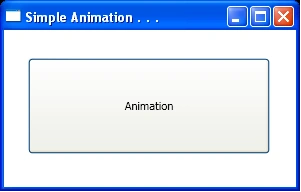
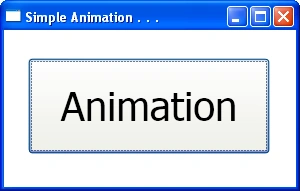
Figure 1: First Run Figure 2: After Click the Button
Summary:
In this writing, using C# & XAML, we have seen how to simply animate any property of control at runtime.
Reference:
Illustrated WPF, by Daniel M. Solis, Publisher – Apress
Join the conversation! Your thoughts help the community grow.