

Introduction
Registering a SharePoint site for client secrets and client ID is essential for integrating custom applications with SharePoint and accessing its resources securely. In this guide, we'll explore the step-by-step process of registering a SharePoint add-in, generating a client ID and client secret, and granting the required permissions using the AppRegNew form. By following these instructions, developers can seamlessly integrate their applications with SharePoint and leverage its capabilities in their solutions.
Understanding SharePoint Add-ins
SharePoint add-ins, also known as apps, are self-contained pieces of functionality that extend the capabilities of a SharePoint site. They can be SharePoint-hosted or provider-hosted, offering flexibility in deployment and architecture.
Now, let's delve into the process of registering a SharePoint add-in and granting the necessary permissions:
Step 1. Begin by navigating to your SharePoint site
Modifying the URL by adding "_layouts/15/appregnew.aspx" at the end (e.g. https://(Site Name)/_layouts/15/AppRegNew.aspx ). This will take you to the AppRegNew form.
Navigate to
[Site Collection URL]/_layouts/15/AppRegNew.aspx.
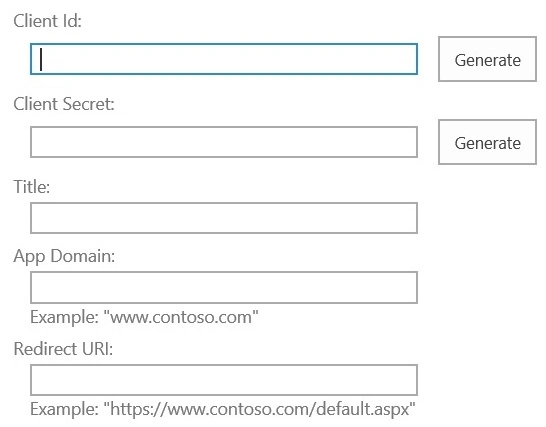
Step 2. Fill in the required details
- Client ID (a unique GUID),
- Client Secret (acts like a password),
- Title (name of the add-in),
- App Domain (domain where the add-in is hosted),
- Redirect URI (provider-hosted add-in).
INPUT
- Fill in the Title as " My-Add-in"
- Fill in the App Domain as www.localhost.com
- Fill in the Redirect URI field as https://www.localhost.com
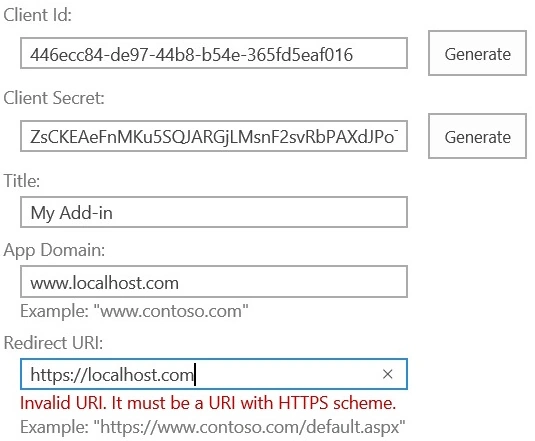
- Click the "Generate" button next to the "App Id" to create a new GUID.
- Click the "Generate" button next to the "App Secret" to generate a new secret.
- Save the generated Client ID and Client Secret for future reference.
- Click "Create" to register the app.
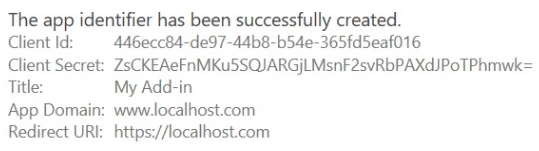
Step 3. Grant Permission to the Add-In
Now that the identifier is created, we need to grant the necessary permission for it to perform any action. In this example, I’ll demonstrate how to grant full control access to a Site Collection.
Navigate to
[Site Collection URL]/_layouts/15/AppInv.aspx
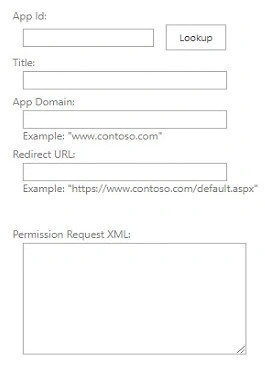
- Enter the Client ID of the add-in and click "Lookup" to display its details.
- Fill in the Title as " My-Add-in"
- Fill in the App Domain as www.localhost.com
- Fill in the Redirect URI field as https://www.localhost.com
- This is the crucial part. In the option Permission Request XML, let’s write the below XML code to grant our add-in full control of the given site collection.
<AppPermissionRequests AllowAppOnlyPolicy="true">
<AppPermissionRequest Scope="http://sharepoint/content/sitecollection" Right="FullControl"/>
<AppPermissionRequest Scope="http://sharepoint/content/sitecollection/web" Right="FullControl"/>
</AppPermissionRequests>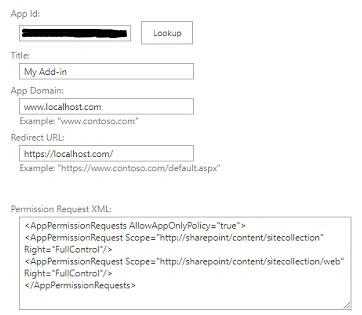
- Click "Create" to grant the permissions

- Trust the add-in for the requested accesses by clicking "Trust It.
Step 4. Verify Permissions
Navigate to
[Site Collection URL]/_layouts/15/appprincipals.aspx
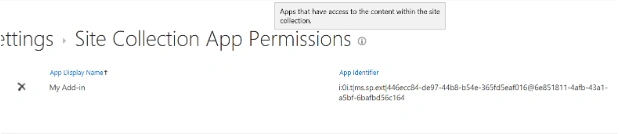
- Confirm that the permissions have been assigned to the add-in by navigating to [Site Collection URL] /_layouts/15/appprincipals.aspx.
Conclusion
SharePoint add-ins offer developers a versatile platform for extending the functionality of SharePoint sites. Through careful management of permissions, developers can ensure that add-ins have appropriate access levels, bolstering security. The distinction between SharePoint-hosted and provider-hosted add-ins streamlines deployment processes, while adherence to security best practices, such as HTML encoding of the Client Secret, safeguards sensitive information. Additionally, the flexibility of token generation add-ins facilitates seamless authentication for custom REST API calls, enhancing interoperability and enabling the creation of robust, tailored solutions within the SharePoint ecosystem. Overall, by leveraging the capabilities of SharePoint add-ins and adhering to established guidelines, developers can create powerful, secure, and scalable solutions that meet the diverse needs of SharePoint users.
Next Step
Please consider liking and following me for more articles and if you find this content helpful.
Join the conversation! Your thoughts help the community grow.