

For dropdown
In Listing 1 I am using ng-app, ng-controller, ng-model, ng-options, ng-change AngularJS directives.
HTML control div consists Select dropdown which is populated from JSON array countryList using ng-options.
In the scope of Angular controller "drpCountryController" ng-model " selectedCountry " is set with 2 like $scope.selectedCountry = 2;
Sample Code
Sample Code
- <script>
- var app = angular.module('App', []);
- app.controller('drpCountryController',function($scope)
- {
- $scope.selectedCountry = 2;
- $scope.countryList = [{ " Name ": "India", "Id": 1 },
- { "Name": "Nepal", "Id": 2 },
- { " Name ": "Pakistan", "Id": 3 }]
- $scope.drpChange= function()
- {$scope.SelectedItemDetails = $scope.selectedCountry; }
- });
- </script>
HTML
- <body ng-app="App">
- <div ng-controller="drpCountryController">
- Employee List<select ng-model="selectedCountry" ng-options="country.Id as country.Name for country in countryList" ng-change="drpChange()"></select>
- <br /><br />
- <span>{{SelectedItemDetails}}</span>
- </div>
- </body>
The output looks like Figure 1.
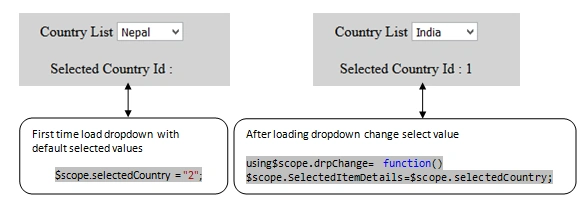
Figure 1
For Radio button list
For Radio button list
In Listing 2 I am using ng-app, ng-controller, ng-model, data-ng-repeat, ng-checked AngularJS directives.
Html control div consists level and radio type input HTML control which is populated from JSON array countryList using data-ng-repeat.
In the scope of Angular controller "rdiobuttonlist" ng-checked is set with 2 like
ng-checked= "{{country.value==2}}".
Listing 2- <script>
- var app = angular.module('App', []);
- app.controller('rdiobuttonlist', function ($scope) {
- $scope.countryList = [{ " Name ": "India", "Id": 1 },
- { "Name": "Nepal", "Id": 2 },
- { " Name ": "Pakistan", "Id": 3 }]
- });
- </script>
- <body ng-app="App">
- <div ng-controller="rdiobuttonlist" style="background-color:lightgray;padding-left:50px">
- <label data-ng-repeat="country in countryList">
- <input type="radio" name="radio2" ng-checked="{{country.Id==2}}" style="margin:0px 5px 0px 10px;" value="{{country.Id}}"/>{{country.Name}}
- </label>
- </div></body>
The output looks like Figure 2

Figure 2
Summary
In this article, I discussed how to set default selected item in the drop-down and how to set the default selected item in radio button list using Angular.
Join the conversation! Your thoughts help the community grow.