

These steps are given below.
Step 1 : First of all we have to create a new Web Application ; let us see the description with images of how to create it.
- Open Visual Studio 2010
- File>New>Project
- Choose Visual C#> Web > Select ASP.NET Empty Web Application
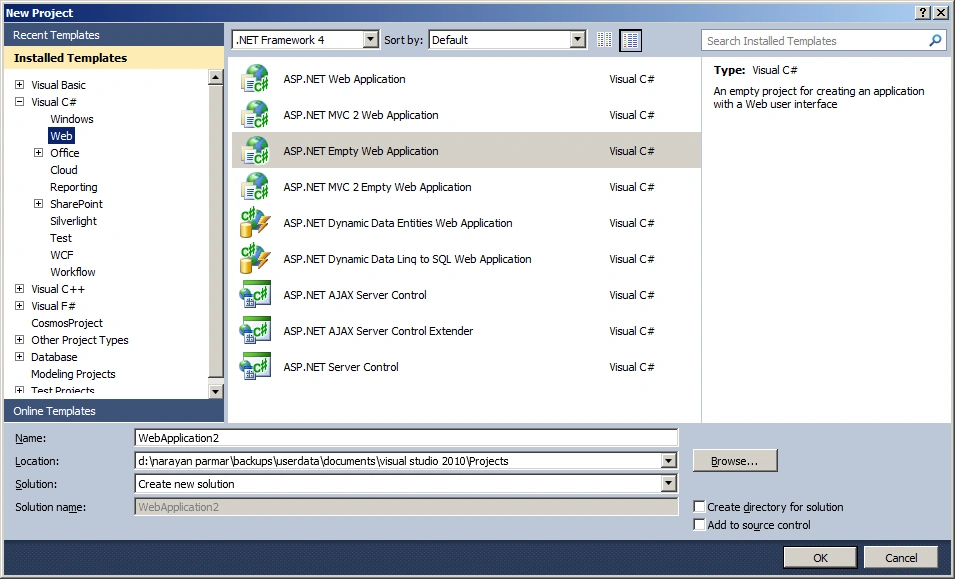
Step 2: Add new ASPX Page
Step 3: Design Page like
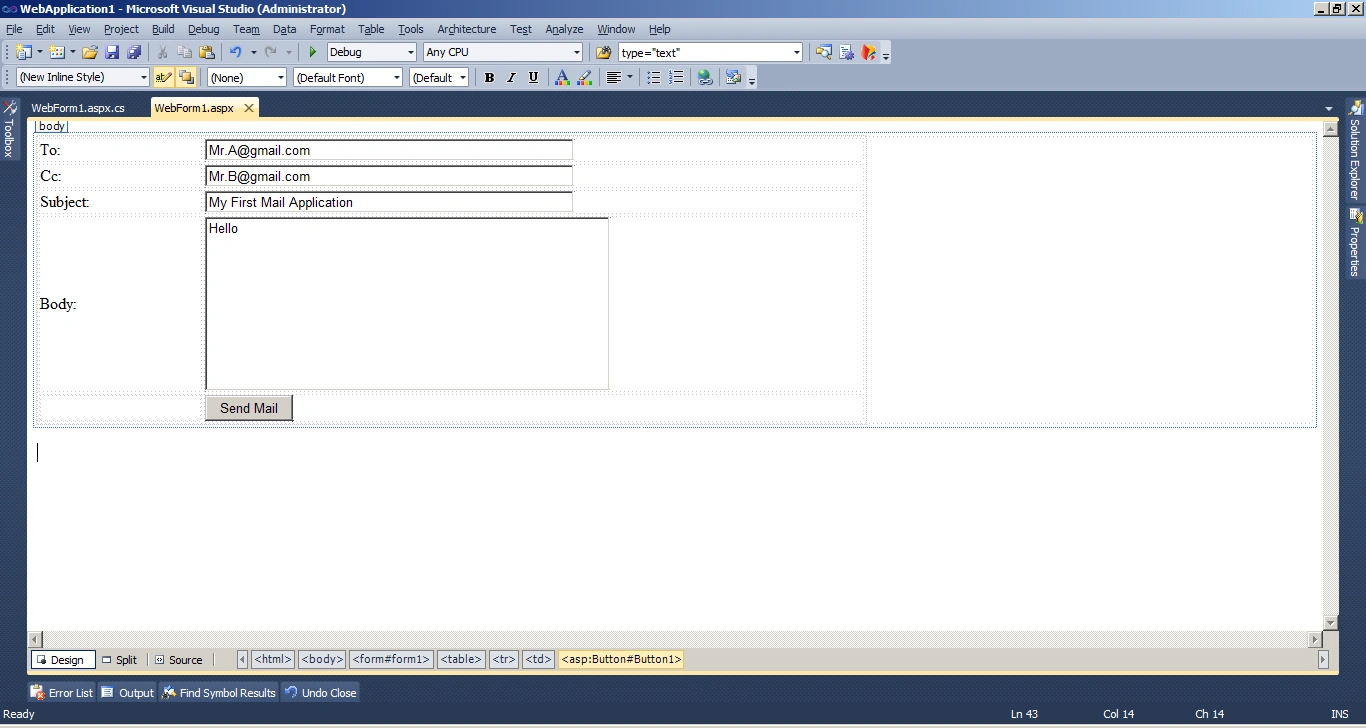
Step 4: Add below code on button click
using
System;
using
System.Collections.Generic;
using
System.Linq;
using
System.Web;
using
System.Web.UI;
using
System.Web.UI.WebControls;
using
System.Web.Mail;
namespace
WebApplication1
{
public partial
class WebForm1 : System.Web.UI.Page
{
protected void
Page_Load(object sender,
EventArgs e)
{
}
protected void
Button1_Click(object sender,
EventArgs e)
{
SendEmail("[email protected]",
"xyz123", Text1.Text, Text2.Text, Text3.Text,
Text4.Text);
}
private void
SendEmail(string UserId,
string UserPassword,
string To, string Cc,
string Subject, string
Body)
{
MailMessage myMail =
new MailMessage();
string smtpserver =
"smtp.gmail.com";
//Below SMTP Setting for gmail you can
set for other domain also.
myMail.Fields.Add("http://schemas.microsoft.com/cdo/configuration/smtpserver",
smtpserver);
myMail.Fields.Add("http://schemas.microsoft.com/cdo/configuration/smtpserverport",
"587");
myMail.Fields.Add("http://schemas.microsoft.com/cdo/configuration/sendusing",
"2");//sendusing:
cdoSendUsingPort ==>> value
2, for sending the message using the network.
//smtpauthenticate: Used when
authenticating to an SMTP service over the network
myMail.Fields.Add("http://schemas.microsoft.com/cdo/configuration/smtpauthenticate",
"1");//Use
0 for anonymous and 1 for
Registered
//Send Mail using the sendusername and
sendpassword fields.
myMail.Fields.Add("http://schemas.microsoft.com/cdo/configuration/sendusername",
UserId);
myMail.Fields.Add("http://schemas.microsoft.com/cdo/configuration/sendpassword",
UserPassword);
myMail.Fields.Add("http://schemas.microsoft.com/cdo/configuration/smtpusessl",
"true");
// gmail server requires an encrypted
connection (SSL) Set True
else Set False
myMail.From =
UserId;
myMail.To = To;
myMail.Subject =
Subject;
myMail.Body =
Body;
SmtpMail.SmtpServer = smtpserver;
SmtpMail.Send(myMail);
}
}
}
NOTE: You can send E-Mail from any domain using the SMTP Setting above code is for GMAIL.
Join the conversation! Your thoughts help the community grow.